Salesforce ERP
 ERP + CRM Platform
  Inventory Management
  Warehouse Management
  Order Management
  Vendor Management
  Logistics Management
  BOM Management
  Order Fulfillment
  Business Operations
  SaaS Platform for Operations
  Salesforce Cloud ERP Platform
  Xero
Xero
 Zoho books
 Quickbooks
 Shopify
 Acumatica
 SAP
SAP
 Odoo
Odoo
 NetSuite
 Microsoft Dynamics 365
 Sage
Sage



 Agentforce Revenue Management
 Agentforce Revenue Management + Billing
  Salesforce CPQ
 Salesforce Advanced Billing
  Migrate from CPQ to ARM
  Managed Services
 Salesforce Implementation
 Revenue Cloud Implementation
 ServiceNow Consulting Services
 Zoho CRM implementation
 MuleSoft Integration
 Workato Integration
 Microsoft
 Data Cloud
 Tableau

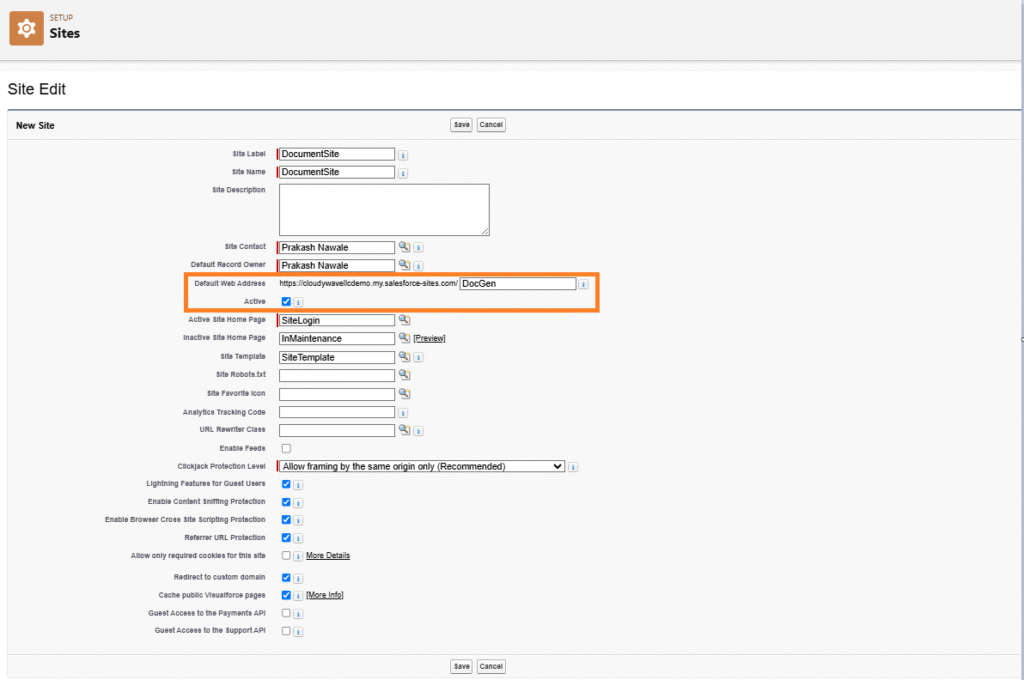
 Site Setup & Configuration
To set up a Site, click the Setup (⚙️ Gear icon) → type “Sites” in the Quick Find box → select Sites → click New, then enter the required site details.
Setup Configuration :
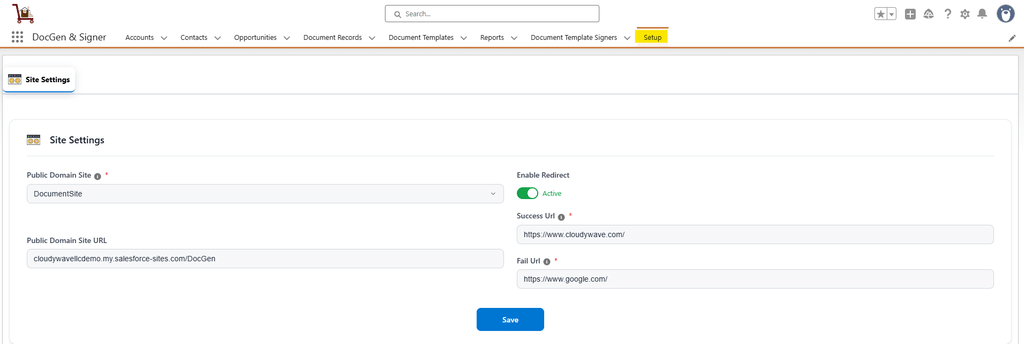
This process enables us to configure system-level settings necessary for document generation and signing. It includes linking the document process to a Salesforce Public Domain Site, setting up redirects, and defining success or failure landing pages or messages. These configurations ensure that signers experience smooth navigation and clear feedback while interacting with generated documents.
Steps to Configure
➢ Go to the Setup tab.
➢ Select the existing Public Domain Site.
➢ Enable the Redirect option if you want to redirect users to another page after document actions.
➢ If using redirects, enter the Success URL (Users are redirected to after a successful action).
➢ Enter the Fail URL (page users are redirected to if the action fails).
➢ Click Save to apply the configuration.