


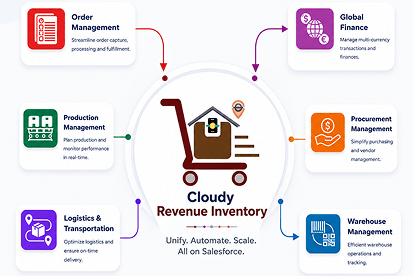



 Salesforce ERP
 ERP + CRM Platform
  Inventory Management
  Warehouse Management
  Order Management
  Vendor Management
  Logistics Management
  BOM Management
  Order Fulfillment
  Business Operations
  SaaS Platform for Operations
  Salesforce Cloud ERP Platform
  Xero
Xero
 Zoho books
 Quickbooks
 Shopify
 Acumatica
 SAP
SAP
 Odoo
Odoo
 NetSuite
 Microsoft Dynamics 365
 Sage
Sage
 Agentforce Revenue Management
 Agentforce Revenue Management + Billing
  Salesforce CPQ
 Salesforce Advanced Billing
  Migrate from CPQ to ARM
  Managed Services
 Salesforce Implementation
 Revenue Cloud Implementation
 ServiceNow Consulting Services
 Zoho CRM implementation
 MuleSoft Integration
 Workato Integration
 Microsoft
 Data Cloud
 Tableau

Salesforce-Native ERP
One platform.
Every business module.
A fraction of the cost.
A side-by-side look at how Cloudy Business Ops 360 stacks up against Salesforce Sales Cloud, Salesforce CPQ, Salesforce Revenue Cloud, and other quote-to-cash apps available on the AppExchange today.
What's inside
Everything your ops team needs.
13 modules. One Salesforce-native license. No middleware.
CPQ & Guided Quoting
Build, price & send quotes in minutes — not hours.
Inventory & Warehouse
Real-time stock, multi-location & smart bin allocation.
Billing & Finance
Automated invoicing, payments & accounting sync.
Logistics & Shipments
End-to-end tracking, multi-carrier & returns mgmt.
Reporting & Analytics
Pre-built dashboards — all data lives in Salesforce.
100% SF Native
LWC-powered
SMB ready
See all modules
One license.
Nine modules.
The math speaks for itself.
Replace four to six separate AppExchange subscriptions with a single, Salesforce-native suite that covers your entire order-to-cash and procure-to-pay lifecycle.
9
Modules in one suite
70%
Avg. license cost reduction
100%
Salesforce Native
∞
Transaction Volume
Cloudy Business Ops 360 — Comparison FAQ
How does Cloudy Business Ops 360 compare to Salesforce CPQ, Revenue Cloud & more?
Answers to the most common questions about how Business Ops 360 stacks up against other Salesforce products and AppExchange apps.
1
vs. Salesforce products & competitors
Salesforce Sales Cloud is a CRM built for managing leads, contacts, and pipeline. Cloudy Business Ops 360 extends Salesforce with a full ERP layer — adding inventory management, warehouse operations, procurement, logistics, billing, and finance that Sales Cloud does not provide. Both are 100% Salesforce-native, but Business Ops 360 covers your entire order-to-cash and procure-to-pay lifecycle in one license.
Salesforce CPQ focuses specifically on configure-price-quote functionality. Cloudy Business Ops 360 includes a full CPQ and guided quoting module plus 12 additional modules covering inventory, warehouse, procurement, logistics, billing, subscriptions, and analytics — all in one Salesforce-native license. This means you replace multiple AppExchange subscriptions with a single platform.
Salesforce Revenue Cloud is designed primarily for subscription billing, revenue recognition, and contract management at the enterprise level, and typically requires significant implementation investment. Cloudy Business Ops 360 covers all of those capabilities plus inventory, warehouse management, procurement, and logistics — and is designed to be cost-effective for SMBs and mid-market companies, with self-implementation available.
Most quote-to-cash apps on AppExchange focus on CPQ and billing only, and many are not fully Salesforce-native — meaning they use middleware or store data outside Salesforce. Cloudy Business Ops 360 is 100% Salesforce-native with a single unified data model, and covers 13 modules including inventory, warehouse, procurement, and logistics that typical Q2C apps do not offer.
2
Architecture & platform
Yes. Cloudy Business Ops 360 is built entirely on the Salesforce platform using Lightning Web Components (LWC). All data lives inside your Salesforce org — there is no external database, no middleware, and no sync required. This means it inherits Salesforce security, permissions, reporting, and automation natively.
A single unified data model means all your business data — accounts, contacts, products, orders, inventory, invoices, shipments — exists in one Salesforce object model with no duplication. Sales Cloud and CPQ do not provide a unified data model across operations. With Cloudy Business Ops 360, a sales rep, warehouse manager, and finance team all see the same real-time data without syncing between systems.
3
CPQ & guided quoting
Yes. The CPQ and guided selling module allows sales teams to build, price, and send quotes in minutes using a Lightning-based interface. It supports product bundles, complex configurations, multi-currency, approval workflows, pricing guidance, and promotions — and converts quotes to orders in one click.
4
Inventory & warehouse management
Yes. Cloudy Business Ops 360 includes real-time stock tracking, multi-location inventory visibility, and auto-replenishment with forecasting alerts. This is a major differentiator — Sales Cloud, CPQ, and Revenue Cloud do not include any inventory management capability.
The warehouse management module includes smart bin allocation, pick-pack-ship workflows, inbound receiving, label printing, and barcode/QR code support — all inside Salesforce. None of the competing Salesforce products (Sales Cloud, CPQ, Revenue Cloud) include warehouse management.
5
Procurement & logistics
Yes. The procurement module covers vendor management, automated purchase order generation, and three-way matching (PO, receipt, invoice). This is exclusively available in Cloudy Business Ops 360 — it is not offered in Sales Cloud, CPQ, Revenue Cloud, or most other AppExchange Q2C applications.
The logistics module provides end-to-end shipment tracking, multi-carrier integration, shipment cost allocation, and returns management — all inside Salesforce. Other AppExchange Q2C apps offer partial shipment tracking at best. Sales Cloud, CPQ, and Revenue Cloud do not include logistics features.
6
Billing & finance
Cloudy Business Ops 360 includes automated invoice generation, invoice adjustments and credit notes, payment processing, accounting sync with QuickBooks, Xero, and Zoho Books, and all billing data living natively inside Salesforce. Sales Cloud and CPQ do not offer billing features. Revenue Cloud offers billing but at a higher cost and complexity.
Cloudy Business Ops 360 includes native accounting sync with QuickBooks Online, QuickBooks Desktop, Xero, and Zoho Books. It also integrates with Stripe and Authorize.Net for payment processing. These integrations are pre-built and do not require middleware or a separate integration platform.
Yes. Multi-currency support and flexible tax configuration are included natively. This allows businesses operating across multiple countries and jurisdictions to manage pricing, quotes, orders, invoices, and billing in different currencies with region-specific tax rules.
7
Order management & subscriptions
Yes. The order management module supports quote-to-order conversion in one click, multi-channel order capture, partial shipments, backorders, amendments, and real-time fulfillment tracking. Salesforce CPQ and Revenue Cloud offer quote-to-order conversion but not multi-channel capture or partial shipment workflows.
Yes. The subscriptions and recurring billing module supports co-terms, prorations, automatic renewal reconciliation, and automated contract management — without requiring additional tools. These features are comparable to Salesforce Revenue Cloud but available at a fraction of the cost.
8
Reporting & analytics
Because Business Ops 360 is fully Salesforce-native, all operational data is available in native Salesforce reports and dashboards. Additionally, the platform ships with pre-built operational dashboards for inventory, orders, procurement, warehouse, and finance. Revenue recognition reporting is also included — a feature typically found only in Revenue Cloud.
9
Pricing & implementation
Cloudy Business Ops 360 includes 13 modules in one Salesforce-native license: CPQ and Guided Quoting, Order Management, Subscription and Recurring Billing, Inventory Management, Warehouse Management, Procurement and Manufacturing, Logistics and Shipments, Billing and Finance, Reporting and Analytics, Product Catalog, Accounting Integrations, Multi-currency and Tax, and Contract Management.
Cloudy Business Ops 360 starts at $40 per user per month and includes all 13 modules in one license. Purchasing equivalent capabilities separately — Salesforce CPQ, Revenue Cloud, a WMS app, a procurement app, and a logistics app — would typically cost 3 to 5 times more per user. Customers report an average license cost reduction of approximately 70% compared to running multiple separate AppExchange subscriptions.
No. Cloudy Business Ops 360 has no minimum user count requirement, making it accessible for small teams as well as large enterprise deployments. You pay only for the users you need.
Yes. There are no transaction volume limits. Whether you process 100 or 100,000 orders per month, the pricing is based on users only — not on transaction volume, record counts, or API calls within the platform.
Yes. Cloudy Business Ops 360 is designed to be self-implemented with an admin configuration wizard and a comprehensive self-service knowledge base. Salesforce CPQ and Revenue Cloud typically require a certified Salesforce implementation partner, adding significant cost. Cloudy Wave also provides direct onboarding and setup support for customers who need assistance.
Yes. Cloudy Business Ops 360 is a certified Salesforce AppExchange application, developed by Cloudy Wave as a Salesforce OEM partner. It is fully vetted through Salesforce's security review process and listed on AppExchange for direct installation into any Salesforce org.
Cloudy Business Ops 360 is specifically designed to be cost-effective and practical for small and medium-sized businesses, while scaling to mid-market and enterprise requirements. Salesforce Revenue Cloud and many competing ERP solutions are typically priced and scoped for large enterprise deployments. Business Ops 360 fills the gap for growing companies that need a complete ERP on Salesforce without enterprise-level budget or implementation timelines.
Still have questions?
See the full feature comparison or get a personalised walkthrough of all 13 modules.
Loading…
Download Company Deck
Thank You!
Your download will begin shortly.
Loading…