




 Salesforce ERP
 ERP + CRM Platform
  Inventory Management
  Warehouse Management
  Order Management
  Vendor Management
  Logistics Management
  BOM Management
  Order Fulfillment
  Business Operations
  SaaS Platform for Operations
  Salesforce Cloud ERP Platform
  Xero
Xero
 Zoho books
 Quickbooks
 Shopify
 Acumatica
 SAP
SAP
 Odoo
Odoo
 NetSuite
 Microsoft Dynamics 365
 Sage
Sage
 Agentforce Revenue Management
 Agentforce Revenue Management + Billing
  Salesforce CPQ
 Salesforce Advanced Billing
  Migrate from CPQ to ARM
  Managed Services
 Salesforce Implementation
 Revenue Cloud Implementation
 ServiceNow Consulting Services
 Zoho CRM implementation
 MuleSoft Integration
 Workato Integration
 Microsoft
 Data Cloud
 Tableau

100% Salesforce Native ERP
Salesforce ERP Platform for Inventory, Manufacturing, Warehouse, CRM & Finance
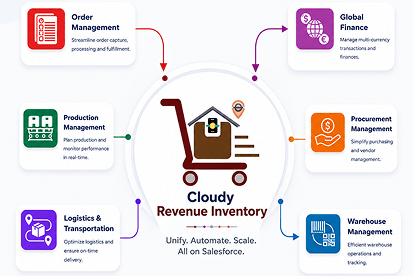
Cloudy Business Ops 360 is a Salesforce ERP that combines CRM, Inventory Management, Warehouse Management, Procurement, Manufacturing, Order Management, Logistics, Billing, and Finance in one Salesforce-native platform.
 100% Salesforce Native
 Salesforce OEM Partner
 9 Integrated Modules
 No Minimum User Count
 Live on AppExchange
Trusted by Leading Companies
Our Globally 80+ Clients.










10+
Years of Salesforce Excellence

80+
Happy Clients

95%
Implementation Success Rate

Certified Salesforce
ISV & Consulting
Partner
ISV & Consulting
Partner
The Salesforce ERP Problem
Why Running 6–10 Disconnected Tools Is Costing Your Business — And Why a Salesforce ERP Fixes It.
Most growing manufacturers and distributors already use Salesforce CRM for sales — but without a true Salesforce ERP, operational data stays trapped across siloed accounting, inventory, warehouse, and logistics tools.
The result? Broken handoffs, duplicate data entry, and costly errors that become the new "normal." A unified Salesforce ERP platform eliminates these gaps by connecting every department — from quote to cash — in a single source of truth.

Salesforce CRM (Sales Only)
Powerful for pipeline, but disconnected from ops without a Salesforce ERP layer.
A Separate CPQ or Quoting Tool
Quotes don't sync with inventory or finance, causing pricing errors at fulfillment.

QuickBooks, Xero, or Zoho Books
Accounting lives outside the sales cycle, creating manual reconciliation every month.
Spreadsheets for Inventory
A spreadsheet (or three) means no real-time stock visibility across locations.

Standalone Warehouse Management (WMS)
Pick, pack, and ship data never reaches your CRM or finance team automatically.

Email Threads for Procurement
Approval chains via email create bottlenecks and no audit trail for compliance.

A Separate Logistics or Shipping Portal
Tracking updates and carrier data stay outside your customer-facing records.

A Standalone BI Tool for Reporting
Dashboards built on stale exports — not the live operational data you actually need.
Salesforce ERP Platform
One Platform. Nine Modules.
Zero Integration Headaches.
Everything your manufacturing or distribution operation needs — sales, inventory, warehouse, finance, and more — already connected inside a single Salesforce ERP.
-
Sales & CPQ
Guided selling, product bundles, multi-currency pricing, and one-click quote-to-order — all native to your Salesforce ERP.
Sales Cloud -
Order Management
Multi-channel order capture, partial shipments, and real-time fulfillment tracking — no separate OMS required.
Fulfillment -
Subscriptions & Recurring Billing
Automated renewals, usage-based billing, and dunning management — built into Salesforce ERP without extra tools.
Revenue Cloud -
Inventory Management
Real-time stock tracking across multiple warehouse locations, with auto-replenishment alerts — replacing spreadsheet-based inventory.
Inventory -
Warehouse Management (WMS)
Smart bin allocation, pick-pack-ship optimization, and inbound receiving flows — a full WMS inside your Salesforce ERP, no separate system needed.
WMS -
Procurement & Manufacturing
Vendor management, 3-way PO matching, and automated purchase order generation — purpose-built for manufacturers on Salesforce ERP.
Procurement -
Logistics & Shipments
End-to-end shipment tracking, freight cost allocation by order, and returns management — all within your Salesforce ERP.
Logistics -
Billing & Finance
Automated invoicing with native QuickBooks, Xero, and Stripe sync — replacing standalone accounting tools with Salesforce ERP's finance module.
Finance -
Analytics & Reporting
Real-time operational metrics, pipeline visibility, and custom dashboards — powered natively by Salesforce ERP's built-in reporting engine.
Analytics








Why Native Salesforce ERP
Salesforce Isn't Just a CRM — It's the Foundation for a Native Salesforce ERP.
Native means no middleware, no sync errors, and one single source of truth — across every module of your Salesforce ERP.
-
Salesforce ERP · Data Integrity
One Data Model
Account in CRM = Account in ERP. No duplicate records, no reconciliation, no data mismatches across your Salesforce ERP.
-
Salesforce ERP · Security
One Security Layer
Existing Salesforce roles, profiles, and permission sets apply automatically across every ERP module — no separate access management needed.
-
Salesforce ERP · User Experience
One UI Across All ERP Modules
Sales, operations, and finance teams all work in the same Salesforce interface — no context-switching, no extra training.
-
Salesforce ERP · Automation
One Automation Engine
Salesforce Flow, Apex, and Process Builder work across every ERP module — enabling end-to-end automation from quote to fulfilment without middleware.
-
Salesforce ERP · Einstein AI
One AI Layer — Einstein & Agentforce
Einstein AI and Agentforce work natively across all Salesforce ERP modules — forecasting, anomaly detection, and AI-assisted operations with zero separate integration.
-
Salesforce ERP · TCO
One Vendor Relationship
One contract, one support team, one product roadmap — a native Salesforce ERP eliminates multi-vendor complexity and reduces total cost of ownership.




Which Industries Use
Cloudy Business Ops 360 Salesforce ERP?
From high-volume distribution to regulated manufacturing, a native Salesforce ERP adapts to the complexity of your industry — without custom integrations or bolt-on modules.
-
Manufacturing & Assembly
Multi-level BOMs, production batches, and sales-order-linked manufacturing for discrete and configure-to-order production — natively in Salesforce ERP.
BOM Software Production CTO Orders -
Wholesale & Distribution
High-volume order management, multi-tier pricing, ATP logic, and multi-location inventory across distribution operations on Salesforce ERP.
High Volume Multi-Location ATP Logic -
Retail & eCommerce
Multi-channel order capture, real-time inventory across channels, carrier tracking, and returns management at scale — built into Salesforce ERP.
Multi-Channel Returns Fast SLAs -
Trading & Import-Export
International orders, multi-currency pricing, multi-entity legal structures, and global logistics tracking — all in one Salesforce ERP platform.
Multi-Currency Multi-Entity Global -
Healthcare & Medical Supply
Lot and serial-aware fulfillment, expiry date tracking, compliance-ready traceability, and regulated procurement workflows on Salesforce ERP.
Lot Control Compliance Traceability -
Industrial & B2B Supply
Complex multi-line orders, spare-part procurement, BOM-linked production, and full quote-to-cash traceability for B2B operations on Salesforce ERP.
Multi-Line Procurement Quote-to-Cash -
Supply Chain & Procurement
Vendor management, purchase orders, goods receipt, and supply chain visibility from vendor to warehouse to customer — all within Salesforce ERP.
Vendor Mgmt PO Automation Spend Control -
Subscription & Order-Based Businesses
Recurring order generation, renewals, proration, and subscription billing schedules connected to fulfillment and finance — natively in Salesforce ERP.
Renewals Recurring Proration
Legacy ERP vs Cloudy Business Ops 360
Your ERP architecture defines your operational ceiling. Here's exactly what a native Salesforce ERP delivers — and what legacy on-premise systems leave behind.
| Capability | Legacy / On-Premise ERP |  Cloudy Business Ops 360 — Salesforce ERP Cloudy Business Ops 360 — Salesforce ERP |
|---|---|---|
| Deployment Time | ✗ 3–9 months including hardware procurement | ✓ 14-day average Salesforce ERP go-live |
| Salesforce CRM Integration | ~ Custom connector required, high ongoing maintenance | ✓ 100% native — ERP and CRM share one data model |
| Real-Time Visibility | ~ Delayed updates, batch-based reporting cycles | ✓ Live order, inventory, and production status in Salesforce ERP |
| Minimum User Count | ✗ Typically 10–50 minimum users required | ✓ No minimum user count — start small, scale freely |
| Accounting Integration | ~ Custom development, high maintenance cost | ✓ Pre-built Xero, Zoho Books, QuickBooks connectors in Salesforce ERP |
| Scalability | ✗ Hardware upgrades required for growth | ✓ Elastic Salesforce cloud — infinite scaling without infrastructure |
| System Updates | ✗ Manual upgrades, costly IT projects each cycle | ✓ Automatic Salesforce platform updates — always current |
| Manufacturing / BOM | ~ Separate module or third-party system required | ✓ Built-in BOM, production batches, and lot traceability in Salesforce ERP |
| Security & Compliance | ~ Varies by vendor and implementation quality | ✓ Salesforce trust infrastructure + SOC 2 Type II certified |
| Total Cost of Ownership | ✗ High — hardware, maintenance, upgrades compound annually | ✓ 40–60% lower TCO vs. on-premise ERP with Salesforce ERP |

QuickBooks Online & Desktop
Xero

Zoho Books
Already Connected to the Tools You Already Use.
Cloudy Business Ops 360 ships with native, pre-built integrations for the most common SMB and mid-market finance and payment stacks.

Stripe

Authorize.Net
Open REST APIs
Your Data Inherits Salesforce's Enterprise Security.
Built In. Not Bolted On.
A native Salesforce ERP doesn't just connect to Salesforce's trust infrastructure — it is Salesforce's trust infrastructure. One platform, one compliance posture, zero separate vendor security reviews.
SOC 2 Type II Compliance
Annual third-party audit of security, availability, and confidentiality controls — inherited by your Salesforce ERP.
ISO 27001, 27017 & 27018
International information security management standards covering cloud services and personal data protection.
GDPR & HIPAA Ready
Data residency, consent management, and PHI safeguards built into the Salesforce ERP platform by default.
Field-Level Encryption
Encrypt sensitive ERP data — orders, financial records, PII — at the field level, natively within Salesforce.
Salesforce Shield Compatible
Full support for Shield Platform Encryption and Event Monitoring across all Salesforce ERP transactions.
Native Audit Trails
Every change to ERP records — orders, inventory, financials — is logged automatically for compliance and forensics.
Products Feedback
What Our Customers Say

Finally a fully native Business Ops 360 app for Salesforce. Do yourself a favor and try this app. It delivers real value and improves operational efficiency.

This app has been great for our team. It is easy to implement and navigate and the 360 team is very responsive in setting up and training. Thank you Go

This app is a time saver, keeps everything in line with your follow-up needs, and is not over-complicated

This app is a time saver, keeps everything in line with your follow-up needs, and is not over-complicated

We implemented Cloudy Business Ops 360 for a seed farm with a massive catalog of products and variants.
We have enjoyed incredible support from the CloudyWave team over the years, and I'm excited to see this latest development.

