






 Salesforce ERP
 ERP + CRM Platform
  Inventory Management
  Warehouse Management
  Order Management
  Vendor Management
  Logistics Management
  BOM Management
  Order Fulfillment
  Business Operations
  SaaS Platform for Operations
  Salesforce Cloud ERP Platform
  Xero
Xero
 Zoho books
 Quickbooks
 Shopify
 Acumatica
 SAP
SAP
 Odoo
Odoo
 NetSuite
 Microsoft Dynamics 365
 Sage
Sage



 Agentforce Revenue Management
 Agentforce Revenue Management + Billing
  Salesforce CPQ
 Salesforce Advanced Billing
  Migrate from CPQ to ARM
  Managed Services
 Salesforce Implementation
 Revenue Cloud Implementation
 ServiceNow Consulting Services
 Zoho CRM implementation
 MuleSoft Integration
 Workato Integration
 Microsoft
 Data Cloud
 Tableau

Native Salesforce Integration
Connect Salesforce
with QuickBooks Seamlessly
Cloudy Business Ops 360 provides a powerful native QuickBooks Integration , enabling businesses to synchronize accounting and operational data between Salesforce and QuickBooks in real time.
Trusted by Leading Companies
Our Globally 80+ Clients.












 10+
10+
Years of Salesforce Excellence
 80+
80+
Happy Clients
 95%
95%
Implementation Success Rate
 Certified Salesforce
ISV & ConsultingPartner
✦ Why Choose This Integration
Everything You Need from a Salesforce – QuickBooks Integration
Designed to streamline your financial operations and eliminate the friction between your CRM and accounting systems.
Automated Financial Operations
Eliminate repetitive manual tasks with automated workflows across invoicing, payments, and procurement.
Real-Time Accounting Sync
Keep Salesforce and QuickBooks in perfect alignment with live or scheduled bidirectional synchronization.
Improved Reporting Accuracy
Consistent, reconciled data across both systems means your financial reports are always reliable.
Reduced Manual Effort
Free your finance team from duplicate data entry and manual reconciliation work — for good.
Better Operational Visibility
Get a unified view of sales, procurement, inventory, and finance all within Salesforce.
Faster Business Processes
Built for growing businesses — handles high transaction volumes without increasing complexity.
Scalable Accounting Workflows
Enterprise-grade, token-based authentication keeps your financial data safe and compliant.
Connected CRM & Finance
Bridge the gap between sales and accounting — one source of truth for your entire business.
✦ Integration Benefits
Transformative Benefits for Your Finance & Operations Teams
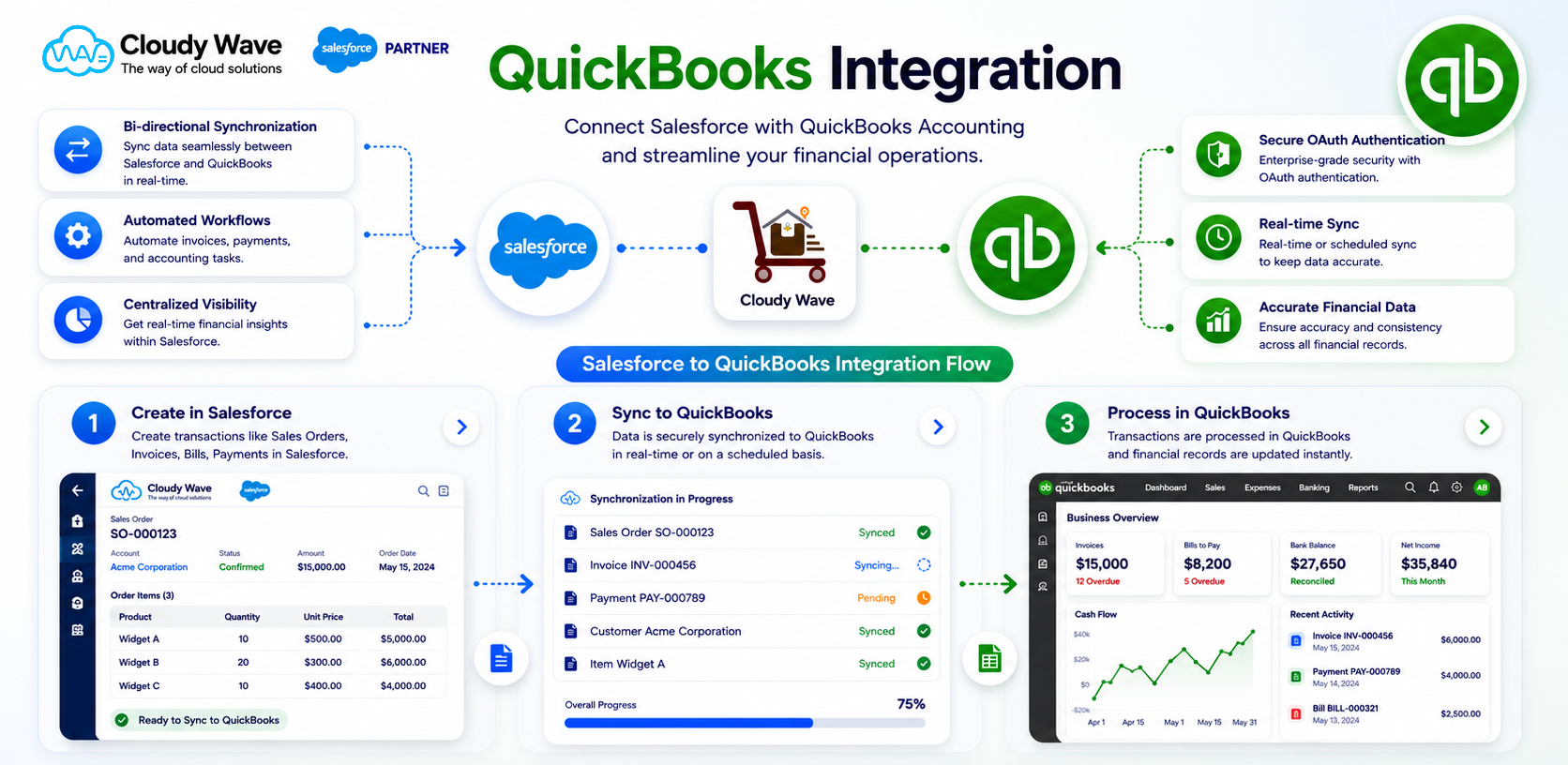
The Salesforce–QuickBooks integration eliminates manual processes and enables real-time synchronization, helping organizations improve productivity and decision-making.
Automated Accounting Workflows
The integration automates key financial and operational workflows between Salesforce and QuickBooks.
 Automatic invoice synchronization
- Real-time payment updates
- Automated customer and vendor sync
- Streamlined procurement workflows
- Reduced manual accounting effort
Time & Cost Savings
By eliminating duplicate data entry and manual reconciliation, the integration significantly reduces operational overhead.
- Faster invoice processing
- Reduced accounting workload
- Improved employee productivity
- Lower operational costs
- Faster transaction processing
Improved Financial Accuracy
The Salesforce–QuickBooks integration ensures synchronized and consistent financial records across systems.
- Reduced duplicate entries
- Accurate financial data synchronization
- Consistent customer and vendor records
- Better accounting compliance
- Improved reconciliation accuracy
Real-Time Reporting & Insights
With synchronized operational and financial data, businesses gain complete visibility into performance and accounting operations.
- Revenue and payment tracking
- Expense and procurement visibility
- Financial performance analytics
- Inventory and sales reporting
- Real-time dashboard monitoring
Scalable Integration Architecture
The integration is designed to support growing transaction volumes and evolving business operations.
- Real-time and scheduled synchronization
- Secure OAuth-based authentication
- Enterprise-grade reliability
- Flexible field mapping configuration
- Support for multiple accounting workflows
Better Cross-Team Collaboration
The integration creates a unified workflow between sales, finance, procurement, and operations teams.
- Shared financial visibility
- Faster approval workflows
- Improved cross-department communication
- Centralized operational tracking
- Better customer and vendor management
✦ How It Works
Powerful Accounting Setup Inside Salesforce
Three powerful modules — Configuration, Field Mappings, and Sync Operations — give you complete control over your Salesforce–QuickBooks integration.
Step 1 of 3
QuickBooks Configuration
& Accounting Setup
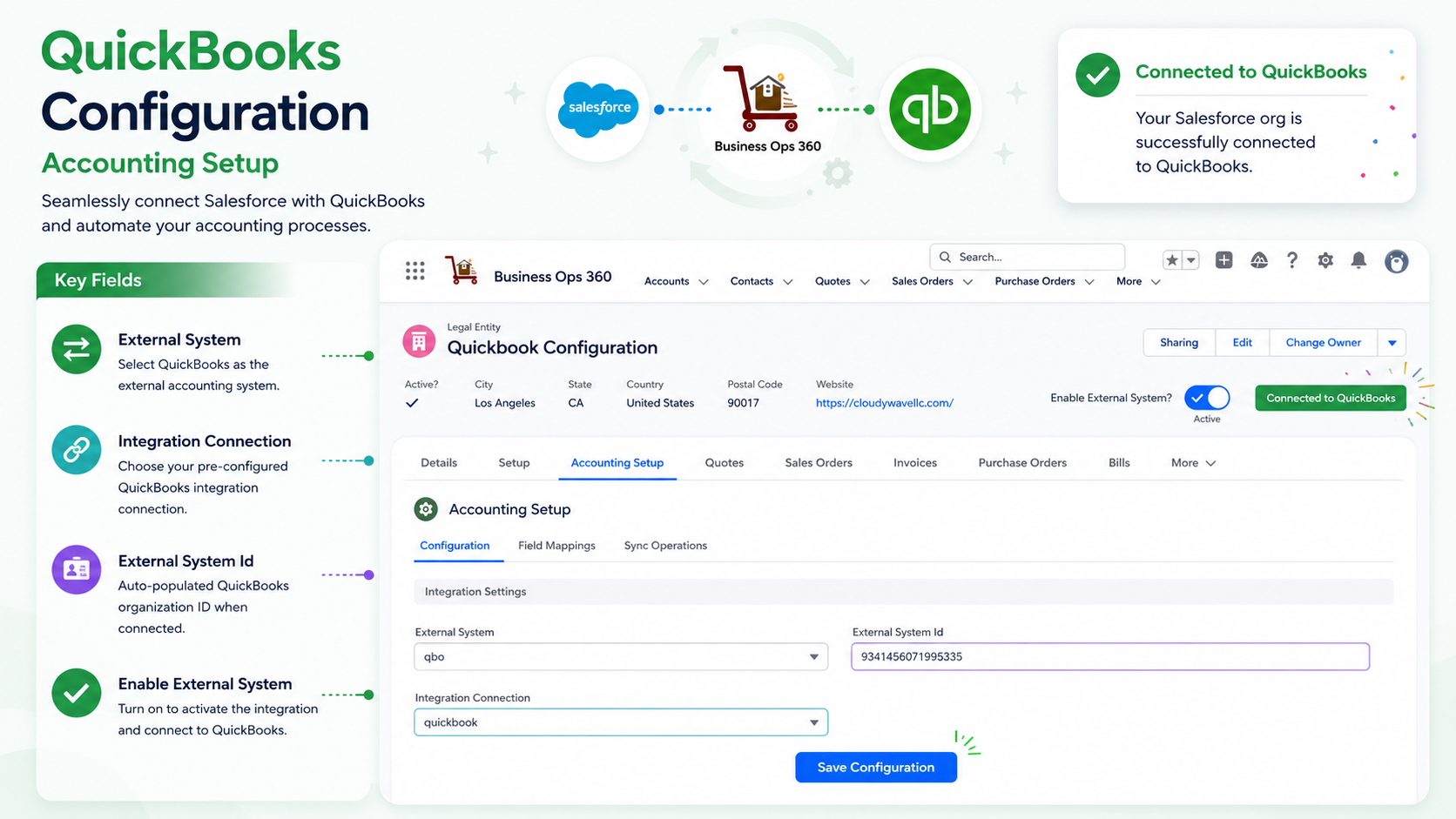
Seamlessly connect Salesforce with QuickBooks and automate your accounting processes. Select QuickBooks as your external system, configure the integration connection, and go live in minutes.
🔄
External System
Select QuickBooks as the external accounting system directly from your Salesforce Legal Entity record.
🔗
Integration Connection
Choose your pre-configured QuickBooks integration connection with secure OAuth-based authentication.
Step 2 of 3
QuickBooks Field Mappings
& Data Alignment
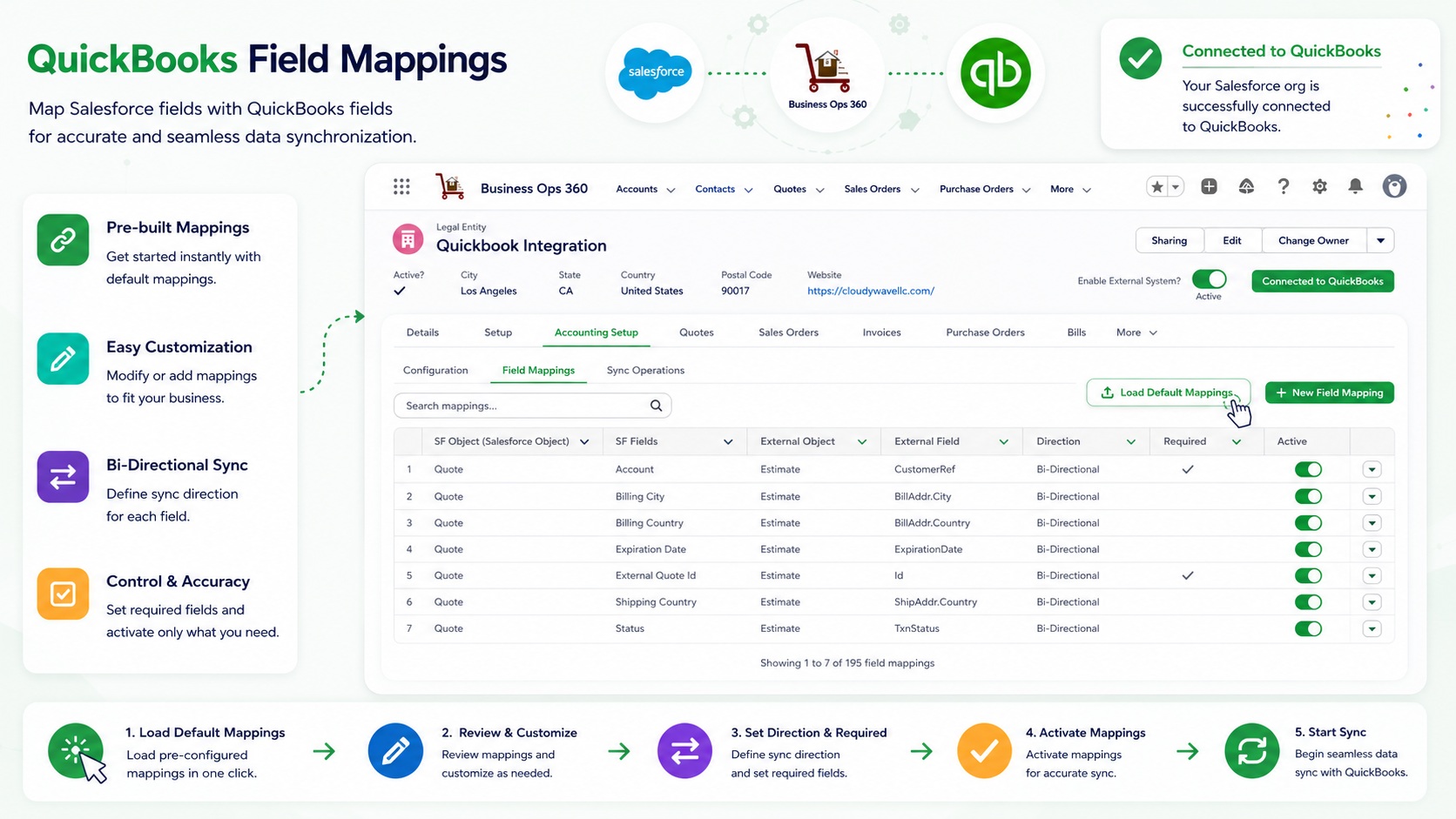
Map Salesforce fields with QuickBooks fields for seamless data synchronization. Configure direction, required flags, and active status for every field with full flexibility.
🗂️
Smart Field Mapping
Map Salesforce fields with QuickBooks fields effortlessly using a clean, structured mapping table.
↔️
Bi-Directional Sync
Choose the sync direction for each field — Bidirectional, SF to QuickBooks, or QuickBooks to SF.
Step 3 of 3
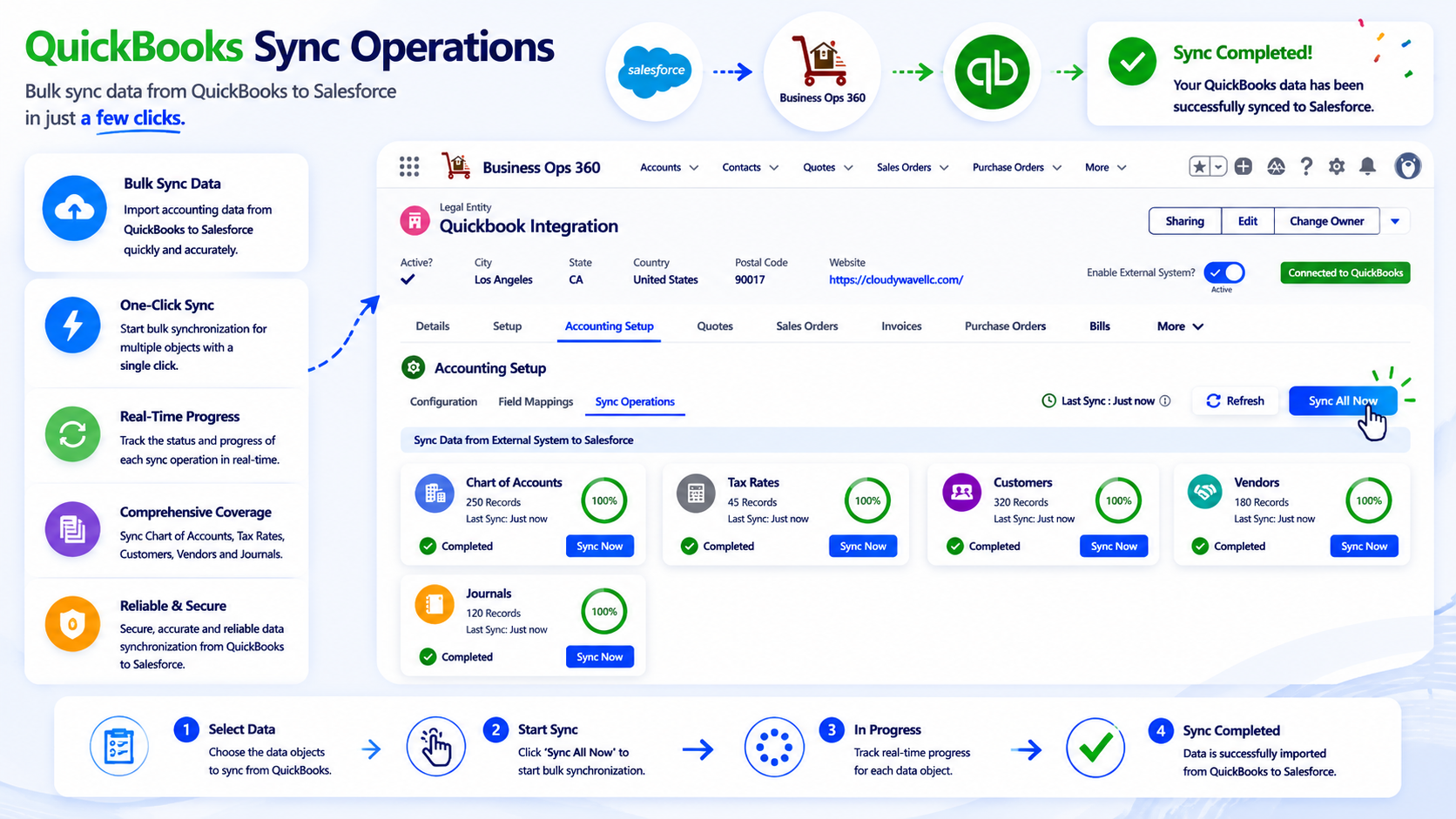
QuickBooks Sync Operations
& Bulk Data Import
Bulk sync data from QuickBooks to Salesforce in just a few clicks. Track real-time progress across Chart of Accounts, Tax Rates, Customers, Vendors, and Journals — all from one screen.
☁️
Bulk Sync Data
Import accounting data from QuickBooks to Salesforce quickly and accurately in a single operation.
🚀
One-Click Sync
Start bulk synchronization for multiple objects simultaneously with a single "Sync All Now" click.
3 Steps
Simple Setup Process
15+
Object Types Synced
100%
Sync Accuracy
1-Click
Default Mappings Load
Supported Commerce & Accounting Integrations
Connect Shopify, Xero, QuickBooks, and Zoho Books with Cloudy Business Ops 360 for seamless data synchronization from a single platform.

Customize your plan with optional Accounting Integration
Select billing preference for your integrations. Save significantly with annual billing.
Monthly
Yearly (Save 16.67%)
Add-on Name
License Type
Pricing

Organization
One Time
$3000
Organization
Clients Feedback
Don't Just Take Our Word for It

Cloudy Wave played a key role in building our complex financial operations with Salesforce ERP software. Their deep technical expertise, combined with a responsive and reliable approach, helped us streamline processes and scale efficiently

Over the past 8 years, Cloudy Wave has consistently delivered exceptional value. Their expertise in Salesforce ERP software, combined with a reliable and forward-thinking approach, has transformed our operations and enhanced our overall business performance.

We’ve partnered with Cloudy Wave for over 8 years, and their expertise in Salesforce ERP software has been exceptional. They consistently deliver high-quality solutions and proactively recommend improvements that have enhanced our operations and customer experience.
✦ Get Started Today
Ready to Connect Salesforce with QuickBooks?
Join businesses using Cloudy Business Ops 360 to automate their financial operations and gain real-time visibility across every transaction.
✕
