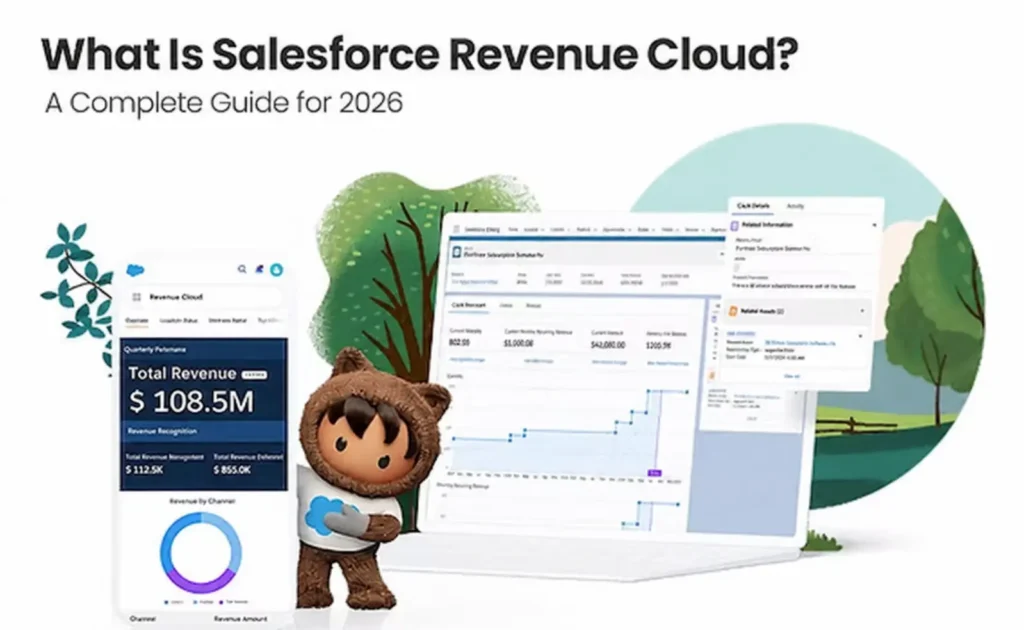
Salesforce Revenue Cloud is a revenue lifecycle management platform built natively on Salesforce that unifies product catalog management, pricing, quoting, contracting, order fulfillment, and invoicing. Salesforce Help now calls it Revenue Management, and Trailhead calls it Agentforce Revenue Management, but it is the same platform.
What Is Revenue Cloud?
Revenue Cloud is software that manages the full revenue lifecycle: everything from defining what you sell to collecting payment and renewing the customer. Salesforce gives a general definition of a revenue cloud: a unified platform that manages and automates the whole revenue lifecycle by connecting CPQ, catalog management, order management, quoting, invoicing, and billing, which used to run in separate silos.
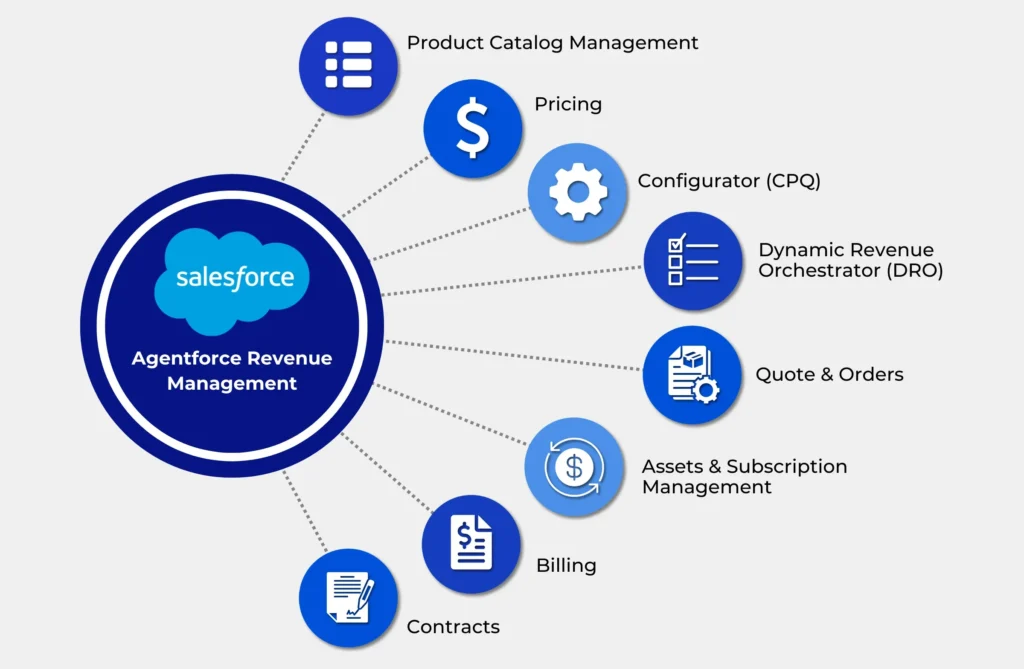
A revenue lifecycle management platform typically covers these capabilities:
- Product catalog management: one definition of products, bundles, and attributes
- Pricing and product configuration: rules that produce valid combinations and correct prices
- CPQ (configure, price, quote): guided quote creation
- Contract management: turning agreed terms into enforceable contracts
- Order management: breaking deals down into fulfillment work
- Subscription management and usage-based pricing: recurring and consumption charges
- Billing and invoicing: calculating what the customer owes and collecting it
- Renewals and revenue operations: expanding and retaining the relationship
Managing sales versus managing revenue. A sales tool stops at the signed deal. Revenue lifecycle management continues after signature, through fulfillment, invoicing, amendments, and renewals. For subscription and usage businesses, the relationship is ongoing, so that post-sale portion carries much of the complexity.
A simple example. A software company sells a platform license, an onboarding service, and API usage:
Product → Configure (choose modules) → Price (apply a volume tier) → Quote → Contract (three-year term) → Order → Fulfillment (provision the tenant, schedule onboarding) → Usage (track monthly API calls) → Invoice (subscription plus usage overage) → Payment → Renewal (upsell additional modules)
When each step runs in a separate system, data gets re-entered at every handoff. A revenue cloud keeps that chain on one data model.
What Is Salesforce Revenue Cloud?
Salesforce Revenue Cloud is Salesforce’s native revenue lifecycle management product. It handles subscriptions, usage-based services, and one-time products, and it is designed to keep data accurate and consistent from the first quote a customer sees through to payment collection. Four architectural traits set it apart:
- Native to the platform. Because it is built natively on the Salesforce Platform, teams can run quote-to-cash without leaving Salesforce.
- Composable. Organizations can start with the capabilities they need most and add more over time.
- API-first. Salesforce’s developer guide describes Revenue Management as extensible, API-first business components for product-to-cash processes.
- Shared data and security. It uses the same data model, security, and user interface as Sales Cloud and Service Cloud.
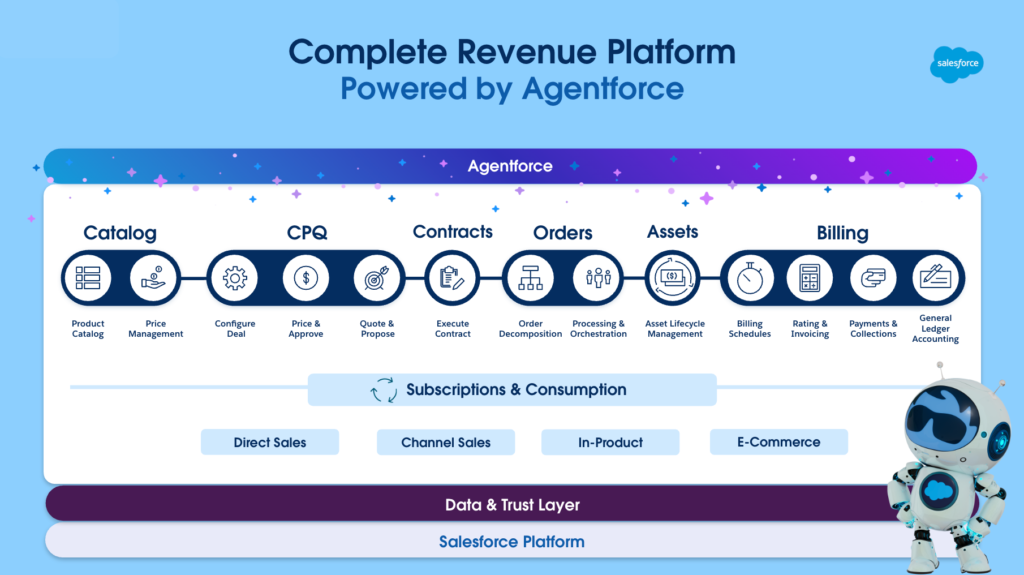
Salesforce describes the suite as a set of composable components: catalog, CPQ, contracts, assets, orders, billing, and subscriptions and consumption. Agentforce AI runs across these components, as covered later in this guide.
Revenue Cloud vs Revenue Management: What Changed?
The product has been renamed several times, so older and newer sources use different terms:
- Original “Revenue Cloud.” For years, Revenue Cloud was an umbrella brand over the Salesforce CPQ and Salesforce Billing managed packages.
- Revenue Lifecycle Management (RLM) and Revenue Cloud Advanced. RLM launched in the Spring ’24 release as the new core of Revenue Cloud and was renamed Revenue Cloud Advanced at Dreamforce ’24.
- Revenue Management and Agentforce Revenue Management. In 2025, Salesforce repositioned Revenue Cloud around its vision for AI-powered revenue operations, with Agentforce built natively into the platform. Salesforce’s own sources currently differ on the name. Salesforce Help uses “Revenue Management” and notes that references to Revenue Cloud still appear in the application and documentation. Trailhead and product marketing use “Agentforce Revenue Management.”
- Editions still say “Revenue Cloud.” The official pricing page lists the editions as Revenue Cloud Growth and Revenue Cloud Advanced.
What searchers should know: “Revenue Cloud,” “Revenue Management,” and “Agentforce Revenue Management” all describe the current native platform. Check the publication date of any source you read. Material from before 2024 usually describes the older CPQ and Billing managed packages, which have a different architecture. Knowledge of those packages still helps with migration planning, but it does not describe how the current platform is configured.
How Does Revenue Cloud Work?
Revenue Cloud works by passing one set of records through each stage of the revenue lifecycle. In Trailhead’s description, teams define the catalog with Product Catalog Management, set pricing and discounts with Salesforce Pricing, build configuration templates with Product Configurator, create quotes from the catalog, convert quotes to orders, and generate and sign contracts with Salesforce Contracts.
The end-to-end workflow:
- Product catalog. Products, bundles, and attributes are defined once.
- Product configuration. Rules keep selections valid.
- Pricing. Pricing procedures apply list prices, tiers, and discounts.
- Quote creation. Reps build quotes in a quote workspace.
- Approvals. Discounts or terms that exceed policy go to approvers.
- Contract. Agreed terms become a contract.
- Order. The quote converts to an order.
- Fulfillment. Orders are decomposed into fulfillment tasks.
- Subscription and usage management. Assets, subscriptions, and consumption are tracked.
- Billing. Billing schedules and usage ratings calculate the charges.
- Invoice. Invoices are generated.
- Payment. Payments are captured and applied.
- Renewal and expansion. Assets drive amendments, upsells, and renewals.
B2B example. A manufacturer of industrial IoT sensors sells hardware, a monitoring subscription, and data-overage fees. A rep configures 500 sensors with a compatible gateway, and a volume price tier is applied. The 18% discount triggers regional manager approval. The signed contract becomes an order. Hardware shipment and subscription activation are handled as separate fulfillment tasks. Monthly data usage is rated against tiers, invoiced alongside the subscription, and paid. At month 30, the asset record shows the renewal date and current usage, which gives customer success a clear starting point for the renewal conversation.
Key Revenue Cloud Features
Product Catalog Management
What it does: It provides a central hub that acts as the single source of truth for products and pricing, where product designers organize products, attributes, and bundles.
Why it matters: Every channel sells from the same definitions.
Example: A new service tier is created once and then appears in direct, partner, and self-service channels.
Business impact: Fewer catalog conflicts and faster product launches.
Pricing Management
What it does: The pricing engine supports fixed, tiered, volume, matrix, usage-based, and other pricing models, and pricing procedures are built in a declarative designer.
Why it matters: Pricing logic moves out of spreadsheets and into rules that can be governed.
Example: A distributor applies region-specific discount matrices automatically.
Business impact: Consistent pricing and a clear record of why a price was applied.
Product Configuration
What it does: A constraint-based configurator handles complex scenarios, and Constraint Modeling Language (CML) is available for advanced cases.
Why it matters: Invalid configurations are caught before they reach fulfillment.
Example: The configurator blocks a server bundle that lacks a compatible power supply.
Business impact: Less rework after the order is placed.
CPQ and Quoting
What it does: It includes a spreadsheet-like editor for multi-year, multi-product deals, ramp deals, scheduled uplifts, real-time pricing with waterfall visibility, and natural-language quoting through Agentforce.
Why it matters: Complex deals can be modeled on a single screen.
Example: A three-year ramp deal with annual uplifts is built without side calculations.
Business impact: Faster and more accurate quotes.
Contract Management
What it does: It converts accepted quotes into contracts and provides AI-assisted clause generation, collaborative redlining, automated amendments, and template management.
Why it matters: Contract terms stay linked to pricing and billing.
Example: Legal uses pre-approved templates so non-standard terms are less likely to slip into deals.
Business impact: Shorter contracting cycles and less compliance risk.
Order Management
What it does: The Dynamic Revenue Orchestration engine decomposes orders, manages fulfillment plans, and coordinates with downstream systems.
Why it matters: One commercial order often requires several separate fulfillment actions.
Example: A telecom order is split into a device shipment, a line activation, and a service configuration.
Business impact: Fewer fulfillment failures and better visibility into order status.
Subscription Management
What it does: Asset lifecycle management shows the products, services, and entitlements each customer owns and handles amendments, renewals, and cancellations with a full history.
Why it matters: Subscriptions change after they are sold, and those changes need a reliable record.
Example: A mid-term seat increase is prorated and co-termed with the existing contract.
Business impact: Cleaner renewals and more accurate recurring revenue data.
Usage-Based Pricing
What it does: Usage Management tracks and calculates charges for consumption-based products using defined price tiers and usage quantities. It also supports token grants and commitments.
Why it matters: Consumption models need rating logic that stays connected to billing.
Example: An API platform bills a committed volume plus tiered overage.
Business impact: Invoices that match what customers actually used.
Billing and Invoicing
What it does: It automates invoice generation, manages payments, and processes credit and debit memos. Salesforce also lists proration, customer self-service portals, collections, payment processor integration, and a billing agent.
Why it matters: Billing uses the same records sales created, so nothing has to be re-keyed.
Example: Amendments automatically produce corrected invoices.
Business impact: Fewer disputes and a faster path to cash.
Revenue Operations and Analytics
What it does: Out-of-the-box dashboards built on Tableau Next cover pricing, subscription revenue (ARR, MRR, churn), orders, and billing.
Why it matters: Sales and finance metrics come from one data set.
Example: RevOps uses discount-trend analysis to tighten approval thresholds.
Business impact: Decisions based on data that sales and finance both accept.
AI and Agentforce
What it does: AI agents help sellers by suggesting product bundles and checking that pricing stays within company policy.
Why it matters: Routine revenue tasks get assistance, while governance stays in place.
Example: A rep asks for a draft quote in natural language, and the agent assembles it for review.
Business impact: More capacity for sellers and operations teams. See the AI section below for how guardrails work.
What Problems Does Revenue Cloud Solve?
| Problem | Revenue Cloud capability | Business outcome |
|---|
| Disconnected CPQ and billing systems | Shared data model from quote to invoice | Fewer quote-to-bill mismatches |
| Manual, spreadsheet-based pricing | Declarative pricing procedures | Consistent, auditable pricing |
| Complex product configurations | Constraint-based configurator | Valid orders on the first attempt |
| Slow approvals | Rule-based approval routing | Shorter deal cycles |
| Quote-to-order errors | Direct quote-to-order conversion | Less rekeying |
| Subscription and usage complexity | Asset lifecycle and usage rating | Accurate amendments and overage charges |
| Poor revenue visibility | Revenue analytics dashboards | Shared view of ARR, churn, and pipeline |
| Manual renewals | Asset-driven renewals | Fewer missed renewal dates |
| Duplicate data across systems | One source of truth | Less reconciliation work |
Salesforce frames this as removing the old divide between sales and finance. Sales traditionally closed deals in a CRM while finance handled billing and revenue recognition in an ERP, and the gap between the two led to manual errors, revenue leakage, and a fragmented customer experience.
Revenue Cloud Benefits
- Faster quoting, because pricing is calculated instantly and approvals are automated.
- Pricing consistency. Direct, partner, and self-service sales all run on the same catalog and pricing engine.
- Better quote accuracy, because the configurator validates each selection.
- Reduced manual work at the handoffs between sales, operations, and finance.
- End-to-end quote-to-cash visibility on shared records.
- Support for multiple revenue models: one-time, subscription, usage, and hybrid.
- Compliance support. Salesforce says the platform supports ASC 606 and IFRS 15 compliance by giving finance consistent contract and billing data.
- Scalability. It supports multi-currency, multi-entity, and multi-GAAP requirements.
Actual results depend on process design, data quality, and adoption. Treat any ROI projection as a hypothesis to test during discovery, not a promise.
Revenue Cloud vs Salesforce CPQ
Revenue Cloud is not simply “CPQ plus Billing.” Salesforce CPQ is a managed package focused on deal structuring. Revenue Cloud is a rebuilt, native platform. Salesforce says the best of CPQ has been folded into Revenue Cloud, and that the platform adds contract lifecycle management, order orchestration, asset lifecycle management, billing, and revenue analytics.
Salesforce CPQ’s current status: it is end-of-sale, not end-of-life. New customers cannot buy CPQ licenses, but existing customers keep support and can renew, and Salesforce has not announced an end-of-life date. CPQ is in a maintenance phase without new feature development.
| Capability | Salesforce CPQ | Revenue Cloud |
|---|
| Architecture | Managed package | Native to the Salesforce Platform, API-first |
| Product catalog | Product and price book objects | Central catalog with attributes and classifications |
| Pricing | Price rules and discount schedules | Declarative pricing procedures and multiple pricing models |
| Configuration | Product rules and bundles | Constraint-based configurator, CML |
| Quoting | Core strength | Enhanced quote editor, ramps, uplifts |
| Contract management | Contracted subscriptions, amendments, renewals | Contract lifecycle management (edition-dependent) |
| Order management | Order generation | Dynamic Revenue Orchestration |
| Subscription management | Supported through contracts | Asset lifecycle management |
| Usage-based pricing | Limited; typically paired with Billing | Native usage management |
| Billing | Separate Salesforce Billing package | Billing and invoice management capabilities |
| Revenue lifecycle | Primarily pre-signature | Quote to cash to renewal |
| AI/Agentforce | No new feature investment | Agentforce built into the platform |
For a deeper comparison, see Cloudy Wave’s Salesforce CPQ 2026 guide.
Revenue Cloud vs Salesforce Billing
In the legacy stack, CPQ handled configuration, pricing, and quoting, while Salesforce Billing, a separate managed package built on CPQ, handled invoices, payments, and billing schedules. Together they covered quote-to-cash, but as two layered packages.
Revenue Cloud includes billing capabilities in the native platform. SalesforceBen notes that Revenue Cloud Advanced includes basic invoicing, while a separate billing SKU adds fuller capabilities such as invoice management, tax calculation, and consumption management. Confirm with Salesforce which billing capabilities your edition includes.
| Area | Legacy Salesforce Billing | Revenue Cloud billing |
|---|
| Dependency | Requires Salesforce CPQ | Part of the native Revenue Cloud platform |
| Data model | Managed package objects | Native revenue data model |
| Usage | Supported, with more configuration | Native usage rating and commitments |
| AI | Minimal | Billing agent for explaining charges |
| Quote-to-cash link | Spans two packages | One platform from quote to invoice |
Disconnected systems break down at the handoffs: a changed quote line, a mid-term amendment, or a co-termed renewal has to be reproduced exactly in billing. Keeping both on one data model reduces that reconciliation work. Cloudy Wave covers this in more depth in its Agentforce Revenue Cloud Billing overview.
Revenue Cloud vs Quote-to-Cash
Quote-to-cash is a business process. Revenue Cloud is a platform that runs that process. Quote-to-cash is the sequence from quote to collected payment, and a company can run it with spreadsheets, email, and three separate systems. Revenue Cloud is one way to carry out and automate that process inside Salesforce, and it also extends the process at both ends, into catalog design before the quote and into renewals after payment.
Example: Two companies both “do quote-to-cash.” One exports quotes to a spreadsheet, emails finance, and keys invoices into an accounting tool. The other converts quotes to orders and invoices on shared records. The process is the same, but the platforms, error rates, and visibility are very different.
Revenue Cloud Use Cases
- SaaS companies: tiered plans, seat changes, and co-termed renewals.
- Subscription businesses: proration, upgrades, and renewal management.
- Technology companies: hardware, software, and services sold in one deal.
- Manufacturing: configurable products combined with service agreements.
- Professional services: fixed-fee and recurring retainers linked to contracts.
- Telecommunications: multi-step order decomposition and fulfillment.
- Media: subscriptions, advertising packages, and bundled offerings.
- Complex product bundles: constraint rules that prevent invalid combinations.
- Usage-based pricing: rating consumption against tiers and commitments.
- Recurring revenue: ARR and MRR visibility for finance and leadership.
- Frequent renewals and expansions: asset history drives upsell and renewal work.
Who Should Use Revenue Cloud?
Revenue Cloud tends to fit organizations with several of these characteristics:
- Large or complex product catalogs
- Multiple pricing models, such as subscription, usage, and one-time
- Frequent renewals, amendments, and complex discounting
- Multiple sales channels, such as direct, partner, and self-service
- Large sales teams where pricing governance matters
- Fragmented processes between sales and finance, with manual quote-to-cash handoffs
When you may not need it: A company with a small catalog, simple list pricing, and few recurring contracts may find a lighter quoting tool or its existing Sales Cloud quoting sufficient. Product companies whose main complexity is inventory, warehousing, and fulfillment rather than subscriptions may be better served by an operations-focused Salesforce-native solution, such as a Salesforce-native ERP. Choose the platform that matches your revenue model, not the most feature-rich option available.
Revenue Cloud AI and Agentforce
Salesforce says Agentforce is now native to the platform, with AI agents helping automate tasks such as quote generation, product catalog management, and consumption auditing. In practice, AI can help with: salesforce
- Quote generation from natural-language requests
- Product recommendations for bundles
- Pricing guidance within policy limits
- Approval assistance, such as summarizing why a deal needs review
- Renewal identification from asset and usage data
- Usage analysis, including consumption anomalies
- Invoice explanation for customers and support teams
- Revenue operations insights
Assistance versus control. Two layers need to stay separate. AI agents suggest, draft, and summarize. The deterministic layer, meaning pricing procedures, configuration constraints, approval rules, permissions, and contract templates, decides what is valid and allowed. A well-designed implementation lets agents act only within those rules, so an agent can draft a discounted quote, but approval policy still decides whether the discount goes through. Agents also depend on clean, well-governed data. Cloudy Wave covers this further in Sales Automation with Agentforce.
Revenue Cloud Integrations
Inside Salesforce: Revenue Cloud integrates natively with Sales Cloud, Service Cloud, Experience Cloud, and other Salesforce applications.
Outside Salesforce: For ERP platforms, payment processors, fulfillment systems, and data warehouses, Salesforce offers REST APIs for real-time data exchange and pre-built connectors for popular enterprise systems. The business logic for quoting, pricing, ordering, and other steps is exposed as modular APIs, so revenue actions can run in any system or channel.
Common integration areas include:
- ERP and general ledger
- Tax engines
- Payment gateways
- Data platforms and warehouses
- External product catalogs
- Commerce storefronts
- Integration platforms such as MuleSoft
Do not assume a native sync exists for your specific ERP or tax system. Confirm connector availability for each system and design each integration explicitly. For the API layer, see Cloudy Wave’s developer guide to Revenue Cloud Business APIs.
Revenue Cloud Implementation
Phase 1: Discovery. Define goals, scope, revenue models, and success metrics.
Phase 2: Revenue process mapping. Document the current and target quote-to-cash process end to end.
Phase 3: Product and pricing design. Rationalize the catalog, attributes, and pricing procedures. Getting the data model right here prevents rework later.
Phase 4: CPQ and configuration design. Build constraint models, quote layouts, and approval rules.
Phase 5: Contract and order design. Set up templates, amendment logic, and order decomposition.
Phase 6: Billing design. Define billing schedules, usage rating, invoicing, and tax handling.
Phase 7: Integration. Connect ERP, payment, tax, and data systems.
Phase 8: Data migration. Move products, price books, active contracts, and subscriptions.
Phase 9: Testing. Run complex pricing, amendment, renewal, and billing scenarios end to end.
Phase 10: User training. Train by role: reps, RevOps, finance, and legal.
Phase 11: Go-live. Execute cutover, then provide hypercare.
Phase 12: Optimization. Tune pricing, approvals, and AI use based on real usage.
Common challenges: undocumented legacy pricing rules, poor product data, custom Salesforce logic, legacy CPQ technical debt, billing edge cases, integration dependencies, migration of in-flight contracts, tax requirements, overly complex approval chains, and change management.
How Much Does Salesforce Revenue Cloud Cost?
License pricing (published by Salesforce): Revenue Cloud Growth is listed at $150 USD per user per month, billed annually, and covers quoting and configurator, order capture, and subscriptions. Revenue Cloud Advanced is listed at $200 USD per user per month, billed annually, and includes everything in Growth plus contracts and orders, consumption and invoicing, and AI and analytics. Some capabilities, including Invoice Management and Dynamic Revenue Orchestration, are listed as available for purchase. Revenue Cloud is a paid add-on to Sales Cloud, requires an annual contract, has no free trial, and its prices are subject to change.
The total cost of ownership includes more than licenses:
- Licenses: edition, user count, and add-ons
- Implementation: scope, complexity, and partner effort
- Integration: the number and complexity of external systems
- Data migration: volume and quality of catalog, contract, and subscription data
- Customization: logic that declarative configuration cannot handle
- Training: role-based enablement
- Ongoing support: for example, Salesforce’s Premier Success Plan is priced at 30% of net license fees
Implementation costs vary too much to estimate reliably without a discovery phase. Confirm current pricing with Salesforce, because contract terms can differ from list price.
Revenue Cloud Migration Considerations
Common migration paths include Salesforce CPQ to Revenue Cloud, Salesforce Billing to Revenue Cloud, a legacy third-party CPQ to Revenue Cloud, spreadsheet pricing to Revenue Cloud, and consolidating several systems onto one platform.
Because Revenue Cloud uses a different architecture from the CPQ managed package, a CPQ migration usually works more like a reimplementation than an upgrade. Plan for these areas:
- Data assessment: what is active, what is historical, and what is obsolete
- Product catalog cleanup: retire unused SKUs before migrating
- Pricing rules: redesign them as pricing procedures rather than copying old rules one-for-one
- Contracts, orders, and subscriptions: preserve active terms and renewal dates
- Billing data: open invoices, balances, and billing schedules
- Integration dependencies: downstream systems that expect the old objects
- Testing and cutover planning: parallel runs and rollback plans
Not every company needs to migrate now. Existing CPQ customers remain supported, so a CPQ org that works well today can migrate on a planned timeline. Cloudy Wave’s article on CPQ migration challenges covers the options in more detail.
Revenue Cloud Best Practices
- Start with business processes, not features.
- Clean product data before you build.
- Standardize pricing rules and remove one-off exceptions.
- Keep customization to a minimum and prefer declarative configuration.
- Define governance for catalog and pricing changes.
- Map quote-to-cash end to end, including renewals.
- Design integrations early, especially ERP and tax.
- Plan data migration in detail, including in-flight contracts.
- Test complex pricing scenarios, such as ramps, amendments, and co-terming.
- Keep approval rules simple and clearly owned.
- Train users by role.
- Monitor adoption and performance after go-live.
Conclusion
Salesforce Revenue Cloud, now called Revenue Management and Agentforce Revenue Management in Salesforce’s own materials, is Salesforce’s platform for running the full revenue lifecycle on one native data model. It goes well beyond legacy CPQ, but whether it is the right fit depends on your revenue models, catalog complexity, and how fragmented your current quote-to-cash process is.







 Salesforce ERP
 ERP + CRM Platform
  Inventory Management
  Warehouse Management
  Order Management
  Vendor Management
  Logistics Management
  BOM Management
  Order Fulfillment
  Business Operations
  SaaS Platform for Operations
  Salesforce Cloud ERP Platform
  Xero
Xero
 Zoho books
 Quickbooks
 Shopify
 Acumatica
 SAP
SAP
 Odoo
Odoo
 NetSuite
 Microsoft Dynamics 365
 Sage
Sage



 Agentforce Revenue Management
 Agentforce Revenue Management + Billing
  Salesforce CPQ
 Salesforce Advanced Billing
  Migrate from CPQ to ARM
  Managed Services
 Salesforce Implementation
 Revenue Cloud Implementation
 ServiceNow Consulting Services
 Zoho CRM implementation
 MuleSoft Integration
 Workato Integration
 Microsoft
 Data Cloud
 Tableau

 ·
September 23, 2026
·
19 min read
·
September 23, 2026
·
19 min read