Most CRM decisions go wrong before the demo ends. A team sees a clean interface or a long feature list, signs a contract, and discovers six months later that the platform doesn’t match how they actually sell, serve, and report.
The HubSpot CRM vs Salesforce CRM question is a good example. Both are major platforms with deep capabilities, but they approach CRM differently and can fit different organizational requirements. HubSpot is built around a unified, easy-to-adopt customer platform. Salesforce is built around a highly configurable data and application platform.
Neither approach is universally right. The better fit depends on your company size, sales complexity, marketing requirements, customization needs, automation, integrations, reporting, AI plans, implementation resources, budget, and where your business needs to be in three to five years.
This guide compares both platforms from the perspective of a decision-maker, not a feature checklist.
HubSpot CRM vs Salesforce CRM at a Glance
| Area | HubSpot CRM | Salesforce CRM |
|---|
| Core CRM | Smart CRM, free foundation included with paid hubs | Sales Cloud on the Salesforce Platform |
| Target business profile | Designed for SMB to mid-market; Enterprise tier available | Designed for SMB (Starter/Pro Suites) through large enterprise |
| Ease of use | Strong out-of-the-box usability | Depends heavily on implementation quality |
| Customization | Custom objects and properties available on higher tiers | Extensive: objects, logic, UI, code |
| Sales management | Deals, pipelines, sequences, forecasting (plan-dependent) | Leads, opportunities, territories, forecasting (edition-dependent) |
| Marketing | Native Marketing Hub on the same platform | Separate products (e.g. Marketing Cloud, Account Engagement) |
| Service | Service Hub: help desk, tickets, knowledge base | Service Cloud: case management, omnichannel, field service |
| Automation | Workflows, sequences; depth by tier | Flow, approvals, Apex for advanced logic |
| Reporting & analytics | Dashboards and custom reports by tier | Reports, dashboards; CRM Analytics/Tableau available |
| AI | Breeze AI, agents via HubSpot Credits | Agentforce; included or add-on by edition |
| Integrations | 2,000+ marketplace apps, REST APIs | AppExchange, extensive APIs, MuleSoft |
| Data model | Standard + custom objects | Highly flexible relational data model |
| Developer platform | Developer tools, APIs, UI extensions | Apex, Lightning Web Components, sandboxes, DevOps tooling |
| Implementation complexity | Generally lighter | Ranges from light to highly complex |
| Pricing approach | Free tier; per-seat Sales/Service; platform fees for Marketing; onboarding fees | Per-user, per-month by edition; mostly annual contracts |
| Enterprise capabilities | Available at Enterprise tier | Extensive governance, security and multi-org options |
| Best-fit scenarios | Marketing-led growth, fast rollout, lean admin teams | Complex processes, custom data, multi-department operations |
![]()
What Is HubSpot CRM?
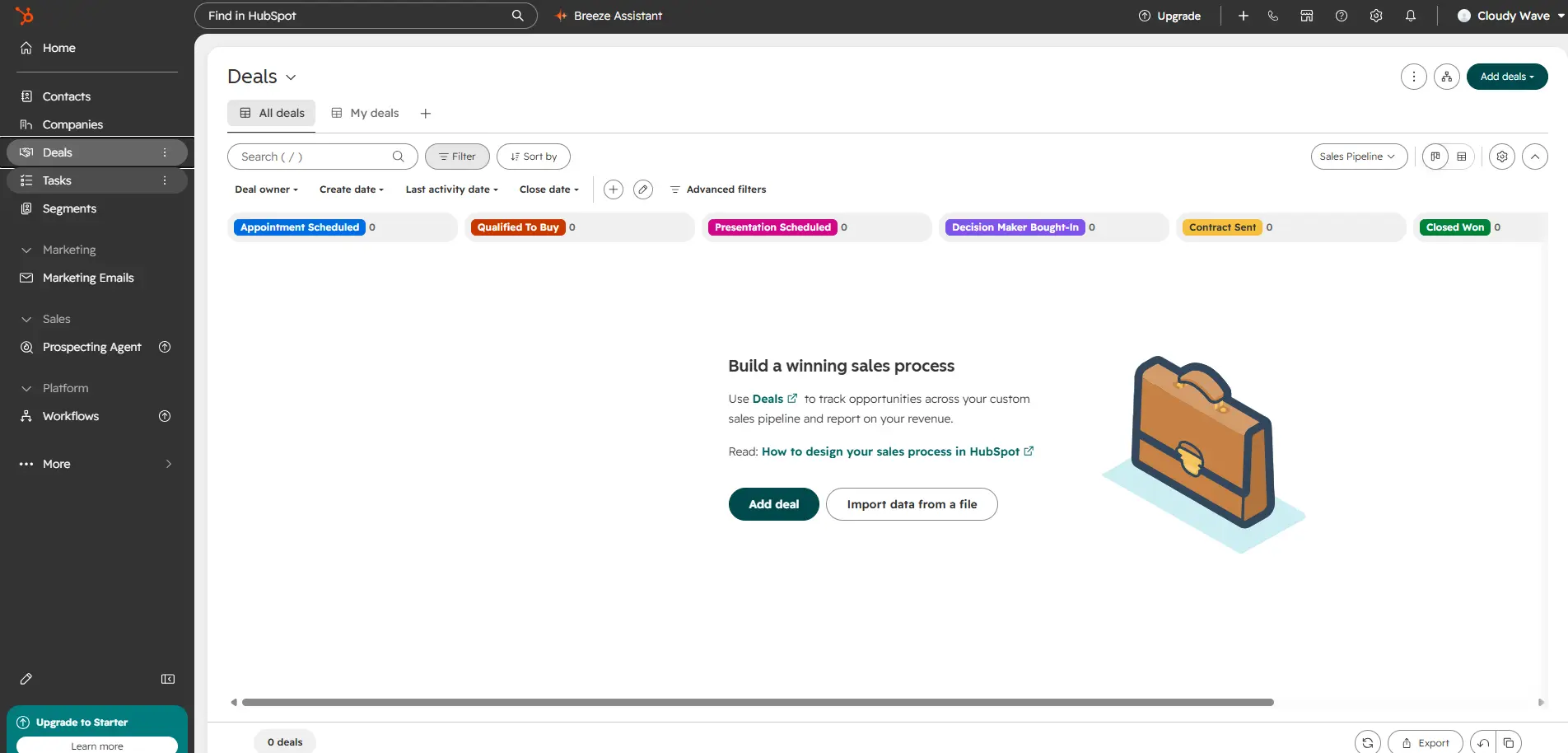
HubSpot CRM is a customer platform built around Smart CRM, the shared database where contacts, companies, deals, tickets, and activities live. HubSpot describes Smart CRM as the foundation that comes with any paid subscription, while Sales Hub, Marketing Hub, Service Hub, Content Hub, Data Hub, and Revenue Hub add specialized tools on top.
Key elements include:
- Contact and company management with activity timelines, email tracking, and meeting scheduling.
- Deal pipelines for tracking opportunities; pipeline limits scale by tier.
- An integrated ecosystem where marketing, sales, and service share one database.
- Automation through workflows and sequences, with full customization reserved for Professional and Enterprise tiers.
- Reporting dashboards on every tier, with custom reporting and forecasting starting at Professional.
- AI under the Breeze brand, including AI agents (such as prospecting, customer, and data agents) that consume HubSpot Credits.
- Free and paid tiers, with a free CRM for up to two users.
HubSpot’s core appeal is coherence: one interface, one database, and marketing and sales on the same platform.
What Is Salesforce CRM?
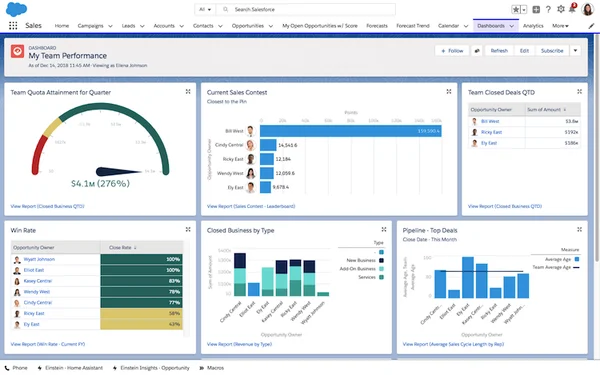
Salesforce CRM usually refers to Sales Cloud, running on the Salesforce Platform. Salesforce now markets Sales Cloud under the Agentforce brand as well, reflecting its AI direction.
Key elements include:
- Lead, account, contact, and opportunity management with a mature, relational data model.
- Automation through Flow, approval processes, and programmatic logic in Apex.
- Customization of objects, fields, page layouts, validation rules, and entire custom applications.
- Reporting and dashboards, extended by CRM Analytics and Tableau.
- AI via Agentforce, which can be included in top editions or added to eligible editions.
- AppExchange, a large marketplace of native apps, agents, and consultants.
- A developer ecosystem including sandboxes, Lightning Web Components, APIs, and MuleSoft for integration.
- Enterprise scalability with granular security, multi-org strategies, and industry clouds.
Salesforce’s core appeal is flexibility: it can model almost any business process, provided you invest in configuring it well.
HubSpot vs Salesforce: Key Differences
Ease of Use
Which is easier to use, HubSpot or Salesforce? HubSpot is generally faster to learn out of the box because its interface and defaults are opinionated. Salesforce can be equally usable, but only when it is implemented with clean page layouts, sensible automation, and good training.
Ease of use is partly a property of your processes. A simple sales motion feels simple in either tool. A complex, multi-step approval process will feel complex anywhere; the question is whether the platform supports it cleanly or forces workarounds.
Administration also differs. HubSpot can often be run by a marketing operations or RevOps generalist. Salesforce typically benefits from a trained administrator, especially as customization grows.
Customization
Which CRM is more customizable, HubSpot or Salesforce? Salesforce offers deeper customization, including custom objects, complex relationships, programmatic logic, and custom user interfaces. HubSpot supports custom objects and properties on higher tiers and has expanded its developer tools, but its model is intentionally more structured.
Deeper customization matters when you need to model things a standard CRM doesn’t know about: equipment, contracts, inventory, projects, subscriptions, or multi-level partner hierarchies. It also matters when business rules vary by region, product line, or customer segment.
The trade-off is governance. Every customization adds maintenance. Salesforce gives you more rope; you need the discipline to use it well.
Sales Management
Both platforms cover the fundamentals: contacts, companies/accounts, deals/opportunities, pipelines, and activity tracking.
- HubSpot focuses on rep productivity: sequences, meeting links, playbooks, conversation intelligence (Enterprise), and forecasting from Professional upward.
- Salesforce emphasizes structured sales operations: lead conversion, opportunity products, territory management, collaborative forecasting, and complex quote processes (often through CPQ or Revenue Cloud).
If your sales motion includes multiple product lines, channel partners, or complex pricing, Salesforce’s data model tends to accommodate it more directly.
Marketing
This is one of the clearest structural differences. HubSpot’s Marketing Hub shares the same database and interface as the CRM, which simplifies lead nurturing, email marketing, landing pages, and attribution.
Salesforce’s marketing capabilities live in separate products, such as Marketing Cloud and Account Engagement, which are licensed separately and often implemented as distinct projects.
Note that neither platform includes full marketing automation in every tier. HubSpot’s advanced automation and attribution depend on Marketing Hub Professional or Enterprise.
Customer Service
HubSpot’s Service Hub offers ticketing, a help desk, knowledge base, customer portal, and AI customer agent, all tied to the same CRM records.
Salesforce Service Cloud offers case management, knowledge, omnichannel routing, contact center capabilities, and field service options. It is commonly chosen by organizations with large or complex service operations.
Automation
Both platforms automate triggers, record updates, notifications, and task creation.
- HubSpot: workflows with visual building; Sales Hub Starter allows limited workflows, while Professional and Enterprise unlock fully customizable workflows (with per-account limits).
- Salesforce: Flow for most declarative automation, plus approval processes and Apex code when logic outgrows point-and-click tools.
For straightforward automation, HubSpot is quick to build. For multi-object, conditional, or transaction-heavy processes, Salesforce offers more headroom.
Reporting and Analytics
HubSpot includes dashboards on every tier, with custom reports, forecasting, and deal journey analytics expanding at Professional and Enterprise. Its cross-functional reporting benefits from marketing, sales, and service sharing one database.
Salesforce’s native reports and dashboards are highly flexible, and organizations can extend into CRM Analytics or Tableau for advanced analytics. Reporting power in Salesforce depends heavily on how cleanly the data model was designed.
AI Capabilities
Both vendors are moving toward agentic AI, but packaging matters more than headlines.
Salesforce (Agentforce): Salesforce positions Agentforce as AI agents working on trusted CRM data for sales, service, and custom workflows. Agentforce is included in top-tier editions and available as an add-on for others; pricing models include per-user licenses, Flex Credits, and per-action or per-resolution options. Salesforce notes that AI can be added to Core and above.
HubSpot (Breeze): HubSpot offers Breeze AI features and agents, including a prospecting agent, customer agent, and data agent, plus an Agent Builder. These run on HubSpot Credits. Sales Hub includes 500 credits at Starter, 3,000 at Professional, and 5,000 at Enterprise per month; additional credits cost $0.01 each. Some features are labeled beta.
Our observation: AI value depends on data quality. Neither platform’s agents will perform well on duplicated, incomplete, or poorly structured CRM data.
Integrations and Ecosystem
HubSpot’s marketplace lists over 2,000 apps and supports public REST APIs, making common SaaS integrations straightforward.
Salesforce’s AppExchange hosts native apps that run inside Salesforce, not just connect to it. That difference matters when you want capabilities like ERP, inventory, document generation, or billing to share the same data and security model. Salesforce also offers MuleSoft for complex enterprise integration.
Scalability
HubSpot scalability has grown significantly, with Enterprise tiers adding custom objects, advanced permissions, and higher limits. Many mid-market companies run successfully on HubSpot.
Salesforce scalability extends to very large user counts, complex data volumes, multiple business units, international operations, and highly regulated industries.
The better question isn’t “small or enterprise?” It’s “how complex will our processes and data model become?” A 30-person company with complex manufacturing workflows may outgrow a simpler model faster than a 500-person company with a standard sales motion.
HubSpot vs Salesforce Pricing
Pricing and packaging can change, so verify current pricing with the vendor before purchasing. Figures below reflect list prices as of September 2026.
HubSpot Sales Hub (per seat, per month):
- Free: $0, up to 2 users.
- Starter: about $20/seat billed monthly, with lower annual or promotional rates.
- Professional: $90/seat annually ($100 monthly), plus a required one-time $1,500 onboarding fee.
- Enterprise: from $150/seat, plus a required one-time $3,500 onboarding fee.
Marketing Hub Professional and Enterprise use a platform fee with included seats rather than pure per-seat pricing, and include their own onboarding fees.
Salesforce Sales Cloud (per user, per month, mostly annual contracts):
- Starter Suite: $25/user.
- Pro Suite: $100/user.
- Core, Advanced, and Max editions: in September 2026, Salesforce introduced new Core, Advanced, and Max editions for new customers, replacing Enterprise, Unlimited, and Agentforce 1. Reported list prices are $195, $395, and $550 per user respectively. Existing customers may remain on legacy editions.
Total cost of ownership matters more than license price:
License + implementation + customization + data migration + integrations + training + administration + ongoing support + add-ons (AI credits, CPQ, marketing products, extra storage).
A lower license cost can be offset by workarounds; a higher license cost can be offset by consolidating tools onto one platform. Compare equivalent tiers and model three-year costs.
HubSpot vs Salesforce for Small Businesses
Which CRM is better for small businesses? It depends on growth plans and process complexity. HubSpot often suits small teams that want fast adoption and marketing-sales alignment. Salesforce Starter and Pro Suites suit small businesses that expect complex processes or plan to build on the Salesforce Platform.
Consider HubSpot when:
- Your team is small and has no dedicated CRM administrator.
- Inbound marketing drives most of your pipeline.
- You want to go live in weeks, not months.
Consider Salesforce when:
- Your processes involve inventory, orders, contracts, or custom data.
- You expect to add native apps from AppExchange as you grow.
- You want to avoid a future migration as complexity rises.
HubSpot vs Salesforce for Mid-Market Businesses
Mid-market companies usually face the hardest choice. Multiple sales teams, territories, product lines, and RevOps reporting needs appear at this stage, along with growing integration demands.
HubSpot Professional and Enterprise can handle many of these requirements, especially where marketing is central. Salesforce tends to fit when cross-functional processes (sales to fulfillment to billing) need to run on shared data with custom logic. At this stage, the strength of your RevOps team and your integration map often decide the outcome.
HubSpot vs Salesforce for Enterprise Organizations
Which CRM is better for enterprise businesses? Both offer enterprise tiers. Salesforce is more commonly chosen where governance, complex security, multiple business units, and deep customization are required. HubSpot Enterprise can fit organizations that prioritize usability and integrated marketing over extensive customization.
Evaluate governance models, role-based security, sandbox and release management, API limits, data residency, audit requirements, and the availability of skilled administrators and partners.
HubSpot vs Salesforce: Migration Considerations
What should a company evaluate before switching CRM platforms? Evaluate data quality, field mapping, automation dependencies, integrations, reporting continuity, user training, and change management. A CRM migration is a business process project, not only a data transfer.
Plan for:
- Data cleansing and deduplication before migration, not after.
- Field and object mapping, especially where HubSpot deals map to Salesforce opportunities and custom objects differ.
- Historical activities such as emails, calls, and notes.
- Workflow rebuilds; automations rarely translate one-to-one.
- Integration replacement for every connected app.
- Testing in a sandbox with real user scenarios.
- Rollback planning and a parallel-run window.
- Training and change management to protect adoption.
HubSpot or Salesforce: How to Choose
Ask these ten questions:
- How complex is your sales process?
- Do you need extensive customization?
- How much marketing automation do you require?
- How many departments will use the CRM?
- Do you need custom objects or data models?
- How complex are your integrations?
- How much internal CRM administration capability do you have?
- What is your implementation budget?
- What reporting and analytics do you require?
- What will your CRM need to support three to five years from now?
Consider HubSpot if you want fast adoption, marketing and sales on one platform, a lean admin model, and your processes fit a structured CRM model.
Consider Salesforce if you need a highly flexible data model, complex automation, native apps for operations such as ERP or billing, enterprise governance, or broad cross-department use.
Common Mistakes When Choosing Between HubSpot and Salesforce
- Choosing based only on license price.
- Choosing based only on the interface in a demo.
- Ignoring implementation, migration, and integration costs.
- Over-customizing before processes are defined.
- Skipping governance and data ownership planning.
- Ignoring three-to-five-year growth.
- Comparing HubSpot Professional against Salesforce’s top edition (or vice versa) instead of equivalent tiers.
Conclusion
The HubSpot CRM vs Salesforce CRM decision isn’t about finding a winner. It’s about matching a platform to how your business actually operates. HubSpot tends to reward teams that want speed, simplicity, and marketing tightly connected to sales. Salesforce tends to reward organizations that need a flexible data model, complex automation, and room to run more of the business on one platform.
Base your decision on business complexity, budget, customization needs, marketing requirements, automation, integrations, scalability, internal resources, and your long-term CRM strategy. Model total cost of ownership, not license price, and pressure-test each platform against your real processes.
Need help evaluating your CRM requirements? Talk with Cloudy Wave about your Salesforce implementation, customization, migration, and integration requirements.







 Salesforce ERP
 ERP + CRM Platform
  Inventory Management
  Warehouse Management
  Order Management
  Vendor Management
  Logistics Management
  BOM Management
  Order Fulfillment
  Business Operations
  SaaS Platform for Operations
  Salesforce Cloud ERP Platform
  Xero
Xero
 Zoho books
 Quickbooks
 Shopify
 Acumatica
 SAP
SAP
 Odoo
Odoo
 NetSuite
 Microsoft Dynamics 365
 Sage
Sage



 Agentforce Revenue Management
 Agentforce Revenue Management + Billing
  Salesforce CPQ
 Salesforce Advanced Billing
  Migrate from CPQ to ARM
  Managed Services
 Salesforce Implementation
 Revenue Cloud Implementation
 ServiceNow Consulting Services
 Zoho CRM implementation
 MuleSoft Integration
 Workato Integration
 Microsoft
 Data Cloud
 Tableau

 ·
September 28, 2026
·
13 min read
·
September 28, 2026
·
13 min read