Sales teams lose enormous amounts of selling time to work that has nothing to do with selling. Reps update fields in the CRM. They research a lead before a first call. They draft the same style of follow-up email a dozen times a week. They chase forecast updates before a pipeline review. None of this closes deals, but all of it has to get done.
Traditional sales automation improved parts of this problem. Salesforce Flow, assignment rules, and workflow-based lead scoring took repetitive, rule-based work off people’s plates. But rule-based automation only works when the situation matches the rule. The moment a lead doesn’t fit the predefined path, a human has to step in.
Agentforce changes what “automation” means inside Salesforce. Instead of only following predefined steps, Agentforce introduces AI agents that can reason over Salesforce data, interpret context, decide what to do next, and take action—drafting a follow-up, updating a record, summarizing an account, or flagging a deal at risk—within the permissions and guardrails a business defines.
The future of sales automation isn’t simply automating tasks. It’s building intelligent sales systems that can act on behalf of sales teams, under human oversight.
Salesforce consulting and implementation partners like Cloudy Wave work with sales and RevOps leaders to figure out where this shift actually creates value, and where it doesn’t. This article walks through what sales automation with Agentforce is, how it works stage by stage across the sales process, where it fits alongside traditional Salesforce automation, and how to plan an implementation that holds up in production.
Executive Summary
- Sales automation with Agentforce combines Salesforce CRM data with AI agents that can reason, decide, and act—not just execute fixed rules.
- Agentforce sits on top of, not instead of, existing Salesforce automation. Salesforce Flow, assignment rules, and approval processes still matter.
- Agentforce can support lead qualification, follow-up, CRM updates, meeting preparation, opportunity summaries, and pipeline intelligence—always within permissions a business configures.
- The clearest distinction between traditional and agentic automation is that traditional automation is rule-based and reactive, while agentic automation is context-aware and can handle a wider range of situations before escalating to a human.
- Not every sales activity should be automated. Strategic negotiation, sensitive customer situations, and final approvals belong with people.
- Successful Agentforce implementations depend on clean CRM data, clear use cases, strong governance, and a phased rollout—not on turning on every capability at once.
- A Salesforce consulting partner such as Cloudy Wave can help translate these capabilities into a scoped, governed implementation rather than a generic AI rollout.
What Is Sales Automation?
Sales automation is the use of software to perform sales-related tasks—such as lead routing, follow-up emails, task creation, and data updates—without requiring a person to do each step manually. Traditional sales automation is rule-based: it executes the same action whenever a defined condition is met, using tools like Salesforce Flow and assignment rules.
Sales teams have automated parts of the sales process inside Salesforce for years through:
- CRM workflows that trigger actions when a record changes
- Salesforce Flow, which automates multi-step business processes across objects
- Assignment rules, which route leads and cases to the right owner or queue
- Email automation, which sends templated messages based on triggers
- Lead scoring, which ranks leads using point-based or predictive models
- Task automation, which creates follow-up tasks tied to record changes
- Notifications, which alert reps or managers when specific conditions occur
- Approval processes, which route discounts or deal terms through defined approval chains
The Limits of Rule-Based Automation
Rule-based automation is reliable, but it is also rigid. It cannot interpret a message it wasn’t explicitly told to handle, weigh competing priorities, or decide what “matters most” about a specific lead. When a situation falls outside the predefined path, a human has to intervene—which is exactly the kind of exception handling that consumes sales reps’ time today. This is the gap agentic automation is designed to close.
What Is Agentforce?
Agentforce is Salesforce’s platform for building and deploying AI agents that operate on CRM data, follow business-defined instructions, and take action inside Salesforce within configured permissions. Agents are grounded in a company’s own Salesforce data, guided by instructions and topics that define what they’re allowed to do, and equipped with specific actions—such as updating a record or drafting an email—that they can execute autonomously or with human approval.
Core building blocks of an Agentforce agent include:
- Topics – the areas of responsibility an agent is scoped to handle (e.g., lead qualification, meeting prep)
- Actions – the specific tasks an agent can perform, such as creating a record or sending a summary
- Instructions – business rules and guidelines that shape how the agent behaves within a topic
- Grounding – connecting the agent to trusted Salesforce (and, where configured, external) data so its reasoning reflects real records rather than guesses
- Permissions – the access controls that define exactly what data and objects an agent can read or modify
- Human oversight – checkpoints where a person reviews or approves an agent’s proposed action before it’s finalized
AI Assistant vs. AI Agent
A useful way to understand Agentforce is to compare it with a conversational AI assistant, which answers questions but doesn’t act on its own.
| Capability | AI Assistant | AI Agent (Agentforce) |
|---|
| Answers questions using CRM data | Yes | Yes |
| Executes multi-step actions | Limited | Yes, within defined permissions |
| Updates Salesforce records | Rarely, or requires manual copy-paste | Can update records directly, per configured actions |
| Operates without a person typing each request | No | Can be triggered by events, not just prompts |
| Makes decisions based on business rules | Limited | Yes, guided by instructions and guardrails |
| Escalates to a human when uncertain | Not typically designed for this | Can be configured to hand off to a person |
The distinction matters because it changes what “automation” can cover. An assistant helps a person do their job faster. An agent can perform parts of the job itself, under supervision.
Sales Automation vs. Agentic Sales Automation
The shift from rule-based to agentic automation is a shift in what the system is capable of deciding, not just what it can execute.
| Traditional Automation | Agentic Automation |
|---|
| Rule-based | Goal-oriented |
| Predefined workflows | AI-driven decisions within guardrails |
| Fixed paths | Context-aware actions |
| Human handles all exceptions | Agent can handle defined exceptions, escalates the rest |
| Task automation only | Task + reasoning + action |
| Reactive to triggers | Can be proactive within its scope |
| Manual escalation | Intelligent, rule-guided escalation |
This distinction matters for a practical reason: rule-based automation requires a human to anticipate every scenario in advance. Agentic automation can handle a wider range of real-world variation without needing a new rule written for every case—provided the agent is scoped, grounded, and governed correctly. That last condition is not optional; an ungoverned agent is a liability, not an upgrade.
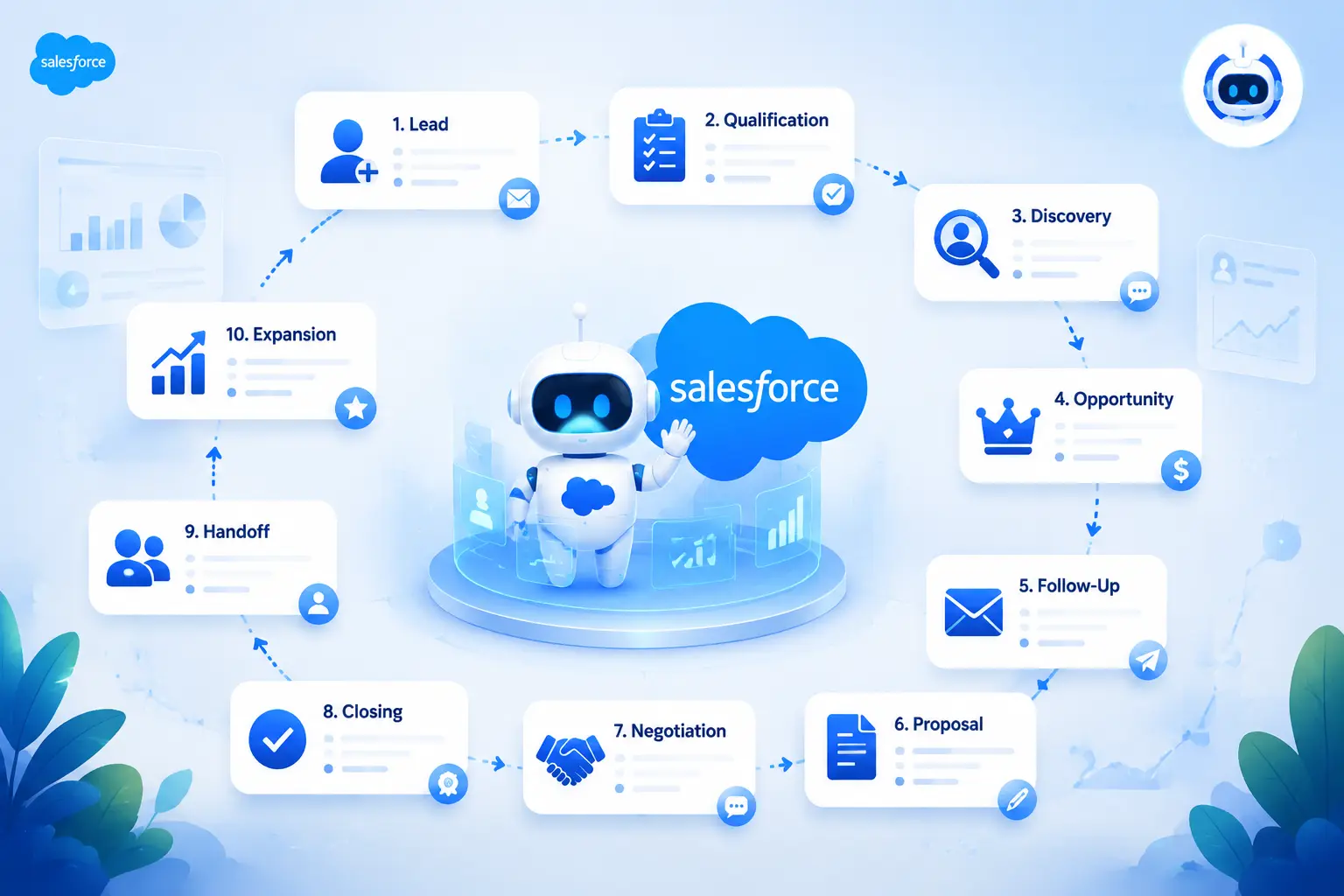
How Agentforce Automates the Sales Process
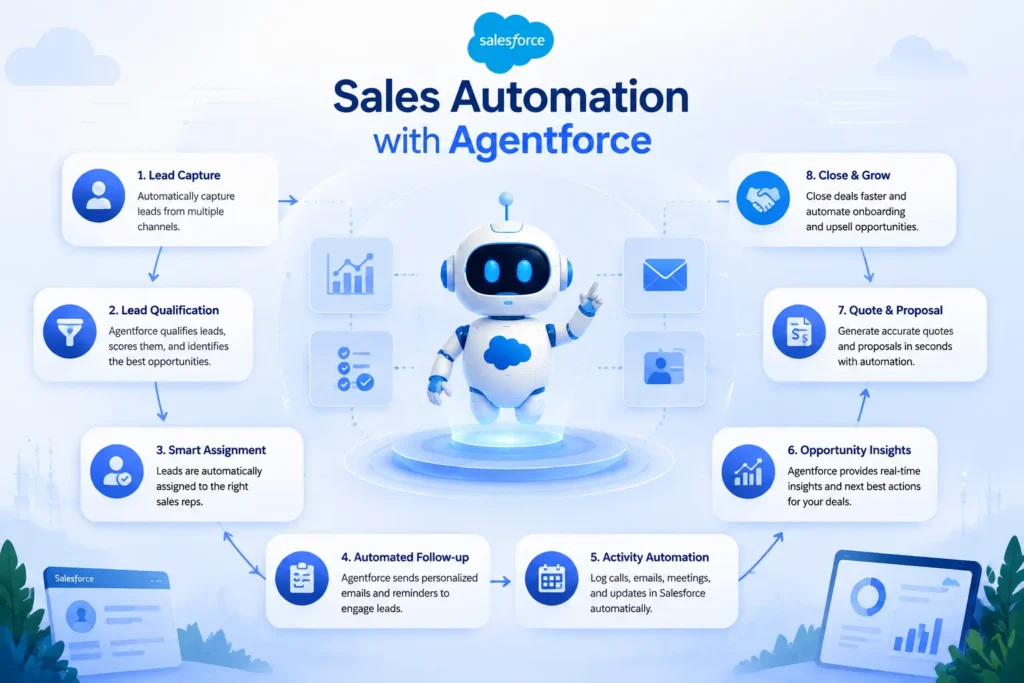
Agentforce can support activity across the sales lifecycle: Lead → Qualification → Discovery → Opportunity → Follow-Up → Proposal → Negotiation → Closing → Handoff → Expansion. The sections below walk through each stage.
1. Lead Capture and Response
When a new lead enters Salesforce, Agentforce can gather information, identify intent, route the lead, and notify the right sales representative—reducing the delay between lead capture and first response. Agents can be configured to:
- Respond to inbound lead inquiries with relevant, policy-approved information
- Gather qualifying details through conversation or form data
- Identify buying intent based on the content of the inquiry
- Route the lead to the correct owner, territory, or queue
- Create or update the corresponding Lead or Contact record
- Trigger the next step in the sales process
- Notify the assigned sales representative
Human handoff is built into this flow by design: once intent and basic qualification are established, the agent hands the lead to a person for the parts of the conversation that require judgment, trust-building, or negotiation.
2. AI Lead Qualification
Agentforce can research a lead, apply ideal customer profile (ICP) criteria, and produce a qualification summary so a rep starts the conversation informed instead of starting from zero. This can include:
- Lead and company research using available CRM and grounded data
- Structured qualification questions aligned to a defined framework (such as BANT or MEDDIC)
- ICP matching against a business’s defined criteria
- Identification of relevant intent signals
- Lead prioritization based on fit and signal strength
- Data enrichment of existing lead or account fields
- A concise qualification summary delivered to the rep
Instead of manually researching every inbound lead, a sales representative can receive a short briefing that highlights fit, likely intent, and open questions—turning research time into selling time.
3. Automated Follow-Up
Agentforce can help sales teams follow up faster and more consistently by drafting messages, creating tasks, and flagging next steps based on prospect behavior. This includes:
- Recommending follow-up timing based on prospect activity
- Drafting follow-up emails for a rep to review and send
- Creating tasks and reminders tied to specific next steps
- Surfacing prospect responses that need attention
- Recommending the next-best action for a given lead or opportunity
Speed-to-lead is one of the most studied variables in B2B sales response research, and delayed follow-up is a well-documented reason pipeline stalls. Agentforce doesn’t eliminate the need for judgment in these conversations, but it reduces the administrative lag between “a prospect responded” and “someone follows up.”
4. Sales Email Automation
Agentforce can draft personalized sales emails—follow-ups, meeting summaries, and opportunity updates—grounded in CRM context, while leaving final review and send decisions to the rep. This includes:
- Personalized outreach and follow-up drafts
- Meeting recap emails based on logged notes or activity
- Next-step emails tied to opportunity stage
- Opportunity update messages for internal or customer-facing use
AI-generated messages still need to operate within company brand voice, compliance requirements, and messaging guidelines. Agent instructions and grounding data are how a business enforces that consistency, rather than relying on each rep to remember the rules.
5. Opportunity Management
Agentforce can help sales teams keep opportunities moving by identifying stalled deals, summarizing account activity, and recommending next actions—without replacing the rep’s judgment on how to close the deal. Specific support includes:
- Identifying opportunities with no recent activity
- Summarizing account and opportunity history
- Highlighting missing or incomplete information
- Recommending next actions based on opportunity stage
- Updating CRM records with new activity or status
- Surfacing risk factors, such as missing stakeholders or slipped close dates
- Preparing opportunity briefs ahead of a review or call
6. Sales Meeting Preparation
Before a call, Agentforce can assemble an account summary that pulls together contact history, open opportunities, recent activity, and suggested talking points—work a rep would otherwise do manually. A meeting prep briefing typically draws on:
- Account and contact summaries
- Relevant contact information and roles
- History of previous interactions
- Status of open opportunities
- Related support cases, where relevant
- Recent activity across the account
- Recommended talking points based on account context
7. Quote and Proposal Support
Agentforce can support quote and proposal preparation by pulling product information, applying pricing guidance, and routing approvals—but it does not replace dedicated quoting systems. It’s important to separate what Agentforce does from what a configure-price-quote (CPQ) or revenue management system does:
- Agentforce can help gather product information, prepare context for a quote request, apply pricing guidance defined by the business, route items through approval workflows, and draft proposal or follow-up content.
- Salesforce CPQ and Revenue Cloud handle the underlying quoting logic, pricing rules, contract generation, and billing—the systems of record for the transaction itself.
Agentforce does not independently perform every CPQ function; it works alongside quoting and revenue systems rather than replacing them.
8. Sales Approval Automation
Agentforce can help identify when a deal requires human approval and route it accordingly, based on discount thresholds, deal size, or other policy triggers a business defines. This includes:
- Flagging discount requests that exceed defined thresholds
- Routing deal approvals to the correct approver
- Identifying exceptions that fall outside standard policy
- Escalating time-sensitive approvals
- Enforcing documented approval policy consistently
9. CRM Data Automation
Agentforce can reduce manual CRM upkeep by updating fields, logging activity, and creating follow-up tasks based on what happens in a deal—improving data quality without requiring reps to do it all by hand. Examples include:
- Updating opportunity stage or fields based on activity
- Creating tasks tied to next steps
- Logging call or meeting interactions
- Summarizing meeting notes into structured CRM fields
- Updating account information as it changes
- Creating follow-up activities automatically
Better CRM data quality is a direct benefit here: when updates happen consistently rather than depending on a rep remembering to log them, forecasting, reporting, and handoffs all improve.
10. Sales Forecasting and Pipeline Intelligence
Agentforce can support forecasting by summarizing pipeline health, flagging at-risk opportunities, and preparing deal inspection notes—supporting the forecasting process rather than generating a guaranteed number. This includes:
- Pipeline analysis across owners, stages, or segments
- Opportunity risk detection based on activity gaps or stalled stages
- Forecast preparation summaries ahead of a review
- Deal inspection notes for manager 1:1s
- Pipeline summaries for leadership visibility
AI can improve the consistency and speed of forecast preparation, but it does not guarantee forecast accuracy—forecasting still depends on the judgment of sales leaders interpreting the data.
11. Next-Best Actions
Agentforce can recommend who to contact, when, and about what, based on account and opportunity context—helping reps prioritize where limited selling time goes. Recommendations can include which contact to reach out to, timing, suggested talking points, which opportunity needs attention, which deal shows risk signals, and what the next logical action should be.
12. Account Expansion and Upselling
Agentforce can help account teams spot cross-sell, upsell, and renewal opportunities by analyzing usage and engagement signals already captured in Salesforce. This includes identifying cross-sell and upsell fit based on product usage or account profile, flagging upcoming renewal opportunities, and surfacing customer engagement signals worth acting on. These recommendations are only as reliable as the underlying data—expansion signals built on incomplete or outdated account data will produce weak recommendations, which is why data quality is a prerequisite, not an afterthought.
Agentforce Sales Automation Use Cases
| Use Case | Manual Process | Agentforce Opportunity | Business Impact |
|---|
| Lead qualification | Rep manually researches and scores each lead | Agent researches, scores, and summarizes | Faster, more consistent qualification |
| Lead follow-up | Rep drafts and sends follow-up manually | Agent drafts follow-up for rep review | Reduced response lag |
| Opportunity summaries | Rep reviews full activity history before a call | Agent generates a concise summary | Faster prep, less manual review |
| Meeting preparation | Rep pulls account, contact, and case data manually | Agent assembles a pre-meeting briefing | More consistent meeting prep |
| CRM updates | Rep manually updates fields after calls | Agent logs activity and updates fields | Better data quality |
| Sales emails | Rep writes each message from scratch | Agent drafts on-brand message for review | Time saved per touchpoint |
| Deal risk detection | Manager reviews pipeline manually for stalled deals | Agent flags inactivity and risk signals | Earlier intervention on at-risk deals |
| Pipeline inspection | Rep or manager compiles pipeline notes manually | Agent prepares inspection summaries | Faster, more consistent reviews |
| Forecast preparation | Rep manually compiles forecast commentary | Agent drafts forecast summary for review | Less admin time before forecast calls |
| Task creation | Rep manually creates follow-up tasks | Agent creates tasks tied to next steps | Fewer missed follow-ups |
| Account research | Rep researches account background manually | Agent compiles account summary | Faster, informed outreach |
| Cross-sell identification | Account manager reviews usage data manually | Agent flags cross-sell signals | More proactive account management |
| Upsell identification | Account manager tracks usage trends manually | Agent surfaces upsell opportunities | Earlier expansion conversations |
| Renewal follow-up | CS or sales manually tracks renewal dates | Agent flags upcoming renewals | Reduced renewal slippage |
| Quote assistance | Rep manually gathers product/pricing info | Agent assembles quote context for CPQ | Faster quote turnaround |
| Approval routing | Rep manually routes discount requests | Agent routes based on policy thresholds | Consistent policy enforcement |
| Lead routing | Ops manually assigns leads by territory | Agent routes based on defined rules and context | Faster lead assignment |
| Data enrichment | Rep manually looks up missing account details | Agent enriches records from grounded data | More complete CRM records |
| Stalled deal alerts | Manager notices stalled deals during reviews | Agent flags inactivity proactively | Fewer deals silently going cold |
| Meeting recap logging | Rep manually writes up call notes | Agent structures notes into CRM fields | More complete activity history |
| Next-best-action guidance | Rep decides priorities independently | Agent recommends prioritized actions | More focused rep time allocation |
Before vs. After Agentforce
| Before Agentforce | With Agentforce |
|---|
| Manual lead research | AI-assisted research and summarization |
| Manual follow-up drafting | Automated follow-up drafts for review |
| Manual CRM updates | AI-assisted record updates |
| Manual opportunity review | AI-generated opportunity summaries |
| Manual meeting preparation | AI-generated pre-meeting briefings |
| Reactive sales management | Proactive risk and opportunity flagging |
| Inconsistent follow-up cadence | More consistent, timely follow-up support |
| Fragmented account context | Consolidated account and activity summaries |
Traditional Sales Automation vs. Agentforce
| Dimension | Traditional Automation | Agentforce |
|---|
| Workflow automation | Executes predefined steps | Can execute steps and adapt reasoning within scope |
| AI reasoning | None | Interprets context and CRM data |
| Context awareness | Limited to trigger conditions | Draws on grounded account and activity data |
| Personalization | Template-based | Context-driven drafting within guardrails |
| CRM actions | Rule-triggered field updates | Agent-initiated actions within permissions |
| Exception handling | Requires manual intervention | Can handle defined exceptions, escalates the rest |
| Human handoff | Manual, ad hoc | Designed checkpoints for review and approval |
| Scalability | Scales well for uniform processes | Scales across varied, less predictable scenarios |
| Governance | Simpler; fewer decision points | Requires explicit permissions, guardrails, and monitoring |
| Data requirements | Moderate | High — agent quality depends on data quality |
How Agentforce Works With Salesforce
Agentforce doesn’t operate in isolation—it works within the broader Salesforce ecosystem, drawing on trusted data and existing automation rather than replacing it.
- Sales Cloud provides the core objects—Leads, Contacts, Accounts, Opportunities—that agents read from and act on.
- Data Cloud unifies data from multiple sources so agents can ground their reasoning in a more complete customer view.
- Salesforce Flow continues to handle deterministic, rule-based automation; Agentforce complements it rather than replacing it outright.
- Revenue Cloud (including CPQ) handles quoting, pricing, and billing logic that Agentforce can support but does not replicate.
- Salesforce APIs allow agents and automation to interact with external systems where appropriate and permitted.
- Business rules and permissions govern what any given agent is allowed to see and do.
Trusted, well-governed data is the foundation this entire model depends on. An agent grounded in incomplete or inconsistent CRM data will produce inconsistent, unreliable output—regardless of how well the agent itself is configured.
Agentforce + Sales Cloud in Practice
Within Sales Cloud specifically, Agentforce commonly interacts with:
- Leads — qualification, enrichment, routing
- Contacts — relationship and role context
- Accounts — summaries, history, expansion signals
- Opportunities — stage tracking, risk detection, next actions
- Activities and Tasks — logging, creation, follow-up reminders
- Cases (when relevant to sales context, e.g., renewal risk tied to open support issues)
- Reports and Dashboards — as source context for pipeline and forecast summaries
Real-World Sales Automation Scenario
Consider a mid-market B2B software company. A prospect submits a high-intent product inquiry through the website at 11:30 PM—well outside the sales team’s working hours.
- The lead enters Salesforce through the web-to-lead process.
- Agentforce evaluates the available context: the inquiry content, firmographic data, and any prior touchpoints with the company.
- The agent applies the business’s qualification criteria to assess fit.
- It summarizes the lead’s likely intent and relevant background for the assigned rep.
- The prospect receives an appropriate, policy-approved acknowledgment—set up in advance by the business, not improvised by the agent.
- The assigned sales representative is notified once qualification is complete.
- A new Opportunity record is created, or an existing one is updated if the company already has a record in Salesforce.
- A follow-up task is created for the rep, timed to the start of the next business day.
- The agent flags a request for a discovery call, based on the qualification summary.
- Before that call happens, the rep receives an AI-generated briefing pulling together the lead’s inquiry, firmographic context, and any related account history.
- Ongoing opportunity activity is summarized as the deal progresses.
- The agent recommends a next-best action once new activity is logged.
Where human judgment stays in control: the rep decides how to run the discovery call, whether to adjust pricing, how to handle objections, and when the deal is ready to move to proposal. The agent accelerates preparation and reduces administrative lag; it does not make the sales decisions.
Business Benefits
| Benefit | Description |
|---|
| Faster lead response | Reduced delay between lead capture and qualified follow-up |
| Reduced administrative work | Less manual research, data entry, and note-taking |
| Better CRM data | More consistent logging and field updates |
| Increased seller productivity | More time available for direct selling activity |
| Faster opportunity progression | Fewer stalled deals due to missed follow-up |
| Better follow-up consistency | Reduced reliance on individual rep discipline |
| Improved visibility | More consistent pipeline and account summaries for managers |
| Better customer experience | Faster, more informed responses to prospects |
| Scalable sales operations | Support for higher lead volume without proportional headcount growth |
| Reduced repetitive tasks | Less time spent on tasks that don’t require judgment |
| More time for selling | Time freed from admin work redirected to selling activity |
| More consistent qualification | Standardized application of ICP and qualification criteria |
| Earlier risk detection | Stalled or at-risk deals surfaced sooner |
| More informed meeting prep | Reps enter calls with relevant context assembled in advance |
| Better handoffs | More complete activity history supports cleaner account transitions |
These are the categories where teams commonly see improvement. Results vary by process, data quality, and adoption—Agentforce does not guarantee specific revenue outcomes.
What Should Sales Teams Automate First?
A practical way to prioritize is to rank candidate processes using Business Value × Frequency × Automation Feasibility × Risk.
| Process | Priority | Why |
|---|
| Lead response and qualification | High | High frequency, clear rules, high business value, low risk |
| Meeting preparation | High | High frequency, low risk, immediate time savings |
| CRM data updates and logging | High | High frequency, directly improves downstream data quality |
| Follow-up drafting | Medium-High | High frequency, moderate need for human review before sending |
| Opportunity summaries | Medium | Valuable for managers, lower frequency than lead-level tasks |
| Stalled-deal flagging | Medium | High value, but depends on clean stage and activity data |
| Quote/proposal support | Medium | Value depends on integration with CPQ/Revenue Cloud |
| Approval routing | Medium | Valuable, but requires precise policy configuration |
| Cross-sell/upsell identification | Lower initially | High value long-term, but depends on mature usage data |
| Negotiation and pricing exceptions | Do not automate | High risk, requires human judgment |
Start with high-frequency, low-risk, well-defined processes. Expand into judgment-heavy areas only after governance and data quality are proven.
What Not to Automate Completely
Not every part of the sales process should be handed to an agent, even a well-governed one. Businesses should keep humans firmly in control of:
- Strategic negotiations — where relationship dynamics and trade-offs require judgment
- Sensitive customer situations — churn risk, complaints, or relationship repair
- High-value deal decisions — where the cost of a wrong call is significant
- Complex pricing exceptions — outside standard, pre-approved policy
- Relationship management — the human trust-building work AI cannot replicate
- Ethical decisions — situations requiring judgment beyond stated rules
- Final approvals — the last checkpoint before a commitment is made
This is the practical meaning of human-in-the-loop Agentforce: agents prepare, draft, summarize, and recommend; people decide on anything with real stakes attached. Designing this boundary deliberately—rather than letting it default to “whatever the agent can technically do”—is one of the more important decisions in an implementation.
Agentforce Governance and Security
Enterprise Salesforce teams need a practical governance framework before scaling agent use beyond a pilot. Key areas include:
- Permissions — precisely scoping what data and objects each agent can access, following least-privilege principles
- Data access — auditing which fields and records feed an agent’s grounding and reasoning
- Guardrails — defined boundaries on what actions an agent can take without approval
- Human approval — checkpoints for higher-risk or higher-value actions
- Auditability — logging what an agent did, when, and why, for review and compliance
- Data quality — establishing minimum data standards before an agent relies on a given object
- Instruction management — treating agent instructions and topics as controlled, versioned configuration, not one-off prompts
- Testing — validating agent behavior against realistic scenarios before production rollout
- Monitoring — ongoing review of agent actions and outcomes, not just a one-time launch check
- Responsible AI practices — consistent with the business’s broader AI usage policy and any applicable regulatory requirements
Governance isn’t a one-time setup step. It’s an ongoing discipline that determines whether an Agentforce deployment stays trustworthy as usage scales.
Common Agentforce Implementation Mistakes
- Automating a broken process — Agentforce accelerates whatever process it’s applied to, including bad ones.
- Poor CRM data quality — agents grounded in incomplete or inconsistent data produce unreliable output.
- No clear use case — starting with “let’s use AI” instead of a specific, measurable problem.
- Over-automation — handing an agent judgment-heavy work before it’s proven itself on simpler tasks.
- Ignoring human handoffs — not designing clear points where a person takes over.
- Weak governance — launching without defined permissions, guardrails, or audit logging.
- Insufficient testing — skipping realistic scenario testing before go-live.
- No adoption strategy — rolling out a capability without training reps on how and when to use it.
- No success metrics — being unable to say afterward whether the automation actually helped.
- Treating Agentforce as a chatbot only — underusing its ability to take action, and only using it for Q&A.
How Cloudy Wave Helps Businesses Implement Salesforce Sales Automation
Turning Agentforce’s capabilities into a working, governed part of a sales process is an implementation project, not a feature toggle. Cloudy Wave is a certified Salesforce ISV and consulting partner with more than a decade of Salesforce-focused experience, working across Sales Cloud, Service Cloud, Data Cloud, and Agentforce, including dedicated Agentforce Revenue Management and CPQ-to-Agentforce migration work.
In practice, this kind of partner helps businesses:
- Assess sales processes to identify where manual work is concentrated and where it’s actually worth automating
- Identify automation opportunities using a value-versus-risk lens, rather than automating everything at once
- Design Salesforce architecture that supports agent grounding, permissions, and data flow correctly from the start
- Implement Salesforce automation, combining Flow-based automation with Agentforce where each is the right tool
- Configure Agentforce — topics, actions, instructions, and grounding — aligned to real sales workflows
- Integrate business systems, including CPQ, billing, and external data sources where relevant
- Improve CRM data quality, since agent output is only as reliable as the data behind it
- Build workflows that connect agent actions to existing sales processes rather than sitting apart from them
- Establish governance, including permissions, guardrails, and human-approval checkpoints
- Optimize sales operations as usage and data mature over time
- Measure automation outcomes against the specific KPIs tied to each automated process
Cloudy Wave’s own products, including Cloudy Business Ops 360, are built Agentforce-ready and Salesforce-native, which reflects hands-on familiarity with how agent-based automation needs to be architected inside Salesforce rather than bolted on as an external tool.
Ready to identify where Agentforce can automate your sales process? A conversation with a Salesforce consulting partner like Cloudy Wave is a reasonable next step for evaluating fit before committing to a full rollout. Learn more at cloudywave.com or explore Cloudy Wave’s Salesforce consulting services.
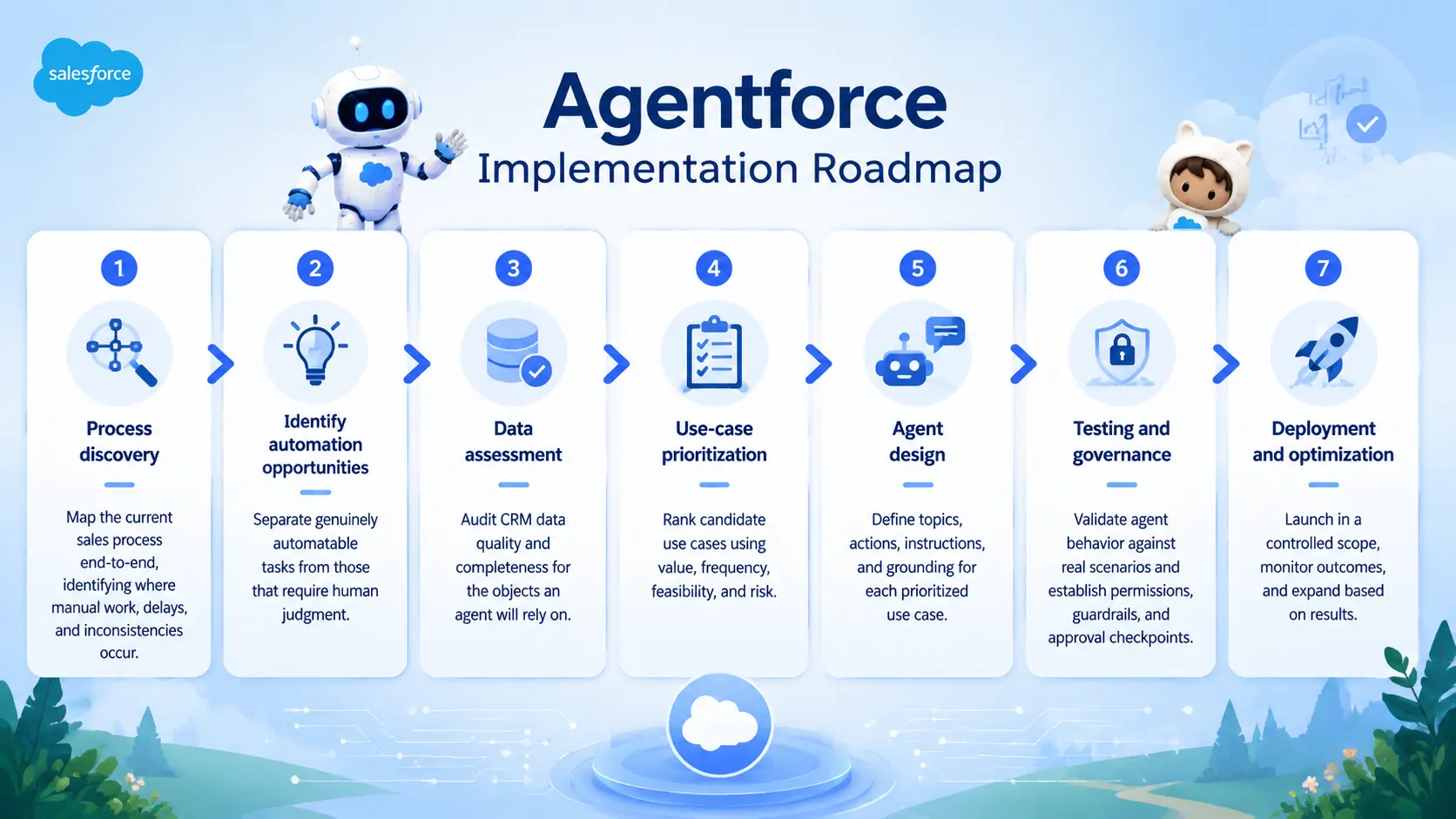
Agentforce Implementation Roadmap
- Process discovery — Map the current sales process end-to-end, identifying where manual work, delays, and inconsistencies occur.
- Identify automation opportunities — Separate genuinely automatable tasks from those that require human judgment.
- Data assessment — Audit CRM data quality and completeness for the objects an agent will rely on.
- Use-case prioritization — Rank candidate use cases using value, frequency, feasibility, and risk.
- Agent design — Define topics, actions, instructions, and grounding for each prioritized use case.
- Testing and governance — Validate agent behavior against real scenarios and establish permissions, guardrails, and approval checkpoints.
- Deployment and optimization — Launch in a controlled scope, monitor outcomes, and expand based on results.
Each stage builds on the one before it. Skipping data assessment or governance to move faster is one of the most common reasons implementations stall after launch rather than during it.
How to Measure Sales Automation ROI
| KPI | What It Measures |
|---|
| Lead response time | Time from lead capture to qualified follow-up |
| Lead qualification time | Time required to qualify a lead |
| Seller administrative time | Time reps spend on non-selling tasks |
| Follow-up completion rate | Percentage of leads or opportunities that receive timely follow-up |
| Opportunity velocity | Speed at which opportunities move through stages |
| CRM data completeness | Percentage of required fields accurately populated |
| Sales cycle length | Total time from lead to closed deal |
| Meeting conversion | Percentage of qualified leads converting to meetings |
| Pipeline coverage | Ratio of pipeline value to quota |
| Forecast quality | Accuracy of forecast versus actual results over time |
| User adoption | Percentage of reps actively using Agentforce-supported workflows |
ROI should be measured against the specific process being automated, not as a single blended number across the whole sales organization. A lead-qualification agent should be evaluated against qualification time and lead response time; an opportunity-summary agent should be evaluated against meeting prep time and manager visibility, not against overall revenue growth in isolation.
Future of Sales Automation
Sales automation is moving through a recognizable progression: CRM → Workflow Automation → AI Assistant → AI Agent → Agentic Sales Organization.
Looking ahead, several directions are reasonable to expect, though they remain predictions rather than current, universally available capabilities:
- More autonomous lead qualification, with less manual review required for routine cases
- AI-assisted prospecting, identifying and researching potential accounts at greater scale
- More sophisticated AI opportunity management, spanning more of the deal lifecycle
- Multi-agent workflows, where specialized agents coordinate across sales, service, and marketing
- More predictive sales intelligence, surfacing risk and opportunity earlier
- More personalized customer engagement, grounded in richer unified data
- AI-powered RevOps, extending automation into planning, compensation, and territory processes
These represent the likely direction of the technology, not commitments about specific timelines or guaranteed outcomes for any individual business.
External Authority Resources
Salesforce (product and platform)
Salesforce Trailhead (learning resources)
Gartner
McKinsey







 Salesforce ERP
 ERP + CRM Platform
  Inventory Management
  Warehouse Management
  Order Management
  Vendor Management
  Logistics Management
  BOM Management
  Order Fulfillment
  Business Operations
  SaaS Platform for Operations
  Salesforce Cloud ERP Platform
  Xero
Xero
 Zoho books
 Quickbooks
 Shopify
 Acumatica
 SAP
SAP
 Odoo
Odoo
 NetSuite
 Microsoft Dynamics 365
 Sage
Sage



 Agentforce Revenue Management
 Agentforce Revenue Management + Billing
  Salesforce CPQ
 Salesforce Advanced Billing
  Migrate from CPQ to ARM
  Managed Services
 Salesforce Implementation
 Revenue Cloud Implementation
 ServiceNow Consulting Services
 Zoho CRM implementation
 MuleSoft Integration
 Workato Integration
 Microsoft
 Data Cloud
 Tableau

 ·
August 11, 2026
·
23 min read
·
August 11, 2026
·
23 min read