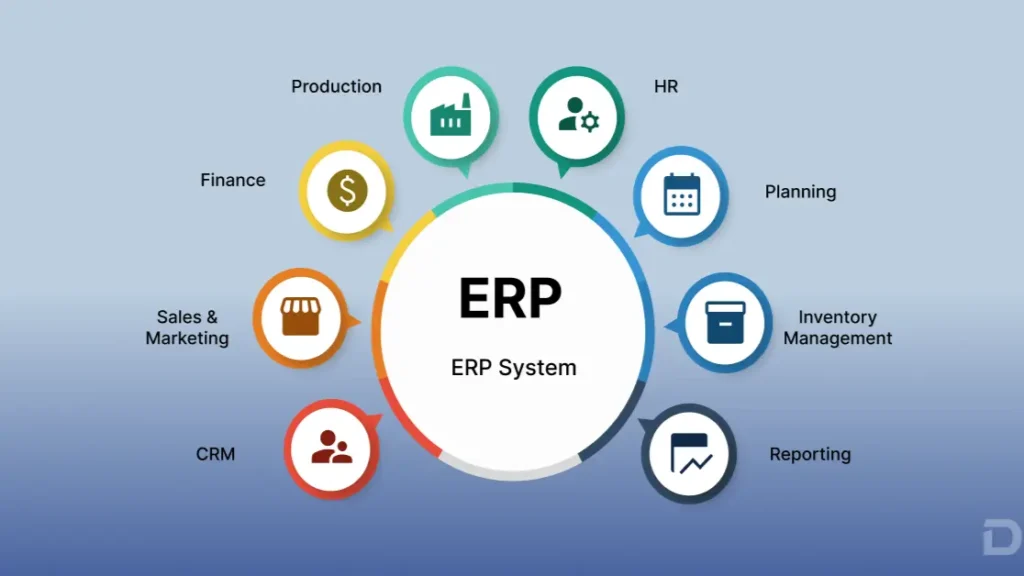
ERP stands for Enterprise Resource Planning — a category of software that connects and manages core business processes across an organization using a shared set of data. An ERP system brings together functions like finance, procurement, inventory, order management, manufacturing, and fulfillment into one unified environment, replacing the disconnected tools and spreadsheets that slow businesses down.
If your teams currently move information manually between different systems, spend significant time reconciling data, or struggle to get a clear view of operations in real time, ERP addresses exactly those challenges. This guide explains what ERP is, how it works, and why it matters — with specific context for businesses already using Salesforce as their CRM.
What Is ERP?
ERP (Enterprise Resource Planning) is software that helps organizations manage and connect their core business functions through a centralized data environment. Rather than running finance, purchasing, inventory, and sales operations in separate tools, an ERP system shares data across all of these functions, so every team works from the same information. The result is better coordination, reduced manual effort, and more consistent operational data across the business.
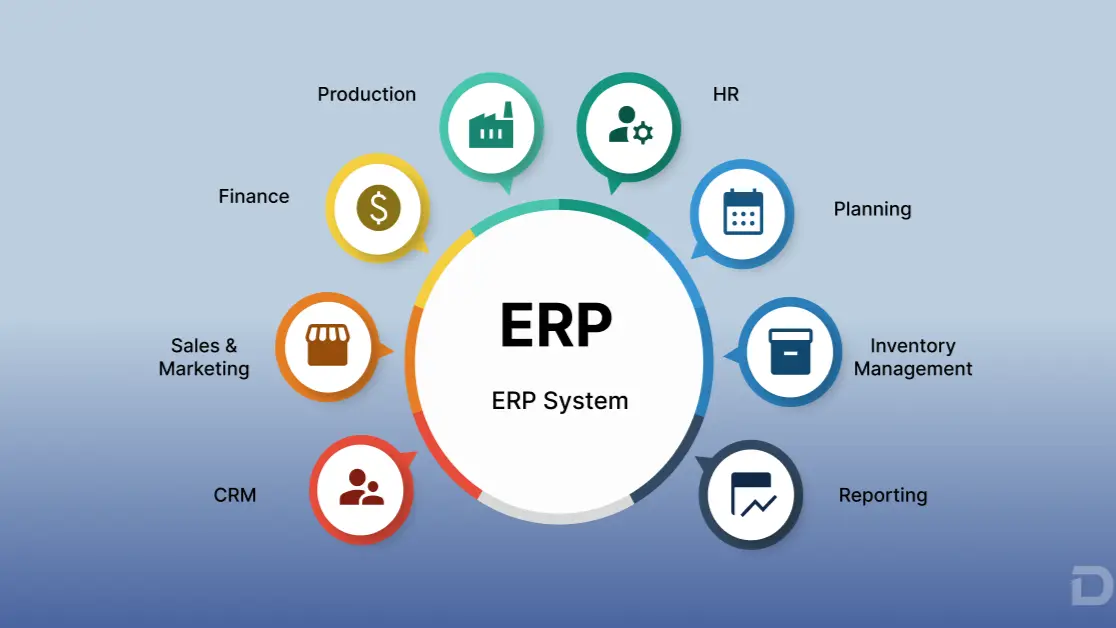
What Does ERP Stand For?
ERP stands for Enterprise Resource Planning.
- Enterprise refers to the organization itself — typically a company managing multiple business functions, departments, and processes.
- Resource refers to the assets a business manages: inventory, finances, people, suppliers, and production capacity.
- Planning refers to the ability to coordinate and optimize how those resources are allocated and used based on connected, real-time information.
Despite the name, ERP is not purely a planning tool. Modern ERP systems are operational platforms that manage day-to-day transactions, automate workflows, and provide the data visibility needed for business decisions.
What Is an ERP System?
An ERP system is a software platform that connects multiple departments and workflows through a shared data model. Instead of each department maintaining its own records, an ERP system allows information to flow between functions automatically.
For example, when a sales team creates a quote, an integrated ERP system can validate inventory availability, trigger a purchase order if stock is low, update warehouse operations when an order is confirmed, generate a shipping record when the order is fulfilled, and produce an invoice automatically when the shipment is complete — all without requiring employees to manually re-enter data at each stage.
This kind of connectivity is the defining characteristic of ERP. The system is not simply a collection of separate tools; it is a platform where data created in one area is immediately available to every connected function. According to Oracle’s ERP overview, ERP provides organizations with a suite of integrated applications that collect, store, manage, and interpret data from across the business.
How Does ERP Work?
ERP works by centralizing business data and automating the flow of information across connected processes. Here is a straightforward view of how a typical ERP workflow operates:
- Business data enters the system — through sales orders, purchase requests, inventory receipts, or financial transactions.
- Data is stored centrally — in a shared database that all authorized users and processes can access.
- Business processes use shared data — fulfillment teams see order details created by sales, finance teams see operational costs created by procurement, and so on.
- Workflows automate repetitive activities — approvals, notifications, stock replenishment alerts, and invoice generation can be automated based on defined business rules.
- Departments access relevant information — role-based access means each team sees the data relevant to their function.
- Reports and dashboards provide visibility — management can monitor performance across sales, operations, and finance in one place.
- Connected data supports decisions — rather than assembling reports from multiple sources, leaders work from a single, consistent data set.
A practical example: Quote → Order → Procurement → Inventory → Fulfillment → Invoice → Payment. In a business without ERP, each of these stages may involve a different system, a different spreadsheet, and a manual hand-off. ERP connects these stages so information flows automatically from one step to the next.
What Are the Main ERP Modules?
ERP systems are typically organized into modules, each of which manages a specific area of business operations. Most ERP platforms allow organizations to activate the modules relevant to their business model.
Finance and Accounting
The finance module manages invoices, payments, accounts receivable, accounts payable, general ledger, and financial reporting. It provides the financial visibility businesses need to track cash flow, recognize revenue, and maintain compliance. This module is central to most ERP implementations because operational activities — like fulfilling an order or receiving goods — generate financial transactions that need to be recorded accurately.
Procurement
The procurement module manages the purchasing process from vendor selection through purchase order creation, approval, receipt, and payment. It helps organizations control spending, maintain supplier relationships, and connect purchasing activity with inventory and financial data.
Inventory Management
Inventory management tracks stock levels, locations, movements, and availability in real time. It can support multi-location inventory, automated replenishment alerts, and demand forecasting — helping businesses avoid both overstocking and stockouts. IBM’s ERP resource guide notes that inventory management is one of the most commonly cited ERP functions for businesses moving away from spreadsheet-based tracking.
Order Management
Order management handles the capture, processing, and tracking of customer orders across channels. It connects the moment a customer places an order with the downstream processes needed to fulfill it — including inventory allocation, warehouse picking, shipment, and invoicing.
Supply Chain Management
Supply chain functions within ERP help organizations manage the flow of goods and information from suppliers through to customers. This includes vendor management, inbound logistics, and coordination between procurement and fulfillment.
Manufacturing
Manufacturing ERP modules manage production planning, work orders, bills of materials (BOM), production batches, work-in-progress tracking, and finished goods. They help manufacturers connect raw material procurement with production scheduling and finished goods fulfillment.
Warehouse and Fulfillment
Warehouse management within ERP covers bin and space allocation, inbound and outbound workflows, pick-pack-ship operations, and inventory transfers. Connected warehouse operations reduce fulfillment errors and improve delivery speed.
Reporting and Analytics
Reporting and analytics modules provide dashboards, custom reports, and operational metrics across all connected ERP functions. When data from sales, procurement, inventory, and finance is centralized, organizations can produce reports that reflect the actual state of the business rather than assembled estimates from multiple sources.
What Are the Key Features of ERP Software?
| ERP Feature | What It Does |
|---|
| Centralized Data | Connects business information across departments |
| Workflow Automation | Automates repetitive processes and approvals |
| Financial Management | Tracks invoices, payments, and financial operations |
| Inventory Management | Provides real-time inventory visibility |
| Procurement | Manages vendor and purchasing workflows |
| Order Management | Tracks orders from creation to fulfillment |
| Reporting & Analytics | Provides operational and financial insights |
| Role-Based Access | Gives users access appropriate to their function |
| Integrations | Connects ERP with other business platforms |
| Scalability | Supports growing transaction volumes and complexity |
What Are the Benefits of ERP?
ERP can deliver meaningful operational improvements when implemented thoughtfully. The specific benefits any organization experiences will depend on their business model, implementation quality, and how consistently teams adopt the system.
Better Data Visibility
When business information is stored across multiple disconnected systems, it is difficult to get a clear picture of operations. ERP can help reduce data silos by bringing operational and financial information into one environment, making it easier for teams to access consistent, up-to-date data.
Process Automation
Many businesses rely on manual effort to move information between systems — entering order details into inventory, copying invoice data into accounting, or updating spreadsheets after purchases are made. ERP can automate these hand-offs, reducing the time teams spend on repetitive data entry.
Improved Operational Coordination
When sales, procurement, operations, and finance teams work from shared data, coordination between departments can improve. A fulfillment team that can see confirmed orders in real time, or a procurement team that can see inventory levels automatically, is better positioned to act without waiting for manual updates.
Better Inventory Visibility
Inventory data that lags behind reality leads to stockouts, over-ordering, and fulfillment delays. ERP systems that manage inventory in real time can give businesses a more accurate view of what is in stock, where it is, and when it needs to be replenished.
More Connected Financial and Operational Data
One of the most significant limitations of disconnected systems is that financial data and operational data are managed separately. ERP can connect these, so that events like receiving goods, shipping orders, or issuing invoices are reflected in financial records automatically — supporting faster month-end close and more reliable reporting.
Improved Reporting
When data is centralized, reporting becomes more straightforward. Instead of consolidating figures from multiple spreadsheets or exports, managers can access reports that draw from a single, consistent data set.
Scalability
As businesses grow, operational complexity typically increases. More orders, more suppliers, more inventory, more customers. ERP systems are designed to handle increasing transaction volumes without requiring a corresponding increase in administrative headcount.
What Are the Different Types of ERP?
On-Premises ERP
On-premises ERP software is installed and run on an organization’s own servers. The business is responsible for infrastructure, maintenance, security patching, and upgrades. On-premises ERP offers control over the system environment but typically requires significant upfront investment and internal IT capability to maintain.
Cloud ERP
Cloud ERP is hosted and maintained by the software vendor or a cloud infrastructure provider. Organizations access the system over the internet, typically through a subscription model. Cloud ERP generally reduces infrastructure costs and simplifies upgrades, and is increasingly the default choice for growing businesses. Microsoft’s cloud ERP resources note that cloud deployment has become the standard approach for most new ERP implementations.
Hybrid ERP
Some organizations operate a mix of on-premises and cloud-based ERP components. This is common in businesses that have legacy on-premises systems they cannot immediately migrate, alongside newer cloud-based applications. Hybrid models introduce integration complexity but can allow organizations to modernize incrementally.
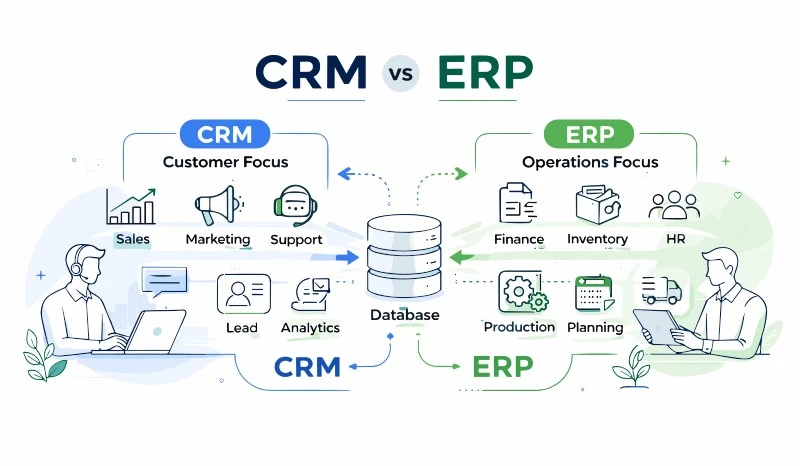
ERP vs CRM: What Is the Difference?
This distinction matters particularly for businesses that already use Salesforce.
| Area | CRM | ERP |
|---|
| Primary purpose | Customer relationships | Business operations |
| Main focus | Front-office/customer-facing | Operational/back-office processes |
| Sales | Core function | Often connected to order processes |
| Customer service | Core function | Supporting operational context |
| Finance | Limited in most CRM tools | Core ERP function |
| Inventory | Usually limited | Core ERP capability |
| Procurement | Usually limited | Core ERP capability |
| Manufacturing | Usually limited | Common ERP capability |
| Order management | May support parts of the process | Core ERP capability |
CRM and ERP are complementary systems, not interchangeable ones. CRM — like Salesforce — manages the customer relationship: leads, opportunities, accounts, contacts, cases, and communications. ERP manages the operational processes that happen after a customer relationship results in a transaction: fulfillment, inventory, procurement, manufacturing, finance, and reporting.
A business that uses Salesforce as its CRM but manages inventory in a spreadsheet, purchasing through email, and finance in a separate accounting tool is experiencing the gap that ERP is designed to fill.
Is Salesforce an ERP?
Salesforce is fundamentally a CRM and customer success platform. Salesforce itself describes its core platform as a customer relationship management system — designed to manage sales pipelines, customer service, marketing, and customer data.
Traditional ERP, by contrast, focuses on operational and financial processes: procurement, inventory, manufacturing, fulfillment, and financial management. These are different capabilities from what a CRM system is architected to deliver.
That said, the line between CRM and ERP has become less rigid as platform ecosystems have expanded. The more relevant question for Salesforce users is not whether Salesforce is an ERP, but whether ERP capabilities can be built natively on the Salesforce platform — bringing operational processes into the same environment where customer data already lives.
What Is a Salesforce-Native ERP?
A Salesforce-native ERP is an ERP solution built entirely on the Salesforce platform — not a separate system integrated via API, but a product that runs within the Salesforce environment using Salesforce data structures, security models, and infrastructure.
For businesses already using Salesforce as their CRM, a Salesforce-native ERP approach offers meaningful advantages:
- Operational workflows live in the same platform as customer data
- Sales orders created from CRM opportunities flow directly into fulfillment processes
- Inventory, procurement, and finance data is visible alongside customer and pipeline data
- Users work in a single environment rather than switching between systems
- There is no separate system to integrate, maintain, or synchronize with Salesforce
It is important to note that capabilities vary by product. Not every Salesforce-native ERP solution covers every ERP function, and organizations should evaluate specific capabilities against their business requirements.
Cloudy Business Ops 360: ERP for Salesforce Users
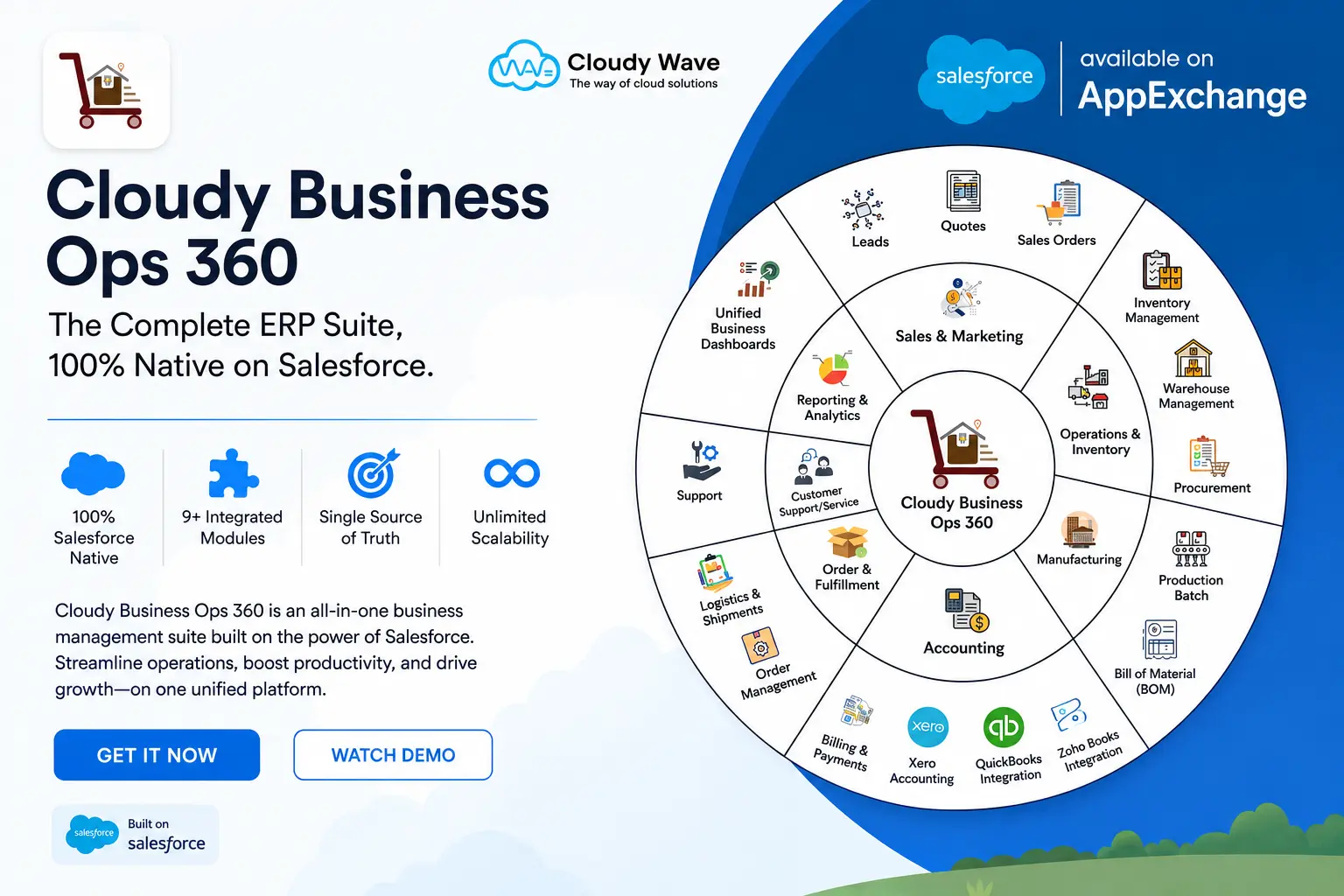
Cloudy Business Ops 360 is a Salesforce-native business operations suite designed for organizations that want to manage connected operational processes directly within Salesforce. Rather than integrating a separate ERP with Salesforce, Cloudy Business Ops 360 brings ERP-style capabilities into the Salesforce platform itself.
The product is structured around nine integrated modules covering:
- Sales & CPQ — guided selling, pricing, discounts, approvals, and one-click quote-to-order
- Order Management — multi-channel order capture, partial shipments, backorders, and fulfillment tracking
- Inventory Management — real-time stock tracking, multi-location visibility, and demand forecasting
- Procurement & Manufacturing — vendor management, purchase orders, bills of materials, work orders, and production batches
- Warehouse Management — bin and space allocation, pick-pack-ship workflows, and inventory transfers
- Billing & Finance — automated invoice creation, tax compliance, payment allocation, and multi-currency support
- Logistics & Shipments — end-to-end shipment tracking, carrier allocation, and returns management
- Analytics & Reporting — real-time dashboards, sales and fulfillment metrics, and financial insights
- Accounting Integrations — native connections to Xero, QuickBooks, and Zoho Books
The operational flow this enables looks like: Quote → Procure → Fulfill → Collect — all within the same Salesforce environment where your customer relationships already live.
For Salesforce users managing operations across disconnected spreadsheets or multiple standalone applications, Cloudy Business Ops 360 provides a path to consolidate those processes without leaving the Salesforce platform.
Want to explore a Salesforce-native ERP approach? Explore Cloudy Business Ops 360 or request a demo.
When Does a Business Need an ERP?
Common signs that a business may benefit from ERP software:
- ✅ Multiple disconnected systems managing different parts of operations
- ✅ Heavy reliance on spreadsheets to track inventory, orders, or procurement
- ✅ Teams spending significant time re-entering data between systems
- ✅ Limited or delayed visibility into inventory availability
- ✅ Manual procurement processes without clear approval workflows
- ✅ Difficulty tracking orders from creation through to delivery
- ✅ Finance and operations data that cannot easily be reconciled
- ✅ No real-time view of operational performance
- ✅ Growing order volumes that current systems struggle to handle
- ✅ Complex fulfillment requirements that spreadsheets cannot support
- ✅ Difficulty understanding the operational status of customer orders
If several of these apply to your business, ERP — or ERP capabilities within your existing Salesforce platform — may be worth evaluating.
How Does ERP Integrate With Salesforce?
For Salesforce users, ERP typically enters the picture in one of two ways.
ERP integrated with Salesforce means a separate ERP system — like SAP, Oracle NetSuite, or Microsoft Dynamics — is connected to Salesforce via API or middleware. Data passes between the two platforms based on integration rules. This approach can work, but it introduces integration complexity, synchronization delays, and ongoing maintenance requirements.
ERP capabilities built natively on Salesforce means operational functions run within the Salesforce platform directly, using the same data model, security framework, and user interface that Salesforce administrators and users already know.
The native approach can simplify the technology stack for businesses that are already committed to Salesforce, reducing the number of systems that need to be maintained and integrated. Cloudy Business Ops 360 is built on this native model: Salesforce CRM → Quote → Order → Inventory → Procurement → Fulfillment → Billing → Finance, all within one platform.
How to Choose the Right ERP Software
When evaluating ERP solutions, consider these factors in sequence:
- Business requirements — document the specific processes that need to be supported
- Industry requirements — some industries have specific compliance, traceability, or operational needs
- Required ERP modules — identify which functional areas matter most for your business model
- Salesforce compatibility — if you use Salesforce, evaluate whether native or integrated ERP fits better
- Native vs integrated architecture — understand the trade-offs for your team and IT capacity
- Data model — how does the ERP store and structure your operational data?
- Workflow automation — what processes can be automated, and how configurable are they?
- Scalability — can the system handle your expected growth in transactions and complexity?
- Reporting and analytics — what visibility does the system provide out of the box?
- Security and permissions — how does the system control access by role and function?
- Implementation requirements — what is needed to deploy the system successfully?
- Total cost of ownership — include licensing, implementation, training, and ongoing administration
- Vendor support — what level of support is available and how is it delivered?
- Migration requirements — how will existing data be moved into the new system?
ERP Implementation: What Businesses Should Expect
Implementing ERP is a business change initiative as much as a technology project. Organizations that plan implementation carefully tend to get better results. A typical ERP implementation follows these stages:
- Business process discovery — document current workflows and identify gaps
- Requirements definition — specify what the ERP system needs to support
- Solution design — configure the system to match business requirements
- Data preparation — clean, structure, and prepare existing data for migration
- Configuration/customization — set up modules, workflows, and rules
- Integration — connect ERP with any remaining external systems
- Testing — validate that the system behaves correctly across scenarios
- User training — ensure teams understand how to use the new system
- Deployment — go live with the new system
- Continuous optimization — refine processes and configurations based on real-world use
Implementation complexity varies significantly by business size, data volume, and the number of modules being deployed. For Salesforce-native ERP solutions, implementation can be more straightforward because the underlying platform is already familiar to administrators and users.
The Future of ERP
ERP is evolving alongside the broader shift toward cloud infrastructure, AI-assisted workflows, and real-time operational data. Key directions include:
- Cloud ERP as the default deployment model, reducing infrastructure overhead
- AI-assisted workflows that can surface anomalies, suggest actions, and automate decisions
- Business process automation that reduces manual effort across procurement, fulfillment, and finance
- Real-time analytics embedded directly in operational workflows rather than accessed through separate BI tools
- Connected CRM and ERP as platform ecosystems converge and the boundary between customer-facing and operational systems becomes less defined
- Industry-specific ERP tailored to the needs of manufacturing, distribution, healthcare, and other verticals
- Mobile access enabling field teams and warehouse staff to interact with ERP data from any device
- Unified business data as organizations move toward platforms that manage both customer and operational information in one place
Conclusion
ERP — Enterprise Resource Planning — is software that connects the operational and financial functions of a business through shared data and automated workflows. Where a CRM like Salesforce manages the customer relationship, ERP manages what happens next: the procurement, inventory, fulfillment, manufacturing, and finance processes that turn customer transactions into delivered products and recognized revenue.
For businesses already running on Salesforce, the question is not simply whether to add an ERP, but what approach fits best. A Salesforce-native ERP brings operational capabilities into the same platform environment where your customer data lives — reducing integration overhead and giving sales, operations, and finance teams a more connected view of the business.
If your business already runs on Salesforce and you’re looking to connect sales with inventory, procurement, fulfillment, finance, and other operational processes, Cloudy Business Ops 360 provides a Salesforce-native approach to ERP — built to help product-moving businesses manage end-to-end operations without leaving Salesforce.







 Salesforce ERP
 ERP + CRM Platform
  Inventory Management
  Warehouse Management
  Order Management
  Vendor Management
  Logistics Management
  BOM Management
  Order Fulfillment
  Business Operations
  SaaS Platform for Operations
  Salesforce Cloud ERP Platform
  Xero
Xero
 Zoho books
 Quickbooks
 Shopify
 Acumatica
 SAP
SAP
 Odoo
Odoo
 NetSuite
 Microsoft Dynamics 365
 Sage
Sage



 Agentforce Revenue Management
 Agentforce Revenue Management + Billing
  Salesforce CPQ
 Salesforce Advanced Billing
  Migrate from CPQ to ARM
  Managed Services
 Salesforce Implementation
 Revenue Cloud Implementation
 ServiceNow Consulting Services
 MuleSoft Integration
 Workato Integration
 Microsoft
 Data Cloud
 Tableau

 ·
September 16, 2026
·
17 min read
·
September 16, 2026
·
17 min read