Salesforce Revenue Cloud (increasingly referenced in newer release notes as Agentforce Revenue Management, though “Revenue Cloud” remains the common working name across most orgs and documentation) is built differently from classic Salesforce clouds. Instead of exposing only record-level CRUD operations, it exposes business capabilities — pricing, product discovery, configuration, usage tracking — as first-class API surfaces. That distinction is the reason this guide exists.
If you’ve spent time inside standard Salesforce REST or SObject APIs, you’re used to reading and writing individual records: query an Opportunity, update a Quote Line, insert a Product2. Revenue Cloud adds a second layer on top of that: Business APIs and Standard Invocable Actions that encapsulate multi-step business processes — like “price this quote,” “search this catalog,” or “configure this bundle” — behind a single callable interface.
Understanding when to reach for a Business API versus an Invocable Action, and how the two compose into a coherent architecture, is one of the more consequential decisions a Revenue Cloud implementation team makes. Get it wrong and you end up rebuilding pricing logic in middleware. Get it right and you get a system that’s scalable, testable, and upgrade-safe.
This guide covers:
- What Business APIs and Invocable Actions are, and how they differ from record-level APIs
- All seven core Business API capability areas in Revenue Cloud
- The four major categories of Standard Invocable Actions
- A side-by-side comparison and decision framework
- A full architecture walkthrough from catalog to orchestration
- Three real-world implementation scenarios across SaaS, telecom, and manufacturing
What Are Salesforce Business APIs?
Salesforce Business APIs are composite, business-capability-level REST interfaces that expose Revenue Cloud processes — such as product discovery, pricing, configuration, and usage tracking — to external applications and integrations without requiring those systems to reimplement the underlying logic.
Unlike record-level APIs, which operate on individual objects, Business APIs typically orchestrate several objects, rules, and calculations in a single call. A single call to a pricing Business API, for example, can evaluate price books, discount schedules, and pricing procedures in one round trip rather than requiring the caller to query and interpret each piece independently.
Record-Level APIs vs. Business-Capability APIs
| Aspect |
Record-Level APIs (SObject/REST) |
Business APIs |
| Unit of work |
Single object/record |
Business process or capability |
| Logic ownership |
Caller must implement business logic |
Salesforce owns and executes the logic |
| Example |
PATCH /sobjects/Product2/{id} |
POST /connect/pcm/search |
| Typical caller |
Internal automation, data sync |
eCommerce, partner portals, middleware |
| Coupling to data model |
Tight — caller must understand schema |
Loose — caller sends business intent |
What Are Salesforce Invocable Actions?
Salesforce Invocable Actions are reusable, declaratively callable units of business logic that can be invoked from Salesforce Flow, Apex, or external systems through the Actions REST resource — without writing custom Apex for each use case.
Standard Invocable Actions ship pre-built for common Revenue Cloud operations: pricing a transaction, refreshing a decision table, converting a quote to an order, or applying rate adjustments. Where Business APIs are typically consumed by external systems and integration middleware, Invocable Actions are the primary mechanism for declarative, in-platform automation — Flow-first, Apex-accessible, and exposable externally when needed.
What Is the Difference Between Business APIs and Invocable Actions?
The short answer: Business APIs are designed for external, API-first consumption; Invocable Actions are designed for declarative automation inside Salesforce that can also be exposed externally. Both sit on top of the same underlying business logic, so they don’t compete — they cover different entry points into that logic. A full comparison is below in Section 5.
Business APIs and Product Catalog Management
What It Is
Product Catalog Management (PCM) Business APIs serve catalog definitions — products, categories, classifications, bundles, and attributes — to applications that need to render or query the catalog without querying raw Salesforce objects directly.
Why It Matters
Most commerce and self-service experiences (storefronts, partner portals, quoting tools) need catalog data shaped for display and search, not raw relational records. PCM Business APIs return that shape directly, which removes an entire translation layer that teams would otherwise build and maintain in middleware.
Developer Use Cases
- Powering an external eCommerce storefront’s product listing pages from live Salesforce catalog data
- Feeding a partner portal with region- or channel-specific product visibility
- Synchronizing catalog metadata to a headless commerce frontend on a schedule
- Validating product availability before initiating a configuration or quoting flow
Architecture
External Application → Product Catalog Management Business API → Revenue Cloud Catalog Data (Product2, ProductCatalog, ProductCategory) → Response Payload
Technical Benefits
- Reusability across storefront, portal, and internal tooling without duplicating catalog logic
- Reduced custom code, since catalog traversal and hierarchy logic live in the platform
- Centralized business logic — one source of truth for what’s sellable, where, and to whom
- Security enforced through standard Salesforce sharing and field-level security on catalog objects
Example
A manufacturer exposes its Salesforce-managed catalog to a dealer portal built on a separate frontend framework. Instead of replicating catalog data into a separate database, the portal calls the PCM Business API on demand, guaranteeing dealers always see current pricing eligibility and product availability.
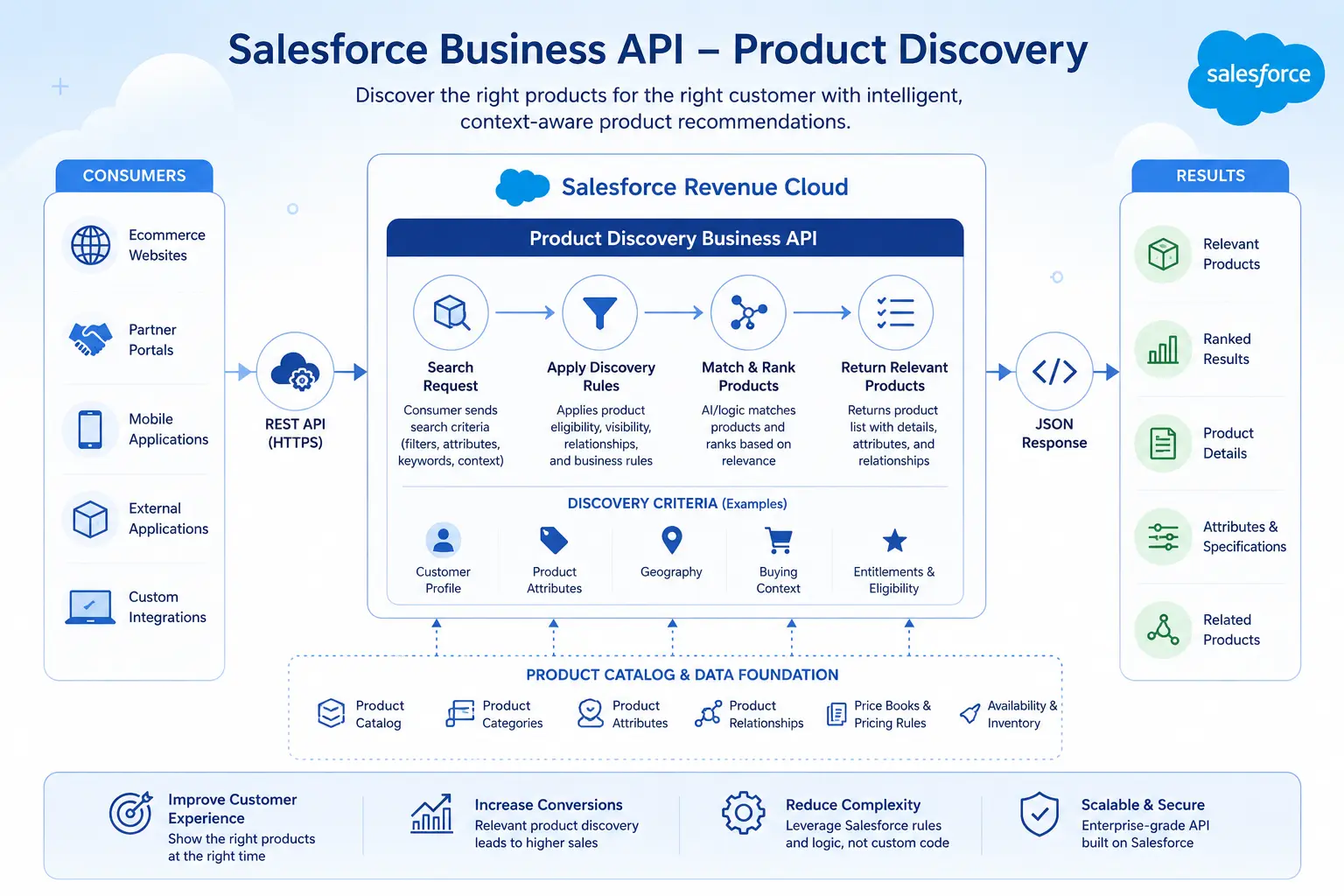
Business APIs and Product Discovery
What It Is
Product Discovery Business APIs are composite APIs used to search products and discover catalogs, categories, and products during a browsing or shopping experience — supporting faceted search and filtering.
Why It Matters
Discovery is a distinct problem from catalog storage: it needs ranking, filtering, and search-index behavior rather than simple object retrieval. Handling it as a dedicated Business API means search performance and relevance tuning happen at the platform layer instead of inside custom integration code.
Developer Use Cases
- Implementing faceted search (by attribute, category, price range) on a commerce frontend
- Powering autocomplete/typeahead search in a sales rep’s quoting tool
- Building category-browsing navigation for a partner-facing catalog
- Supporting agent-assisted product search inside a service console
Architecture
External Application → Product Discovery Business API (Composite) → Search Index / Catalog Data → Ranked Results
Technical Benefits
- Performance, since discovery queries run against optimized indexes rather than ad hoc SOQL
- Scalability for high-volume browsing traffic from external storefronts
- Maintainability, because facet and ranking logic is centralized rather than duplicated per integration
Example
A SaaS vendor’s self-serve upgrade page calls the Product Discovery API to let existing customers filter add-on modules by category and compatibility before initiating a configuration flow.
Business APIs and Salesforce Pricing
What It Is
Salesforce Pricing Business APIs perform pricing requests, create pricing context instances, synchronize pricing data, and manage pricing recipes and pricing waterfall details — returning calculated prices based on price books, discount schedules, and configured pricing procedures.
Why It Matters
Pricing logic in enterprise B2B and usage-based businesses is rarely a flat lookup — it involves tiered discounts, contract-specific overrides, and multi-step waterfalls. Exposing this as a Business API means every channel (direct sales, self-service, partner) prices consistently, using the same rules engine.
Developer Use Cases
- Returning a real-time quote price from an external CPQ-adjacent tool
- Recalculating price on quote line changes triggered from a custom UI
- Synchronizing external ERP-sourced cost or margin data into pricing calculations
- Running “what-if” pricing scenarios from a deal-desk application
Architecture
Sales Application / Flow → Pricing Business API → Pricing Procedures & Price Waterfall → Calculated Price Response
Technical Benefits
- Consistency across every channel that touches price
- Automation of multi-step discount and waterfall calculations
- Centralized business logic, avoiding pricing drift between systems
- Note: exact pricing endpoints, request/response payload structures, and pricing recipe capabilities evolve by release — verify against current Salesforce Revenue Cloud documentation before implementation.
Example
A telecom provider’s self-service portal calls the Pricing Business API to show a customer their updated monthly cost in real time as they add a line or change a plan tier.
Business APIs and Rate Management
What It Is
Rate Management Business APIs manage rate cards and rate adjustments used to price usage-based and consumption-driven products — supporting tiered, volume, and overage-based rate structures.
Why It Matters
Usage-based and consumption pricing models (common in SaaS, telecom, and IoT) require rates that can vary by tier, geography, or contract, and that need to be evaluated at scale as usage events flow in. Rate Management Business APIs centralize that logic instead of leaving it to custom Apex triggers.
Developer Use Cases
- Retrieving the applicable rate card for a customer’s active usage-based subscription
- Applying negotiated rate overrides for enterprise contracts
- Supporting rate lookups for billing systems calculating overage charges
- Validating rate eligibility before activating a new usage-based product
Architecture
Usage Event / Billing System → Rate Management Business API → Rate Card & Adjustment Rules → Applicable Rate Response
Technical Benefits
- Scalability for high-volume rate lookups tied to metered usage
- Reduced custom code for tiered/volume rate logic
- Integration friendliness with external billing and mediation systems
Example
An IoT platform meters device data usage and calls the Rate Management Business API to determine which pricing tier applies before passing the calculated charge to its billing system.
Business APIs and Usage Management
What It Is
Usage Management Business APIs support usage-based pricing by managing usage tracking, entitlement grants, consumption aggregation, and commitment drawdowns for subscription products tied to metered consumption.
Why It Matters
Usage-based billing depends on accurately tracking what a customer has consumed against what they’re entitled to, in near real time. Doing this reliably at scale requires purpose-built aggregation and entitlement logic — not ad hoc record updates.
Developer Use Cases
- Recording metered consumption events against a customer’s usage entitlement
- Checking remaining entitlement balance before authorizing additional usage
- Aggregating usage across a billing period ahead of invoice generation
- Triggering alerts when a customer approaches a usage threshold
Architecture
Metering System → Usage Management Business API → Usage Entitlement & Aggregation Objects → Updated Consumption Balance
Technical Benefits
- Automation of consumption tracking without custom aggregation jobs
- Performance at high event volumes typical of API- or IoT-driven usage
- Centralized business logic for entitlement drawdown rules shared across billing and CS teams
Example
A cloud infrastructure company streams API call volume into Salesforce, where the Usage Management Business API updates each customer’s remaining entitlement and flags accounts nearing their contracted cap.
Business APIs and the Product Configurator
What It Is
Product Configurator Business APIs let applications customize a product or bundle according to business-specific rules — validating attribute selections, component combinations, and constraints, often using Constraint Modeling Language (CML) to define rules declaratively.
Why It Matters
Complex, bundled, or highly configurable products (think laptops with processor/memory/OS/support-plan combinations) need rule validation that can’t be hardcoded per channel. Exposing configuration as a Business API keeps rule logic in one governed place, whether the customer configures a product on a storefront or a rep configures it inside Salesforce.
Developer Use Cases
- Validating a customer-selected bundle configuration on an external storefront
- Preventing invalid attribute combinations (e.g., an incompatible OS/support-plan pairing)
- Powering guided-selling flows for complex B2B product bundles
- Pre-validating configurations before they’re passed into quoting
Architecture
Storefront / Guided Selling UI → Product Configurator Business API → Constraint Rules (CML) → Valid Configuration Response
Technical Benefits
- Reusability of configuration rules across every sales channel
- Reduced custom code, since constraint logic is declarative rather than hand-coded
- Maintainability, since rule changes are made once and apply everywhere
Example
A manufacturing company configures industrial equipment with dozens of interdependent options; the Configurator Business API prevents a dealer from submitting an invalid configuration before it ever reaches a quote.
Business APIs and Quote and Order Capture
What It Is
Quote and Order Capture APIs handle the creation and management of quotes and orders — including line items, configuration results, and pricing outputs — as structured transactional records ready for approval, contracting, and fulfillment.
Why It Matters
Quote and order capture is the point where product, pricing, and configuration outputs become a committed transaction. Exposing this as an API lets external systems (a storefront checkout, a partner deal desk) generate valid quotes and orders without manually assembling every underlying object relationship.
Developer Use Cases
- Generating a quote from a validated configuration and calculated price
- Converting an approved quote into an order programmatically
- Capturing order details from an external checkout experience
- Supporting renewal or amendment orders from an external billing system
Architecture
Configuration + Pricing Output → Quote and Order Capture Business API → Quote/Order Records → Downstream Fulfillment
Technical Benefits
- Automation of transaction creation across channels
- Integration with approval workflows and contracting processes
- Reduced custom code for assembling quote/order line relationships
Example
A SaaS company’s self-service upgrade flow calls the Quote and Order Capture API to generate and submit an order the moment a customer confirms a plan change, without a rep touching the transaction.
Standard Invocable Actions for Pricing
What It Is
Pricing Standard Invocable Actions expose pricing calculations — including standard and “headless” pricing scenarios — as reusable actions callable from Flow, Apex, or the Actions REST resource.
Developer Use Cases
- Triggering a price recalculation from a Record-Triggered Flow when a quote line changes
- Running headless pricing from a batch Apex job for bulk quote updates
- Calling the pricing action from a Screen Flow during guided selling
Architecture
Salesforce Flow → Pricing Invocable Action → Pricing Procedures → Updated Price on Record
Technical Benefits
Declarative reusability, reduced dependency on custom Apex for pricing triggers, and consistent pricing behavior whether invoked from automation or from a UI action.
Standard Invocable Actions for Rate Management
What It Is
Rate Management Standard Invocable Actions apply or refresh rate-related calculations — for example, recalculating applicable rates when usage-based product configurations change — from Flow or Apex.
Developer Use Cases
- Refreshing rate assignments after a contract amendment
- Triggering rate recalculation when a usage-based product’s tier changes
- Automating rate validation as part of an order activation flow
Architecture
Flow / Apex → Rate Management Invocable Action → Rate Card Evaluation → Updated Rate Assignment
Standard Invocable Actions for Usage Management
What It Is
Usage Management Standard Invocable Actions automate usage-related processes — such as recording consumption or checking entitlement balances — as callable actions within declarative automation.
Developer Use Cases
- Automatically decrementing entitlement balances via a Platform Event-triggered Flow
- Validating remaining usage entitlement before allowing a service action to proceed
- Automating usage threshold alerts through Flow
Architecture
Platform Event (Usage Recorded) → Usage Management Invocable Action → Entitlement Update → Notification/Downstream Action
Standard Invocable Actions for Dynamic Revenue Orchestrator
What It Is
Dynamic Revenue Orchestrator Standard Invocable Actions automate post-sale order processing — coordinating tasks like fulfillment tracking, ramp deal handling, and order change management as orders move through their lifecycle.
Developer Use Cases
- Automating fulfillment task creation when an order is activated
- Managing ramp deal schedules and phased order changes
- Triggering downstream billing or provisioning actions after order activation
Architecture
Order Activation → Dynamic Revenue Orchestrator Invocable Action → Fulfillment Tasks / Billing Schedule → Order Lifecycle Update
Technical Benefits
Centralizes what would otherwise be scattered post-sale automation into a governed, upgrade-safe action layer, and reduces the amount of custom Apex needed to manage complex order lifecycles.
Exact action names, parameters, and lifecycle stages for Dynamic Revenue Orchestrator should be verified against current Salesforce Revenue Cloud documentation, as this is an actively evolving capability.
Business APIs vs. Standard Invocable Actions
| Area | Business APIs | Standard Invocable Actions |
|---|
| Primary purpose | Expose business capabilities to external systems via REST | Provide reusable, declarative automation inside Salesforce |
| Typical consumer | External applications, storefronts, portals, middleware | Flow, Apex, internal automation |
| External integrations | Native — designed for external callers | Possible via Actions REST resource, but not the primary use case |
| Salesforce Flow | Not directly invoked from Flow | Directly invocable from Flow (Screen, Record-Triggered, Scheduled) |
| Custom applications | Well suited — headless, API-first | Less suited unless exposed as an external action endpoint |
| Middleware | Common integration point | Occasionally used, less common |
| Automation | Requires orchestration by the calling system | Native declarative automation building block |
| Apex requirement | Optional — can be called directly via REST | Optional — callable from Apex, not required |
| Best use case | Storefronts, partner portals, external system integration | In-platform automation, guided processes, Flow-based orchestration |
When Should Developers Use Business APIs vs. Invocable Actions?
Use Business APIs when the calling system lives outside Salesforce and needs headless, stateless access to a business capability — a storefront checking price, a portal searching the catalog, an ERP syncing usage data. Use Invocable Actions when the automation lives inside Salesforce and benefits from declarative reuse — a Flow that reprices a quote on line-item change, or a scheduled Flow that refreshes rate assignments.
In practice, well-architected Revenue Cloud implementations use both: Business APIs at the integration boundary, Invocable Actions inside declarative automation, both calling down into the same underlying business logic. Avoid rebuilding pricing, configuration, or rating logic in middleware or custom Apex when a Business API or Invocable Action already exposes it — that’s the core efficiency the API-first architecture is designed to deliver.
Designing a Salesforce Revenue Cloud API Architecture
A Revenue Cloud implementation generally moves through a layered sequence of business capabilities:
Product Catalog → Product Discovery → Product Configuration → Pricing → Rate Management → Quote Capture → Order Capture → Usage Management → Revenue Orchestration
Real-World Implementation Examples
SaaS: Product Catalog + Subscription Pricing + Usage-Based Billing
A B2B SaaS company sells tiered subscription plans plus metered API usage. The Product Catalog Business API defines base plans and add-ons; the Pricing Business API calculates the recurring subscription charge; Usage Management Business APIs track API call volume against each customer’s entitlement; and Rate Management applies overage rates once a customer exceeds their included allotment. When usage crosses a threshold, a Usage Management Invocable Action fires inside a Flow to notify the customer and, optionally, auto-upgrade their plan through the Quote and Order Capture API.
Telecommunications: Product Configuration + Rate Management + Usage Management
A telecom provider sells configurable mobile plans — data allotments, add-on lines, international roaming packs. The Product Configurator Business API validates plan and add-on combinations using CML-defined constraints (for example, preventing incompatible roaming and data-cap combinations). Rate Management Business APIs determine the applicable per-GB overage rate by plan tier, while Usage Management tracks real-time data consumption. A Rate Management Invocable Action refreshes rate assignments automatically whenever a customer changes plans mid-cycle.
Manufacturing: Product Catalog + Configuration + Pricing + Quote/Order Capture
An industrial equipment manufacturer sells highly configurable machinery through a dealer network. Dealers browse the Product Catalog via Business APIs on a partner portal, use the Product Configurator Business API to assemble valid equipment configurations (respecting component compatibility rules), and receive real-time pricing through the Pricing Business API reflecting dealer-specific discount tiers. Once configured and priced, the Quote and Order Capture API generates a formal quote for the dealer to submit for approval — all without a manufacturer rep manually assembling the transaction.
External Authoritative References
Final
Building a Revenue Cloud architecture that actually holds up — across pricing, configuration, usage management, and every external integration point — takes more than reading the developer docs. Cloudy Wave is a Salesforce consulting and implementation partner that helps teams design Business API and Invocable Action architectures that scale: from initial product catalog modeling through pricing automation, usage-based billing, and full Revenue Cloud integration. If your organization is planning a Revenue Cloud implementation, modernizing away from CPQ, or connecting external systems to Salesforce’s revenue engine, Cloudy Wave can help you get the architecture right the first time.







 Salesforce ERP
 ERP + CRM Platform
  Inventory Management
  Warehouse Management
  Order Management
  Vendor Management
  Logistics Management
  BOM Management
  Order Fulfillment
  Business Operations
  SaaS Platform for Operations
  Salesforce Cloud ERP Platform
  Xero
Xero
 Zoho books
 Quickbooks
 Shopify
 Acumatica
 SAP
SAP
 Odoo
Odoo
 NetSuite
 Microsoft Dynamics 365
 Sage
Sage



 Agentforce Revenue Management
 Agentforce Revenue Management + Billing
  Salesforce CPQ
 Salesforce Advanced Billing
  Migrate from CPQ to ARM
  Managed Services
 Salesforce Implementation
 Revenue Cloud Implementation
 ServiceNow Consulting Services
 Zoho CRM implementation
 MuleSoft Integration
 Workato Integration
 Microsoft
 Data Cloud
 Tableau

 ·
August 17, 2026
·
17 min read
·
August 17, 2026
·
17 min read
uatpa.blogspot.com, 17 August, 2026
Great information shared.. really enjoyed reading this post thank you author for sharing this post .. appreciated
uatpa.blogspot.com, 19 August, 2026
I like the efforts you have put in this, regards for all the great content.
Saurabh Wankhede, 21 August, 2026
Thank you, really appreciate that! Glad you found the content useful.