Salesforce ERP
 ERP + CRM Platform
  Inventory Management
  Warehouse Management
  Order Management
  Vendor Management
  Logistics Management
  BOM Management
  Order Fulfillment
  Business Operations
  SaaS Platform for Operations
  Salesforce Cloud ERP Platform
  Xero
Xero
 Zoho books
 Quickbooks
 Shopify
 Acumatica
 SAP
SAP
 Odoo
Odoo
 NetSuite
 Microsoft Dynamics 365
 Sage
Sage



 Agentforce Revenue Management
 Agentforce Revenue Management + Billing
  Salesforce CPQ
 Salesforce Advanced Billing
  Migrate from CPQ to ARM
  Managed Services
 Salesforce Implementation
 Revenue Cloud Implementation
 ServiceNow Consulting Services
 Zoho CRM implementation
 MuleSoft Integration
 Workato Integration
 Microsoft
 Data Cloud
 Tableau

Salesforce
 ·
May 21, 2026
·
11 min read
·
May 21, 2026
·
11 min read
Barcode & QR Code Generator for Salesforce: The Complete Guide to Smarter Inventory & Warehouse Operations
·
May 21, 2026
·
11 min read
See how fast your team can go from scan to record
Try the Barcode & QR Code Generator inside Cloudy Business Ops 360 — no setup fees, no third-party tools. Just native Salesforce scanning from day one.
Introduction
Every warehouse manager, operations lead, and supply chain professional knows the silent killer of productivity: manual searching.
You need to locate an inventory record. You open Salesforce, type in a product SKU, scroll through results, click the wrong variant, go back, search again. It costs you 45 seconds. Do that 400 times a day across a team of 20, and you’ve just burned over 100 hours of operational capacity — every single week.
The solution isn’t a faster search bar. It’s eliminating the search altogether.
A Barcode & QR Code Generator for Salesforce does exactly that. By attaching scannable codes to physical items, bins, shipments, and orders — and linking those codes directly to live Salesforce records — warehouse and operations teams can access any record in under two seconds, from any device, anywhere in the facility.
This guide explores how the Barcode & QR Code Generator in Cloudy Business Ops 360 works, why it outperforms disconnected barcode tools, and how it delivers measurable operational efficiency gains for businesses managing inventory, fulfillment, and logistics inside Salesforce.
What Is a Barcode & QR Code Generator for Salesforce?
The Barcode & QR Code Generator in Cloudy Business Ops 360 is a native Salesforce feature that allows businesses to generate, scan, print, and manage barcodes and QR codes directly from Salesforce operational records.
Each barcode or QR code functions as a direct digital link to a corresponding Salesforce record. There is no middleware, no third-party integration, and no additional software layer. The code lives inside Salesforce; the record lives inside Salesforce; the scan opens that record instantly.
Supported Salesforce Objects include:
- Items and Item Variants
- Inventory and Inventory Transaction Details
- Incoming Shipments and Outbound Shipments
- Warehouses and Storage Bins
- Quotes, Purchase Orders, and Sales Orders
This breadth of coverage means the Barcode & QR Code Generator for Salesforce supports the complete operational lifecycle — from procurement to putaway, pick-pack-ship to financial reconciliation.
Why Barcode & QR Code Integration Matters in Salesforce
Salesforce is the backbone of modern business operations. But even the most powerful CRM and ERP platform hits a wall when warehouse and fulfillment teams can’t connect physical goods to digital records quickly.
The operational gap looks like this:
- A warehouse picker needs to confirm an item during a fulfillment run — they stop, walk to a terminal, manually search a SKU.
- A receiving team member processes an incoming shipment — they manually match physical delivery notes to Salesforce shipment records.
- A bin relocation happens — teams update records manually, hours after the fact, introducing data lag.
Barcode and QR code scanning bridges this gap. When every physical asset — from a single item to an entire warehouse bin — carries a scannable code linked directly to a Salesforce record, every operational interaction becomes instant, accurate, and traceable.
The business impact is significant:
- Inventory accuracy improves because records update in real time, not at end-of-shift.
- Picking and packing errors drop because staff verify items by scan, not by eye.
- Operational throughput increases because teams spend time fulfilling orders, not searching systems.
For businesses already running Salesforce, adding native barcode and QR code functionality is the highest-leverage improvement available for warehouse and inventory operations.
Key Features That Set It Apart
Instant Record Access Through Scanning
The most immediate benefit of a Barcode & QR Code Generator for Salesforce is speed. Scan any labeled item, bin, or shipment and the linked Salesforce record opens instantly — no typing, no searching, no delay.
Bulk Barcode & QR Code Generation
Setting up a new warehouse, onboarding a new product line, or relabeling after a reorganization? The system supports bulk barcode and QR code generation, allowing teams to create codes for hundreds or thousands of records in a single action. This eliminates the tedious one-by-one generation process that would otherwise create implementation bottlenecks.
Mobile-Friendly Barcode Scanning
Field teams and warehouse staff can scan barcodes and QR codes directly from mobile devices — no dedicated scanner hardware required. Open the app, navigate to the Scan option, point the camera at any code, and the system redirects to the linked Salesforce record instantly.
Physical Barcode Scanner Compatibility
For high-volume warehouse environments that rely on dedicated barcode scanner hardware, the Barcode & QR Code Generator for Salesforce is compatible with any scanner that operates as keyboard input — the standard for most industrial and commercial-grade scanning equipment.
Error Reduction Through Scan Verification
Manual data entry is the primary source of inventory inaccuracies in warehouse operations. By replacing manual entry with scan-based verification, the system eliminates transcription errors, misreads, and incorrect record associations during picking, packing, receiving, and shipping operations.
Complete Supply Chain Traceability
Every scan creates a traceable operational event. Businesses gain full visibility into inventory movements, warehouse locations, shipment histories, and order transactions — all within a single connected Salesforce environment.
Supported Barcode Formats & Their Industry Applications
One of the most technically important aspects of any Barcode & QR Code Generator for Salesforce is format compatibility. Different industries, regulatory environments, and operational workflows require different barcode standards.
The Barcode & QR Code Generator in Cloudy Business Ops 360 supports five industry-standard formats:
| Format | Primary Use Case |
|---|---|
| CODE-128 | General logistics, shipping, and internal tracking |
| EAN-13 | Retail products and global trade identification |
| EAN-8 | Compact retail packaging with limited label space |
| UPC-A | Consumer goods and North American retail |
| CODE-39 | Industrial, automotive, and government applications |
This multi-format support ensures that businesses can generate codes compatible with their trading partners, retail channel requirements, and internal scanner infrastructure — without needing to maintain separate barcode systems for different product lines or markets.
For warehouse operations, CODE-128 offers the highest data density in a compact linear format, making it ideal for bin labels and internal item tracking. For products that move through retail channels, EAN-13 and UPC-A ensure compatibility with point-of-sale systems at customer locations.
Mobile Scanning vs. Physical Barcode Scanners
Businesses implementing a Barcode & QR Code Generator for Salesforce typically choose between two scanning methods — or combine both based on operational context.
Mobile Device Scanning
Modern smartphones and tablets are capable barcode scanners. The Cloudy Business Ops 360 mobile scanning feature allows warehouse staff to:
- Use their own devices or company-issued mobile hardware
- Scan from anywhere in a warehouse without being tethered to fixed terminals
- Access Salesforce records in real time from the scan point
This is particularly valuable for receiving dock operations, cycle count activities, and field-based inventory checks where fixed-terminal access is impractical.
Physical Barcode Scanner Integration
Industrial barcode scanners offer advantages in high-throughput environments: faster scan rates, longer read distances, and durability for demanding warehouse conditions. Since the Barcode & QR Code Generator for Salesforce accepts input from any scanner operating as keyboard input, existing scanner hardware investments are protected — no proprietary hardware upgrades required.
Label Builder: Designing Professional Barcode Labels in Salesforce
Generating a barcode or QR code is only the first step. The physical label that carries that code into the warehouse is equally critical. A poorly designed label — wrong size, missing key data fields, hard to scan — undermines the entire system.
The Label Builder in Cloudy Business Ops 360 addresses this with a fully integrated, drag-and-drop label design tool built natively inside Salesforce.
Drag-and-Drop Label Design
Users drag Salesforce record fields directly onto a label canvas. No coding. No custom development. The fields pull live data from Salesforce records, so the label preview shows exactly what will print — populated with real item names, SKUs, bin locations, quantities, or any other field available on the record.
Flexible Label Styling Options
Professional warehouse labels require clear information hierarchy. The Label Builder includes:
- Bold and Italic text formatting
- Font Family selection for readability at scanning distances
- Font Size control for emphasis and legibility
- Font Color and Background Color options for color-coded labeling systems
- Padding controls for clean layout spacing
User-Defined Label Dimensions
Warehouse labels come in many formats — small bin tags, medium item labels, large carton labels, pallet markers. The Label Builder allows users to define exact label dimensions in any unit, with no preset size constraints. This ensures compatibility with existing label stock across different operations.
Label Preview Before Printing
Before committing to a print run, users can preview the label exactly as it will appear with real record data. This eliminates waste from print errors and ensures that label templates are correct before deployment.
Reusable Label Templates
Once a label template is designed, it is saved in the system for reuse. Teams printing weekly shipment labels, recurring inventory tags, or standard bin markers can select an existing template and print immediately — without redesigning from scratch each time. This template reusability significantly reduces operational setup time for recurring labeling workflows.
Step-by-Step: How It Works in Real Operations
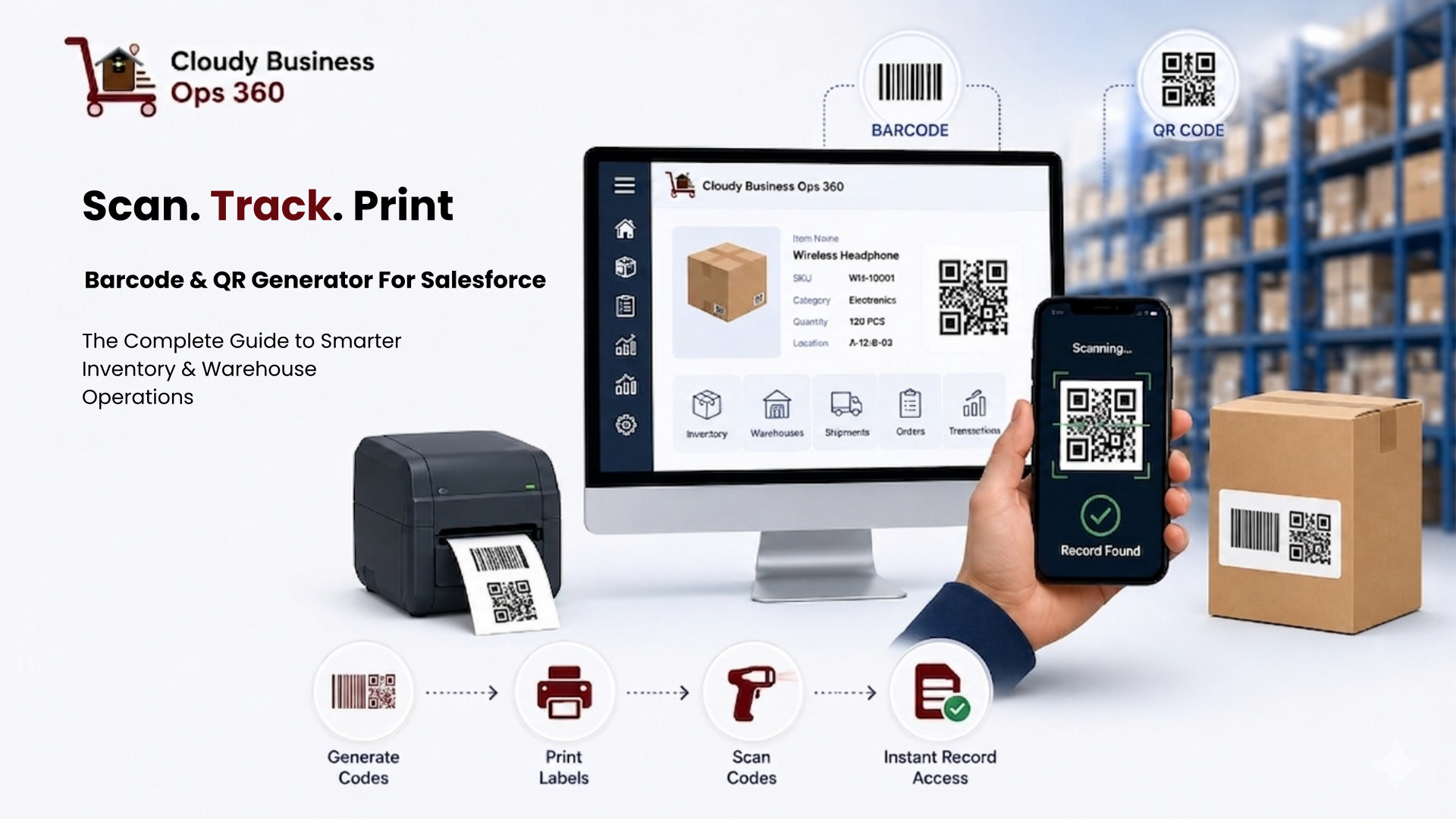
The operational workflow for the Barcode & QR Code Generator for Salesforce follows five clear steps:
Step 1 — Select Business Record
Users navigate to the operational record within Cloudy Business Ops 360 — whether that’s an Item, Inventory record, Shipment, or Warehouse Bin.
Step 2 — Generate Barcode or QR Code
The system generates a unique scannable code linked directly to that Salesforce record. The code is immediately available for download, preview, or label integration.
Step 3 — Design & Print Labels
Using the Label Builder, users create or select an existing label template, add the generated barcode or QR code element, customize the data fields and styling, and print directly from the system.
Step 4 — Scan During Operations
Warehouse or operational teams scan labels using mobile devices or physical barcode scanners during receiving, picking, packing, bin relocation, cycle counting, or shipment verification.
Step 5 — Instant Record Access
The system automatically opens the linked Salesforce record, giving the scanning user real-time access to all operational data associated with that item, bin, or shipment — without any manual search.
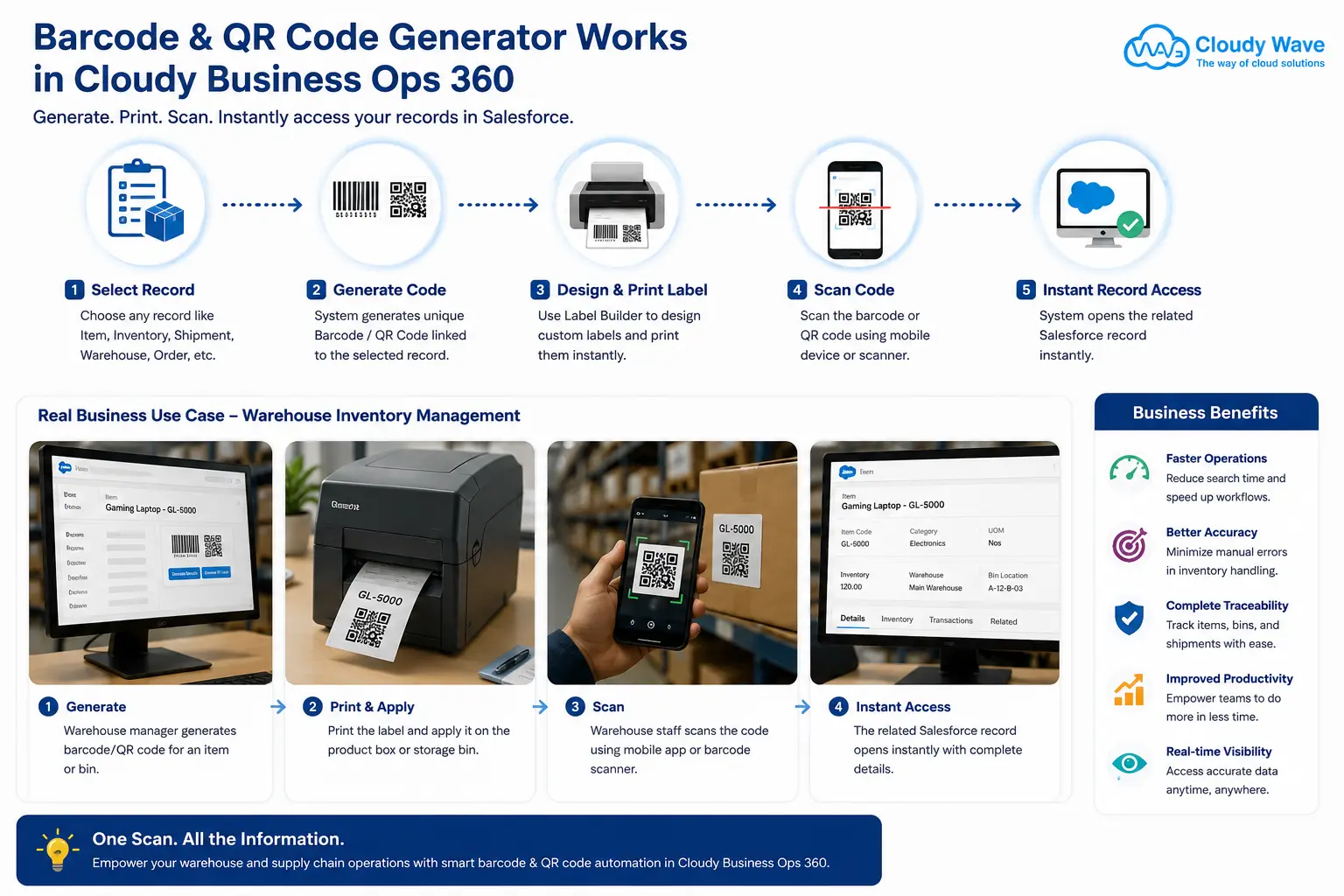
Real-World Business Scenario: Warehouse Inventory Management
To illustrate the practical impact of a Barcode & QR Code Generator for Salesforce, consider the following distribution operation:
The Company: A mid-sized distributor managing thousands of products across three warehouse locations, processing hundreds of daily orders through Salesforce.
The Challenge: Warehouse staff were spending significant time manually searching Salesforce records during receiving, picking, and shipping operations. Inventory discrepancies were common because records were updated manually at end-of-shift rather than in real time.
The Implementation: Using the Barcode & QR Code Generator in Cloudy Business Ops 360, the team:
- Generated QR codes for every storage bin across all three locations
- Created barcode labels for all active inventory items using bulk generation
- Designed standardized label templates for shipment labels, bin markers, and item tags
- Equipped warehouse staff with mobile devices for scan-based record access
The Outcome:
- Warehouse receiving time decreased because incoming shipments were verified by scan, not by manual record matching
- Picking accuracy improved because staff scanned items at pick, confirming the correct variant before packing
- Bin location errors were eliminated because QR codes on bins linked directly to bin records, preventing misplacement
- Inventory data became real-time because scan events updated records at the moment of operational activity, not hours later
- Shipping errors dropped because outbound shipments were scan-verified against Salesforce sales orders before dispatch
This scenario is representative of the operational improvements businesses achieve when they implement a native Barcode & QR Code Generator for Salesforce — replacing manual searching and end-of-day data entry with real-time, scan-driven operational visibility.
Why Native Salesforce Barcode Integration Beats Third-Party Tools
Many businesses initially attempt to solve barcode scanning challenges with standalone tools that connect to Salesforce via API or middleware. While these tools can function, they introduce friction that native solutions eliminate.
The problem with disconnected barcode tools:
- Data sync delays between the barcode system and Salesforce
- Additional software licenses and maintenance overhead
- Staff training across multiple systems
- Integration failure risks when Salesforce updates
- Limited access to related operational records — only the fields the integration surfaces
The native advantage of Barcode & QR Code Generator for Salesforce in Cloudy Business Ops 360:
When a warehouse team member scans a barcode label, they don’t open a barcode app that shows limited item data. They open the actual Salesforce record — with full access to inventory levels, transaction history, related shipments, purchase orders, and financial data. The scan becomes a gateway to the complete operational context of that item, bin, or shipment.
This native connectivity means every scanned record is directly integrated with:
- Inventory Management
- Warehouse Operations
- Procurement
- Order Management
- Shipment Tracking
- Financial Transactions
Everything operates within a single connected Salesforce ecosystem — no sync delays, no data gaps, no integration maintenance.
References
- Cloudy Business Ops 360 — Barcode & QR Code Generator Feature Documentation
Cloudy Wave | cloudywave.com - Barcode and QR Solutions for Salesforce — AppExchange
Salesforce AppExchange | appexchange.salesforce.com - Top Barcoding Software for Salesforce
Slashdot | slashdot.org
Watch barcode scanning work inside Salesforce — live
Book a 20-minute demo and see how warehouse teams generate codes, design label templates, and scan directly to Salesforce records — all without leaving the platform.
Frequently Asked Questions
The Barcode & QR Code Generator in Cloudy Business Ops 360 supports barcode and QR code generation for Items, Item Variants, Inventory records, Inventory Transaction Details, Incoming Shipments, Outbound Shipments, Warehouses, Storage Bins, Quotes, Purchase Orders, and Sales Orders.
No dedicated hardware is required. Teams can scan barcodes and QR codes using standard smartphones or tablets through the Cloudy Business Ops 360 mobile app. For high-volume warehouse environments, the system also supports physical barcode scanners that operate as keyboard input — which covers the vast majority of industrial-grade scanners on the market.
Cloudy Business Ops 360 supports CODE-128, EAN-13, EAN-8, UPC-A, and CODE-39. For internal warehouse and logistics tracking, CODE-128 is the most versatile choice. For retail products, EAN-13 or UPC-A ensures compatibility with point-of-sale systems. CODE-39 is the standard for industrial, automotive, and government applications.
Yes. The system supports bulk barcode and QR code generation, allowing businesses to create codes for entire product lines, warehouse bin sets, or shipment batches in a single action — without generating codes one by one.
Label templates designed in the Label Builder are saved within Cloudy Business Ops 360 for future reuse. Users select a saved template, and the system populates it with live Salesforce record data at print time — enabling consistent, accurate labels without redesigning templates for recurring workflows.
The scan-to-record functionality requires an active connection to Salesforce to open and display live record data. However, for environments with intermittent connectivity, the system's mobile-optimized design minimizes data load requirements for fast record access.
By enabling scan-based item verification during pick operations, warehouse staff confirm the correct item and variant before placing it in a pick container. This eliminates the reliance on visual identification alone, which is the primary source of picking errors in high-SKU environments.
Yes. Because each barcode and QR code links directly to a specific Salesforce record — including Warehouse and Storage Bin records — the system supports multi-location operations natively. Scanning a bin QR code at any location immediately surfaces the correct bin record, regardless of how many warehouse locations the business operates.
Barcodes (linear codes like CODE-128, EAN-13) are optimized for high-speed scanning with industrial scanners and are ideal for items moving through automated or semi-automated workflows. QR codes are two-dimensional, store more data, can be scanned at any orientation, and remain scannable even when partially damaged — making them preferable for bin location labels and items in rougher handling environments.
Because the Barcode & QR Code Generator is native to Cloudy Business Ops 360 within Salesforce, every scanned record is fully connected to all related operational modules — including Inventory Management, Warehouse Operations, Procurement, Order Management, Shipment Tracking, and Financial Transactions — within the same Salesforce instance, with no additional integration required.
Download the warehouse operations checklist
Get the step-by-step guide to implementing barcode and QR code tracking across your warehouse — covering label design, scanner setup, and Salesforce record mapping.