Quick Summary: If you’re searching for the best Salesforce operations app to connect your CRM with your accounting, procurement, and inventory systems — Cloudy Business Ops 360 is the answer. Built natively on Salesforce with bidirectional sync for QuickBooks, Xero, and Zoho Books, it’s the only operations platform your team needs. This guide covers every feature, benefit, and supported sync object across all three integrations.
What Makes an App the Best Salesforce Operations App?
Salesforce is the world’s leading CRM — but out of the box, it doesn’t manage your accounting, procurement, vendor billing, or inventory. That gap forces most businesses to maintain disconnected systems: Salesforce for sales, QuickBooks or Xero for finance, spreadsheets for procurement. The result is fragmented data, manual reconciliation, and delayed decisions.
The best Salesforce operations app solves all of this inside a single, unified platform. It doesn’t just add features — it eliminates the operational gap between your CRM and your financial systems entirely. Here’s what the best Salesforce operations app must deliver:
- Native Salesforce architecture — no middleware, no external platforms, no separate logins
- Bidirectional accounting sync — real-time data flow between Salesforce and your accounting platform
- End-to-end workflow automation — from quote to invoice to payment, fully automated
- Comprehensive object coverage — invoices, bills, payments, credits, purchase orders, inventory items
- Enterprise-grade security — OAuth 2.0 authentication and Salesforce’s native security model
- Fast, easy setup — live in under a week, no developer required
By every one of these standards, Cloudy Business Ops 360 is the best Salesforce operations app available on the Salesforce AppExchange today.
Why Cloudy Business Ops 360 Is the Best Salesforce Operations App
Cloudy Business Ops 360 is a native Salesforce application built specifically to be the best Salesforce operations app for businesses that need real-time financial and operational synchronization. It is available on the Salesforce AppExchange and supports native, bidirectional integration with the three most widely used accounting platforms: QuickBooks Online, Xero, and Zoho Books.
What sets Cloudy Business Ops 360 apart as the best Salesforce operations app is its architecture. It runs entirely inside your Salesforce org — no third-party middleware, no external database, no separate UI. Every sync, every automation, and every dashboard is delivered natively within Salesforce, using Salesforce’s own APIs, security model, and data governance framework.
Cloudy Business Ops 360 is the best Salesforce operations app for teams that want to:
- Sync accounting data bidirectionally between Salesforce and QuickBooks, Xero, or Zoho Books
- Automate invoicing, billing, and payment workflows triggered by Salesforce events
- Maintain accounting-grade data consistency across finance, sales, procurement, and inventory
- Authenticate securely via OAuth 2.0 — no stored API keys or passwords
- Scale seamlessly from startup to enterprise without changing their operational platform
Key Benefits of the Best Salesforce Operations App
Here is a complete overview of the operational benefits that make Cloudy Business Ops 360 the best Salesforce operations app for businesses of every size.
1. Eliminate Data Silos Across Your Entire Business
The most common reason businesses search for the best Salesforce operations app is data fragmentation. Sales teams work in Salesforce. Finance teams work in QuickBooks or Xero. Procurement teams manage spreadsheets. The result is duplicated records, reconciliation delays, and business decisions made on inaccurate information.
As the best Salesforce operations app, Cloudy Business Ops 360 eliminates these silos completely. Every financial and operational record — invoices, payments, bills, vendor records, customer accounts, purchase orders — is centralized inside Salesforce and synchronized with your accounting platform in real time. Every team always works from the same accurate, up-to-date data.
2. Automate Manual, Time-Consuming Workflows
Manual data entry is the enemy of operational efficiency. The best Salesforce operations app replaces repetitive manual tasks with automated workflows that trigger based on real business events. With Cloudy Business Ops 360, the following happen automatically:
- Invoices are created in your accounting platform the moment a deal closes in Salesforce
- Payments, bills, and credit notes sync in real time between Salesforce and QuickBooks, Xero, or Zoho Books
- Purchase orders are generated and tracked without leaving Salesforce
- Customer and vendor records are synchronized bidirectionally across all connected platforms
- Expense records, debit notes, and item variants are kept in perfect alignment at all times
This level of automation is exactly what businesses expect from the best Salesforce operations app — and exactly what Cloudy Business Ops 360 delivers.
3. Real-Time Financial Visibility Inside Salesforce
The best Salesforce operations app doesn’t just move data — it makes that data visible and actionable inside Salesforce. Cloudy Business Ops 360 gives every team real-time access to financial performance data without ever leaving the CRM:
- Sales leaders see invoice status and collected revenue for every closed deal
- Finance teams track outstanding receivables, vendor bills, and expense totals in Salesforce dashboards
- Executives access live revenue, cash flow, and procurement reports in one unified view
This real-time financial visibility is one of the most valued capabilities in the best Salesforce operations app, and one that legacy ERP integrations and middleware solutions simply cannot match.
4. Accelerate the Order-to-Cash Cycle
Cash flow is the lifeblood of every business. The best Salesforce operations app compresses the order-to-cash (O2C) cycle by automating every step from deal close to payment collection. With Cloudy Business Ops 360:
- Quotes generated in Salesforce convert to invoices on approval — automatically
- Invoices sync to QuickBooks, Xero, or Zoho Books in real time
- Payment records flow back into Salesforce instantly upon receipt
- Accounts receivable aging is visible inside Salesforce dashboards without any manual input
Businesses using the best Salesforce operations app report measurably faster billing cycles, reduced days sales outstanding (DSO), and improved cash flow as a direct result.
5. No Middleware — Fully Native on Salesforce
Many competing platforms claim to be the best Salesforce operations app but rely on third-party middleware connectors to bridge Salesforce with accounting systems. This introduces sync delays, additional cost, and maintenance overhead.
Cloudy Business Ops 360 is built natively on Salesforce — which is what truly makes it the best Salesforce operations app. There is no middleware layer, no external database, and no additional platform to manage. All syncs happen through secure, native Salesforce APIs, delivering real-time performance with the reliability your business depends on.
6. Enterprise-Grade Security via OAuth 2.0
The best Salesforce operations app must protect your most sensitive financial data. Cloudy Business Ops 360 uses OAuth 2.0 authentication for all accounting platform connections, meaning no API keys or passwords are ever stored. It inherits Salesforce’s complete security model — role-based access control, field-level security, audit trails, and encryption at rest and in transit.
QuickBooks Integration – Features, Benefits & Sync Objects
As the best Salesforce operations app, Cloudy Business Ops 360 provides a native bidirectional integration with QuickBooks Online – enabling seamless synchronization of accounting and operational data between Salesforce and QuickBooks. This integration ensures accurate financial records, reduced manual data entry, and real-time visibility across sales, procurement, inventory, and finance operations.
Key Capabilities – Salesforce QuickBooks Integration
| Capability | Detail |
|---|
| 🔁 Sync Type | Bidirectional (Salesforce ↔ QuickBooks) |
| ⚡ Sync Mode | Real-time or scheduled |
| 📘 Data Consistency | Accounting-grade accuracy |
| 🔐 Authentication | Secure OAuth 2.0 |
| 🚀 Scale | Designed for high-volume transactions |
Benefits of Salesforce – QuickBooks Integration
Automated Workflows The Salesforce-QuickBooks integration in Cloudy Business Ops 360- the best Salesforce operations app – triggers automated workflows based on business events. An invoice is automatically created in QuickBooks the moment a deal closes in Salesforce, eliminating delays and manual intervention from the billing process entirely.
Time and Cost Savings By eliminating repetitive manual data entry between Salesforce and QuickBooks, the best Salesforce operations app saves valuable time for finance and operations teams. Automation improves productivity, reduces operational costs, and allows employees to focus on higher-value tasks rather than routine accounting work.
Improved Reporting and Business Insights With financial data synchronized between QuickBooks and Salesforce, Cloudy Business Ops 360 gives businesses access to centralized reporting and analytics – making it easier to generate financial reports, track performance, and make informed, data-driven decisions.
Supported Object Synchronization -QuickBooks
📦 Product & Inventory Objects
| Salesforce Object | QuickBooks Object | Sync Direction | Description |
|---|
| Item | Item | ↔ Bidirectional | Syncs product master data including pricing and status |
| Item Variant | Item | → SF to QuickBooks | Syncs variant-level details such as SKU, attributes & prices |
🧾 Sales & Procurement Objects
| Salesforce Object | QuickBooks Object | Sync Direction | Description |
|---|
| Quote | Estimate | → SF to QuickBooks | Syncs approved quotes for accounting reference |
| Invoice | Invoice | ↔ Bidirectional | Syncs customer invoices including line items, taxes, totals, and status |
| Purchase Order | PurchaseOrder | → SF to QuickBooks | Syncs procurement transactions |
🏦 Accounting Master Data
| Salesforce Object | QuickBooks Object | Sync Direction | Description |
|---|
| Chart of Account | Account | ↔ Bidirectional | Keeps ledger accounts aligned |
| Account (Customer) | Customer | ↔ Bidirectional | Syncs customer records |
| Account (Vendor) | Vendor | ↔ Bidirectional | Syncs supplier records |
💳 Payments & Expenses
| Salesforce Object | QuickBooks Object | Sync Direction | Description |
|---|
| Payment | Payment | → SF to QuickBooks | Syncs received and applied payments |
| Bill | Bill | ↔ Bidirectional | Syncs vendor bills |
| Expense | Bill | ↔ Bidirectional | Syncs operational and employee expenses |
🔄 Adjustments & Credits
| Salesforce Object | QuickBooks Object | Sync Direction | Description |
|---|
| Credit Note | CreditMemo | ↔ Bidirectional | Syncs customer credits |
| Debit Note | VendorCredit | ↔ Bidirectional | Syncs debit adjustments |
Best for: US-based SMBs and mid-market businesses already running on QuickBooks Online.
Xero Integration – Features, Benefits & Sync Objects
The best Salesforce operations app must work with the accounting platform your team already uses. Cloudy Business Ops 360 provides a native bidirectional integration with Xero – enabling seamless synchronization of accounting and operational data between Salesforce and Xero. This integration ensures accurate financial records, reduced manual data entry, and real-time visibility across sales, procurement, inventory, and finance operations.
Key Capabilities – Salesforce Xero Integration
| Capability | Detail |
|---|
| 🔁 Sync Type | Bidirectional (Salesforce ↔ Xero) |
| ⚡ Sync Mode | Real-time or scheduled |
| 📘 Data Consistency | Accounting-grade accuracy |
| 🔐 Authentication | Secure OAuth 2.0 |
| 🚀 Scale | Designed for high-volume transactions |
Benefits of Salesforce – Xero Integration
Automated Workflows The Salesforce-Xero integration – part of what makes Cloudy Business Ops 360 the best Salesforce operations app -supports automated workflows triggered by key business events. Invoices are automatically created in Xero when a transaction or deal is completed in Salesforce, reducing manual effort and eliminating processing delays.
Time and Cost Savings By eliminating repetitive manual data entry between Salesforce and Xero, the best Salesforce operations app saves valuable time for finance and operations teams. Automation boosts productivity, lowers operational costs, and frees teams to focus on strategic, revenue-generating work.
Improved Reporting and Business Insights With Salesforce and Xero data synchronized through Cloudy Business Ops 360, businesses gain a centralized view of financial and operational performance — enabling better reporting, easier tracking of key metrics, and actionable insights to support data-driven decisions at every level.
Supported Object Synchronization – Xero
📦 Product & Inventory Objects
| Salesforce Object | Xero Object | Sync Direction | Description |
|---|
| Item | Item | ↔ Bidirectional | Syncs product master data including pricing and status |
| Item Variant | Item | → SF to Xero | Syncs variant-level details such as SKU, attributes & prices |
🧾 Sales & Procurement Objects
| Salesforce Object | Xero Object | Sync Direction | Description |
|---|
| Quote | Estimate | → SF to Xero | Syncs approved quotes for accounting reference |
| Invoice | Invoice | ↔ Bidirectional | Syncs customer invoices including line items, taxes, totals, and status |
| Purchase Order | PurchaseOrder | → SF to Xero | Syncs procurement transactions |
🏦 Accounting Master Data
| Salesforce Object | Xero Object | Sync Direction | Description |
|---|
| Chart of Account | Account | ↔ Bidirectional | Keeps ledger accounts aligned |
| Account (Customer) | Customer (Contact) | ↔ Bidirectional | Syncs customer records |
| Account (Vendor) | Vendor (Contact) | ↔ Bidirectional | Syncs supplier records |
💳 Payments & Expenses
| Salesforce Object | Xero Object | Sync Direction | Description |
|---|
| Payment | Payment | → SF to Xero | Syncs received and applied payments |
| Bill | Invoice | ↔ Bidirectional | Syncs vendor bills |
| Expense | Bill | ↔ Bidirectional | Syncs operational and employee expenses |
🔄 Adjustments & Credits
| Salesforce Object | Xero Object | Sync Direction | Description |
|---|
| Credit Note | CreditMemo | ↔ Bidirectional | Syncs customer credits |
| Debit Note | VendorCredit | ↔ Bidirectional | Syncs debit adjustments |
Best for: Global teams, UK-based businesses, and ANZ organizations using Xero as their primary accounting platform.
Zoho Books Integration – Features, Benefits & Sync Objects
Cloudy Business Ops 360 – the best Salesforce operations app – provides a native bidirectional integration with Zoho Books, enabling seamless synchronization of accounting and operational data between Salesforce and Zoho Books. This integration ensures accurate financial records, reduced manual data entry, and real-time visibility across sales, procurement, inventory, and finance operations.
Key Capabilities — Salesforce Zoho Books Integration
| Capability | Detail |
|---|
| 🔁 Sync Type | Bidirectional (Salesforce ↔ Zoho Books) |
| ⚡ Sync Mode | Real-time or scheduled |
| 📘 Data Consistency | Accounting-grade accuracy |
| 🔐 Authentication | Secure OAuth 2.0 |
| 🚀 Scale | Designed for high-volume transactions |
Benefits of Salesforce – Zoho Books Integration
Faster and More Efficient Invoicing Automated invoice creation and synchronization through the best Salesforce operations app reduces billing cycles, minimizes errors, and improves cash flow management. Invoices generated in Salesforce are immediately reflected in Zoho Books — eliminating the lag between deal close and billing.
Improved Data Accuracy and Consistency By removing manual data entry and duplication, Cloudy Business Ops 360 ensures that financial and customer records remain accurate and synchronized across both Salesforce and Zoho Books. Any update in Salesforce is instantly mirrored in Zoho Books, and vice versa.
Time and Cost Savings As the best Salesforce operations app for Zoho ecosystem users, Cloudy Business Ops 360 reduces administrative overhead — allowing teams to focus on strategic, revenue-generating activities while lowering operational costs. Finance staff no longer need to re-enter data or reconcile records between systems.
Real-Time Reporting and Insights With synchronized data across Salesforce and Zoho Books, Cloudy Business Ops 360 enables Salesforce reports enriched with live accounting data — providing insights into revenue, receivables, expenses, and overall financial performance. Every decision-maker gets a single, accurate view of the business.
Supported Object Synchronization — Zoho Books
📦 Product & Inventory Objects
| Salesforce Object | Zoho Books Object | Sync Direction | Description |
|---|
| Item | Item | ↔ Bidirectional | Syncs product master data including pricing and status |
| Item Variant | Item | → SF to Zoho Books | Syncs variant-level details such as SKU, attributes & prices |
🧾 Sales & Procurement Objects
| Salesforce Object | Zoho Books Object | Sync Direction | Description |
|---|
| Quote | Estimate | → SF to Zoho Books | Syncs approved quotes for accounting reference |
| Invoice | Invoice | ↔ Bidirectional | Syncs customer invoices including line items, taxes, totals, and status |
| Purchase Order | PurchaseOrder | → SF to Zoho Books | Syncs procurement transactions |
🏦 Accounting Master Data
| Salesforce Object | Zoho Books Object | Sync Direction | Description |
|---|
| Chart of Account | Account | ↔ Bidirectional | Keeps ledger accounts aligned |
| Account (Customer) | Customer | ↔ Bidirectional | Syncs customer records |
| Account (Vendor) | Vendor | ↔ Bidirectional | Syncs supplier records |
💳 Payments & Expenses
| Salesforce Object | Zoho Books Object | Sync Direction | Description |
|---|
| Payment | Payment | → SF to Zoho Books | Syncs received and applied payments |
| Bill | Bill | ↔ Bidirectional | Syncs vendor bills |
| Expense | Bill | ↔ Bidirectional | Syncs operational and employee expenses |
🔄 Adjustments & Credits
| Salesforce Object | Zoho Books Object | Sync Direction | Description |
|---|
| Credit Note | CreditMemo | ↔ Bidirectional | Syncs customer credits |
| Debit Note | VendorCredit | ↔ Bidirectional | Syncs debit adjustments |
Best for: Businesses already using the Zoho ecosystem, or teams looking for an accounting platform with a free tier.
Platform Comparison: QuickBooks vs Xero vs Zoho Books
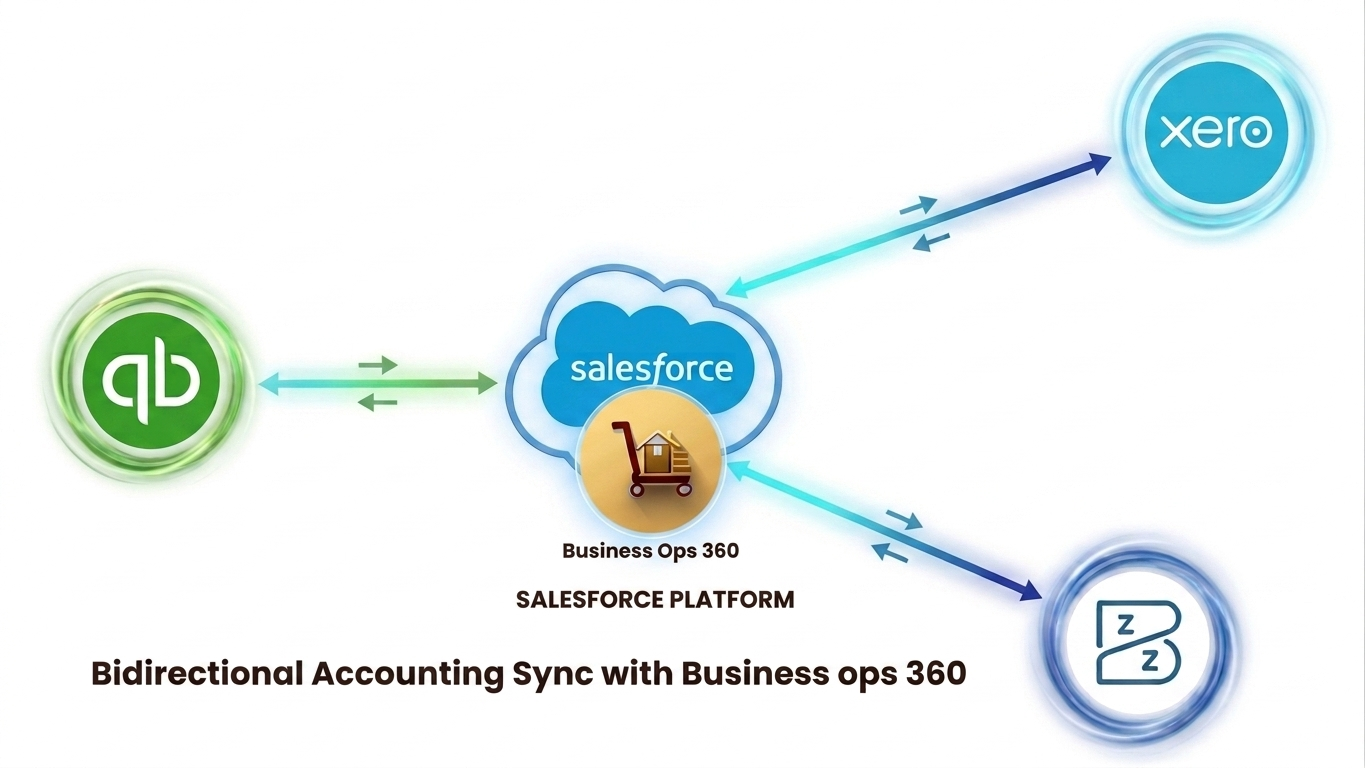
The best Salesforce operations app works with the accounting platform you already use. All three integrations in Cloudy Business Ops 360 share the same bidirectional sync architecture, OAuth 2.0 security model, and object coverage. Your choice of platform typically comes down to your team’s location, existing tech stack, and pricing preference.
| Feature / Capability | QuickBooks | Xero | Zoho Books |
|---|
| Bidirectional Invoice Sync | ✅ | ✅ | ✅ |
| SF → External (Quote, PO, Payment, Item Variant) | ✅ | ✅ | ✅ |
| OAuth 2.0 Authentication | ✅ | ✅ | ✅ |
| Invoice Sync | ✅ | ✅ | ✅ |
| Purchase Order Sync | ✅ | ✅ | ✅ |
| Chart of Accounts Sync | ✅ | ✅ | ✅ |
| Customer / Vendor Sync | ✅ | ✅ (as Contacts) | ✅ |
| Expense Sync | ✅ | ✅ | ✅ |
| Credit & Debit Notes | ✅ | ✅ | ✅ |
| Best For | US-based SMBs & Mid-Market | Global / UK / ANZ Teams | Zoho ecosystem users |
| Accounting Platform Pricing | From $30/month | From $15/month | From $0 (Free tier) |
✅ All three accounting integrations are fully included in every Cloudy Business Ops 360 plan — making it the best Salesforce operations app regardless of which accounting platform your team uses.
Best Salesforce Operations App vs Middleware Solutions
Many platforms competing to be the best Salesforce operations app rely on third-party middleware tools like Zapier, MuleSoft, or Workato to connect Salesforce with accounting systems. This approach introduces sync delays, extra licensing costs, maintenance complexity, and multiple points of failure.
Cloudy Business Ops 360 — the best Salesforce operations app — eliminates all of these problems with its native Salesforce architecture.
| Capability | Best Salesforce Operations App (Cloudy Business Ops 360) | Middleware Solutions |
|---|
| Native Salesforce Architecture | ✅ Yes | ❌ No |
| Real-Time Sync | ✅ Yes | ⚠️ Often delayed |
| No Additional Platform Cost | ✅ Yes | ❌ Additional licensing required |
| Built-in Sync Log & Monitoring | ✅ Yes | ⚠️ Limited or separate |
| Salesforce Security Model Inherited | ✅ Yes | ❌ Separate security layer |
| Setup Time | ✅ Minutes | ❌ Weeks to months |
| Custom Developer Required | ✅ No | ❌ Often yes |
| OAuth 2.0 Authentication | ✅ Built-in | ⚠️ Varies by connector |
There is no middleware tax when you use the best Salesforce operations app. Cloudy Business Ops 360 runs natively on Salesforce — delivering the performance, reliability, and security your business demands, without the complexity of traditional integration projects.
Who Should Use the Best Salesforce Operations App?
Cloudy Business Ops 360 is the best Salesforce operations app for any organization that:
- 🏢 Runs Salesforce as its primary CRM and wants to extend it into a full finance and operations platform
- 💼 Uses QuickBooks, Xero, or Zoho Books and needs real-time, bidirectional sync with Salesforce
- 📊 Has a finance team spending hours on manual reconciliation or data re-entry between systems
- 📈 Has a sales or revenue operations team that needs real-time financial visibility inside Salesforce
- 🏭 Manages procurement or inventory and wants unified visibility across purchasing, stock, and accounting
- 🚀 Is scaling rapidly and needs a best Salesforce operations app that grows without adding complexity or cost
The best Salesforce operations app serves businesses across industries — professional services, manufacturing, wholesale distribution, technology, and e-commerce — and is available for Salesforce orgs of any size.
How to Get Started with the Best Salesforce Operations App
Getting live with Cloudy Business Ops 360 — the best Salesforce operations app — is fast and requires no developer resources. Here’s the complete step-by-step process:
Step 1 — Install from Salesforce AppExchange Install Cloudy Business Ops 360 directly from the Salesforce AppExchange. As the best Salesforce operations app for accounting integration, the full module covering QuickBooks, Xero, and Zoho Books is included in all plans.
Step 2 — Connect Your Accounting Platform Navigate to Settings → Accounting Integration inside Cloudy Business Ops 360. Select your accounting platform and complete the OAuth 2.0 authorization flow. No API keys required — the best Salesforce operations app handles authentication securely.
Step 3 — Configure Sync Settings Choose your sync direction preferences, map custom fields if needed, and select real-time or scheduled sync. Per-object sync rules let you tailor the best Salesforce operations app precisely to your workflow.
Step 4 — Run Your First Sync Trigger an initial full sync to import existing accounting data into Salesforce. From this point forward, all changes flow automatically based on your configured rules.
Step 5 — Monitor & Manage Use the built-in Sync Log dashboard to monitor sync activity, review errors, and manage records. Real-time alerts keep your team informed — because the best Salesforce operations app gives you full operational control at all times.
Most customers go live with the best Salesforce operations app within a week. Many complete setup in a single day.
Conclusion
If your team runs on Salesforce and your finance function runs on QuickBooks, Xero, or Zoho Books, you already know the cost of keeping two separate systems in sync manually. The best Salesforce operations app eliminates that cost entirely — replacing manual effort with automated, real-time data synchronization that keeps your entire business aligned.
Cloudy Business Ops 360 is the best Salesforce operations app for teams that need native bidirectional accounting integration, full O2C automation, and real-time financial visibility — all inside Salesforce, without middleware, without custom code, and without lengthy implementation timelines.
Whether you’re a startup on Zoho Books, a growing mid-market business on QuickBooks Online, or a global enterprise running Xero across multiple entities, the best Salesforce operations app bridges the gap between your CRM and your financial systems in days, not months.
Key Takeaways:
- Cloudy Business Ops 360 is the best Salesforce operations app — native, no middleware, no external platforms
- Bidirectional accounting integration with QuickBooks, Xero, and Zoho Books — all included
- Full object lifecycle sync: items, quotes, invoices, payments, bills, expenses, credit notes, debit notes
- OAuth 2.0 authentication ensures enterprise-grade security across all three integrations
- Automates the full order-to-cash cycle — quote to invoice to payment, without leaving Salesforce
- Real-time financial dashboards and operational reporting built into Salesforce
- No developer required — the best Salesforce operations app is live in under a week
- Starting at $40/user/month on the Salesforce AppExchange







 Salesforce ERP
 ERP + CRM Platform
  Inventory Management
  Warehouse Management
  Order Management
  Vendor Management
  Logistics Management
  BOM Management
  Order Fulfillment
  Business Operations
  SaaS Platform for Operations
  Salesforce Cloud ERP Platform
  Xero
Xero
 Zoho books
 Quickbooks
 Shopify
 Acumatica
 SAP
SAP
 Odoo
Odoo
 NetSuite
 Microsoft Dynamics 365
 Sage
Sage



 Agentforce Revenue Management
 Agentforce Revenue Management + Billing
  Salesforce CPQ
 Salesforce Advanced Billing
  Migrate from CPQ to ARM
  Managed Services
 Salesforce Implementation
 Revenue Cloud Implementation
 MuleSoft Integration
 Microsoft
 Data Cloud
 Tableau

 ·
May 15, 2026
·
17 min read
·
May 15, 2026
·
17 min read

AzImex, 29 June, 2026
This post deserves way more attention from everyone in our community 🙌
Saurabh Wankhede, 06 August, 2026
Thank you so much! Your encouragement means a lot to us. If you found it useful, feel free to share it with others who work with Salesforce, ERP, or digital transformation.
Azimex, 29 June, 2026
This post came at exactly the right moment when I needed 💎 encouragement most
Saurabh Wankhede, 06 August, 2026
We’re really happy this article was helpful when you needed it. Thank you for reading! We hope our future Salesforce and ERP insights continue to add value to your journey.