Salesforce ERP
 ERP + CRM Platform
  Inventory Management
  Warehouse Management
  Order Management
  Vendor Management
  Logistics Management
  BOM Management
  Order Fulfillment
  Business Operations
  SaaS Platform for Operations
  Salesforce Cloud ERP Platform
  Xero
Xero
 Zoho books
 Quickbooks
 Shopify
 Acumatica
 SAP
SAP
 Odoo
Odoo
 NetSuite
 Microsoft Dynamics 365
 Sage
Sage



 Agentforce Revenue Management
 Agentforce Revenue Management + Billing
  Salesforce CPQ
 Salesforce Advanced Billing
  Migrate from CPQ to ARM
  Managed Services
 Salesforce Implementation
 Revenue Cloud Implementation
 ServiceNow Consulting Services
 Zoho CRM implementation
 MuleSoft Integration
 Workato Integration
 Microsoft
 Data Cloud
 Tableau

ERP
 ·
May 6, 2026
·
12 min read
·
May 6, 2026
·
12 min read
15 Reasons You Need ERP On The Salesforce Platform
·
May 6, 2026
·
12 min read

Stop Running Your Business on Disconnected Systems
See how unified ERP and CRM on one platform transforms operations from the inside out.
Modern businesses operate in an environment where fragmented data, disconnected systems, and siloed teams are no longer acceptable. Companies that still run their ERP separately from their CRM are quietly bleeding productivity, revenue, and customer trust every single day.
That’s why forward-thinking enterprises are making a decisive shift: deploying ERP on the Salesforce Platform. This convergence isn’t just a technology upgrade — it’s a fundamental reimagining of how a business runs from the inside out.
In this article, we’ll walk you through 15 powerful, evidence-backed reasons why ERP on the Salesforce Platform is fast becoming the gold standard for modern enterprise operations — and why your business can’t afford to wait.
What Is ERP on the Salesforce Platform?
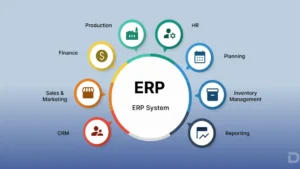
Before diving into the reasons, let’s establish clarity. ERP (Enterprise Resource Planning) is software that integrates core business processes — finance, procurement, inventory, HR, supply chain, and more — into a unified system. Traditionally, ERP and CRM (Customer Relationship Management) lived in separate silos.
ERP on the Salesforce Platform refers to native or deeply integrated ERP solutions built on or connected to Salesforce’s cloud ecosystem. Solutions like Certinia (formerly FinancialForce), Business Ops 360, and Kenandy are purpose-built ERPs running natively on Salesforce, enabling a single source of truth across the entire organization.
According to Gartner, organizations that integrate ERP and CRM on a unified platform reduce total cost of ownership by up to 25% and improve data accuracy by over 30%.

15 Reasons You Need ERP On The Salesforce Platform
Reason 1: A Single Source of Truth Across Your Entire Business
One of the most persistent problems in enterprise operations is data inconsistency. Sales sees one version of a customer’s account; finance sees another; operations sees a third.
ERP on the Salesforce Platform eliminates this fragmentation by consolidating all data — customer records, financial transactions, inventory, project timelines — into a single unified platform. Every team member, from the CFO to the field sales rep, operates from the same real-time data.
IDC research has found that data inconsistencies cost businesses an average of $15 million per year in lost productivity. A unified ERP-CRM platform directly addresses this problem at the source.
Reason 2: Accelerated Quote-to-Cash Cycles
The quote-to-cash process — from generating a sales quote through delivery, invoicing, and payment — is one of the highest-impact workflows in any business. When your CRM and ERP are separate, this process involves manual handoffs, re-keying data, and approval delays.
With ERP on the Salesforce Platform:
- Sales reps create quotes in Salesforce with real-time inventory and pricing data
- Orders flow automatically into the ERP for fulfillment
- Invoices are triggered automatically upon delivery confirmation
- Revenue is recognized in compliance with ASC 606 / IFRS 15 standards
Companies using integrated quote-to-cash solutions report cycle time reductions of 30–50%, according to research by Aberdeen Group. Faster cash collection has a direct, measurable impact on cash flow and working capital.
Reason 3: Native Salesforce AppExchange Ecosystem
The Salesforce AppExchange is the world’s largest enterprise app marketplace, with over 7,000 apps and components. When your ERP runs on the Salesforce Platform, you gain immediate access to this ecosystem.
This means:
- Pre-built integrations with tools like DocuSign, Slack, Tableau, and MuleSoft
- Industry-specific add-ons for manufacturing, healthcare, nonprofits, and more
- Easy extensibility without expensive custom development
By contrast, legacy ERPs like SAP or Oracle on-premise require costly middleware and custom connectors to achieve the same integrations. ERP on the Salesforce Platform makes this plug-and-play.
Reason 4: Real-Time Financial Visibility and Reporting
Finance leaders need instant access to P&L, cash flow, project profitability, and budget variance — not end-of-month reports generated from batch-processed data.
ERP on the Salesforce Platform delivers real-time financial dashboards powered by Salesforce’s native reporting engine and Tableau CRM (formerly Einstein Analytics). CFOs can drill from a top-line revenue figure down to individual transaction details without leaving the platform.
Key financial capabilities include:
- Multi-entity and multi-currency consolidation
- Revenue recognition automation (ASC 606/IFRS 15 compliant)
- Real-time budget vs. actuals monitoring
- Project cost tracking tied directly to customer accounts
This level of financial transparency was once reserved for enterprises spending millions on business intelligence infrastructure. ERP on the Salesforce Platform democratizes it.
Reason 5: Dramatically Lower Total Cost of Ownership (TCO)
Legacy ERP implementations are notoriously expensive. SAP S/4HANA or Oracle ERP Cloud implementations routinely run into seven to eight figures, with ongoing maintenance costs consuming 15–22% of the original license fee annually, per Panorama Consulting’s ERP Report.
ERP on the Salesforce Platform offers a markedly different economics model:
| Cost Factor | Legacy On-Premise ERP | ERP on Salesforce Platform |
|---|---|---|
| Implementation Cost | $1M–$10M+ | $150K–$1.5M (avg) |
| Time to Go Live | 18–36 months | 3–9 months |
| Ongoing Maintenance | 15–22% of license | Included in SaaS subscription |
| Integration Costs | High (middleware required) | Low (native platform) |
| Hardware Infrastructure | Required | None (cloud-native) |
| Upgrade Effort | Months of project work | Automatic, continuous |
The cloud-native, subscription-based model of Salesforce-native ERPs significantly reduces both upfront and long-term costs.
Reason 6: Faster Implementation and Time to Value
Speed matters. Every month your teams spend on an ERP implementation is a month of delayed ROI, continued inefficiency, and mounting implementation cost.
Salesforce-native ERP solutions leverage pre-built data models, workflows, and UI frameworks that dramatically compress implementation timelines. Because your team is working in an environment they likely already know — Salesforce — the learning curve is reduced significantly.
Real-world benchmarks from Certinia (formerly FinancialForce) indicate customers go live in an average of 90–180 days, compared to 18–36 months for traditional ERP programs.
Faster implementation means:
- Quicker ROI realization
- Less organizational disruption
- Reduced implementation risk
- Earlier access to business intelligence
Reason 7: Superior Customer Experience Through Connected Operations
Here’s a scenario: a customer calls your support team asking about an order status. In a fragmented environment, the support agent has to switch between the CRM and ERP, potentially keeping the customer on hold while they toggle systems.
With ERP on the Salesforce Platform, your support agent sees the customer’s full lifecycle in a single screen:
- Purchase history and open orders
- Invoice and payment status
- Active support cases
- Upcoming renewals or deliveries
- Assigned account manager
According to Salesforce’s own State of the Connected Customer report, 88% of customers say the experience a company provides is as important as its products or services. A connected ERP-CRM environment is foundational to delivering that experience.
Reason 8: AI and Einstein Intelligence Built In
Salesforce’s Einstein AI is natively embedded across the platform — and when your ERP runs on Salesforce, that AI applies to financial, operational, and customer data simultaneously.
Practical AI capabilities enabled by ERP on the Salesforce Platform include:
- Predictive cash flow forecasting based on historical payment patterns
- Demand forecasting for inventory and supply chain planning
- Churn prediction tied to revenue data
- Intelligent project resource allocation based on skills, availability, and profitability
- Anomaly detection for financial transactions and fraud prevention
As generative AI capabilities expand through Salesforce Agentforce, ERP functions like invoice generation, purchase order creation, and financial narrative reporting are being increasingly automated — freeing your finance and operations teams for higher-value work.
Reason 9: Seamless Scalability for Growing Businesses
Legacy ERPs are notoriously difficult to scale. Adding new entities, geographies, business units, or users often requires expensive re-implementation projects or module purchases.
ERP on the Salesforce Platform scales with your business:
- Add new business units in days, not months
- Expand to new geographies with multi-currency and multi-language support built in
- Onboard new users without infrastructure upgrades
- Handle seasonal transaction spikes without performance degradation
Salesforce’s infrastructure, built on hyperscaler cloud providers, processes over 1 billion transactions per day across its global customer base. Your ERP inherits this enterprise-grade scalability by default.
Reason 10: Industry-Specific Solutions and Vertical Depth
One of the criticisms historically leveled at cloud ERPs is lack of depth for specific industries. ERP on the Salesforce Platform has comprehensively addressed this.
Today, purpose-built Salesforce ERP solutions serve:
- Professional Services: Certinia PSA for project-centric firms (consulting, IT services, staffing)
- Manufacturing: Rootstock for discrete and process manufacturing, including shop floor management
- Construction & Engineering: Procore and related apps for project cost control
- Software/SaaS: Revenue recognition and subscription management for technology companies
- Nonprofits: Fund accounting, grant management, and program tracking
Each of these solutions is built natively on Salesforce, inheriting the full platform’s capabilities while delivering the vertical-specific workflows your industry demands.
Reason 11: Robust Compliance and Audit Capabilities
In an era of increasing regulatory complexity — from SOX to GDPR to ASC 606 — your ERP must be your compliance backbone.
ERP on the Salesforce Platform delivers:
- Complete audit trails on every transaction, automatically maintained
- Role-based access controls with field-level security granularity
- Revenue recognition automation compliant with ASC 606 and IFRS 15
- GDPR-ready data governance tools
- SOC 1 and SOC 2 certified infrastructure
Salesforce’s Trust site (trust.salesforce.com) provides real-time system status and historical uptime data, giving your compliance and IT teams the transparency regulators increasingly require.
Reason 12: Empowered Mobile and Remote Workforce
The modern workforce is distributed. Your finance manager might be approving purchase orders from an airport lounge. Your project manager might be updating a job completion status from a construction site.
ERP on the Salesforce Platform is mobile-first by design. The Salesforce mobile app provides full access to ERP functions — approvals, dashboards, time entry, expense management, and more — across iOS and Android devices.
This isn’t a watered-down mobile experience. It’s the full platform, optimized for touch interfaces, with offline capability for field teams in areas with limited connectivity.
According to McKinsey, organizations that empower remote workers with the right digital tools see productivity gains of 20–25%. A mobile-enabled ERP is a direct contributor to that outcome.
Reason 13: Streamlined Project and Resource Management
For professional services firms and project-centric businesses, the ability to manage projects, resources, and financials in one system is a competitive differentiator.
With solutions like Certinia PSA (Professional Services Automation) running natively on Salesforce ERP:
- Project budgets tie directly to customer opportunities in CRM
- Resource assignments are tracked against skills, certifications, and availability
- Time and expense capture feeds directly into billing and revenue recognition
- Project profitability is visible in real time against estimated margins
This closed loop — from winning a deal to completing the project to recognizing revenue — is only possible when ERP and CRM share the same platform foundation.
Service businesses using integrated PSA-ERP solutions report 15–20% improvements in billable utilization, a critical metric that directly impacts profitability.
Reason 14: Superior Change Management and User Adoption
The most technically advanced ERP in the world delivers zero ROI if users don’t adopt it. User adoption is consistently cited as one of the top three reasons ERP implementations fail, according to Panorama Consulting.
ERP on the Salesforce Platform benefits from a critical advantage: millions of users already know Salesforce. When your ERP runs on the same platform your sales team uses daily, the training burden drops dramatically.
Additionally:
- Salesforce Trailhead provides free, gamified training resources for every Salesforce-based product
- The familiar Lightning UI reduces cognitive load for new users
- Custom apps can be built with Salesforce Flow (no-code/low-code) to match existing business processes
- In-app guidance tools allow organizations to build contextual tutorials without code
This familiarity dramatically de-risks ERP implementations and accelerates time to productivity.
Reason 15: A Future-Proof Platform Built for What’s Next
Technology choices made today will define your business’s capabilities for the next decade. Choosing ERP on the Salesforce Platform means betting on the world’s most actively developed enterprise platform.
Salesforce invests approximately $5 billion annually in R&D, with recent focus areas including:
- Agentforce: Autonomous AI agents that can execute complex business processes
- Data Cloud: Real-time customer data unification across every touchpoint
- Net Zero Cloud: Carbon accounting and sustainability reporting integrated with operations
- Slack Integration: Collaborative workflows that bring ERP processes into team communication tools
When these innovations ship, your ERP benefits automatically — no upgrade projects, no re-implementation. This continuous innovation pipeline is simply not available to users of legacy on-premise ERP systems.
ERP on the Salesforce Platform: Quick Comparison
| Capability | Legacy ERP (On-Premise) | ERP on Salesforce Platform |
|---|---|---|
| CRM Integration | Complex middleware required | Native, real-time |
| Implementation Time | 18–36 months | 3–9 months |
| Mobile Access | Limited/separate app | Full-featured, native |
| AI Capabilities | Add-on/third-party | Native Einstein AI |
| Scalability | Infrastructure-dependent | Instant, cloud-native |
| User Training | Steep learning curve | Leverages existing Salesforce skills |
| Upgrade Cycle | Annual (disruptive) | Continuous, automatic |
| AppExchange Access | None | 7,000+ apps |
Who Should Consider ERP on the Salesforce Platform?
ERP on the Salesforce Platform is particularly well-suited for:
- Mid-market companies (100–5,000 employees) that have outgrown entry-level accounting software
- Professional services firms (consulting, IT services, marketing agencies, staffing)
- Software and technology companies managing complex subscription revenue
- Manufacturers seeking real-time demand and supply chain visibility
- Businesses already using Salesforce CRM who want to eliminate the ERP-CRM divide
- Companies pursuing digital transformation who need a platform that can grow with them
Organizations still on spreadsheet-based financial management or entry-level tools like QuickBooks Enterprise will find the leap to Salesforce-native ERP particularly transformative.
Key Considerations Before Implementation
While the case for ERP on the Salesforce Platform is compelling, successful implementation requires thoughtful planning:
- Define your process requirements first — Document current workflows before selecting a specific ERP solution
- Choose the right Salesforce-native ERP partner — Certinia, Rootstock, and others have different strengths by industry
- Invest in data cleansing — Poor data quality is the #1 implementation risk
- Engage an experienced Salesforce implementation partner — Look for a certified Salesforce partner with ERP-specific expertise
- Plan for change management — Budget time and resources for training and adoption programs
Conclusion: The Case Is Clear
The evidence is compelling, the technology is mature, and the business case is well-established. ERP on the Salesforce Platform represents a fundamentally different — and superior — approach to running a modern enterprise.
From eliminating data silos and accelerating quote-to-cash cycles, to embedding AI intelligence and future-proofing your technology investment, the fifteen reasons outlined in this article collectively make a powerful argument for action.
Key Takeaways:
- ERP on the Salesforce Platform unifies front-office and back-office operations on a single platform
- Implementation is faster and less expensive than traditional ERP approaches
- Native AI, mobile access, and the AppExchange ecosystem provide compounding advantages
- Industry-specific solutions provide the vertical depth modern businesses require
- The platform’s continuous innovation roadmap ensures your investment remains relevant
The question is no longer whether to integrate ERP with your CRM — it’s when and how. For organizations already on Salesforce, the path is particularly clear. For those evaluating their options, the Salesforce ecosystem offers a compelling destination.
References and Further Reading
- Gartner Research: Magic Quadrant for Cloud ERP for Service-Centric Enterprises — The definitive analyst report evaluating cloud ERP vendors by Ability to Execute and Completeness of Vision.
- IDC: The Salesforce Economy Report — IDC’s analysis of the economic impact of Salesforce’s AI-driven cloud ecosystem, including revenue and job creation projections.
- IDC: Salesforce Economy Report (PDF) — Full PDF of IDC’s Salesforce economic impact white paper.
- Panorama Consulting: 2024 ERP Report — Annual independent benchmark study of ERP selection and implementation trends across industries.
- Panorama Consulting: ERP Implementation Cost Breakdown — A detailed look at the hidden costs of ERP system implementations.
- Salesforce: State of the Connected Customer Report — Survey of 14,300+ global consumers and business buyers on trends shaping customer engagement.
- Salesforce: State of the AI Connected Customer (2024) — The latest edition covering AI’s impact on customer expectations and trust.
See How a Unified ERP-CRM Changes Everything
One platform. Every team. Real-time data across your entire business.
Frequently Asked Questions
Salesforce CRM focuses on managing customer relationships, sales pipelines, and service interactions. ERP on the Salesforce Platform extends this by adding back-office capabilities — financial management, inventory, procurement, HR, and project management — all running on the same Salesforce infrastructure. The two work in concert to give businesses a complete front-to-back-office view.
Most Salesforce-native ERP solutions are designed for mid-market to enterprise organizations. Small businesses with basic accounting needs may find the investment disproportionate. However, companies that have hit the limits of tools like QuickBooks and are scaling rapidly — particularly in services industries — often find Salesforce ERP delivers a strong ROI relatively quickly.
The most widely deployed Salesforce-native ERPs include Certinia (formerly FinancialForce) for professional services, Rootstock for manufacturing and distribution, and Accounting Seed for mid-market financial management. Each is built directly on Salesforce, using Salesforce's data model, security framework, and user interface.
Implementation timelines vary based on organizational complexity and the specific ERP solution chosen. Typical projects range from 90 days for simpler deployments to 12 months for complex, multi-entity implementations. This is significantly faster than traditional on-premise ERP projects, which often run 18–36 months.
The most common risks include: insufficient data preparation before migration, under-investment in change management and training, selecting an ERP solution that doesn't match industry-specific requirements, and engaging implementation partners without adequate Salesforce ERP expertise. A detailed requirements analysis and a partner with a strong reference base in your industry substantially mitigate these risks.
Yes. Salesforce's MuleSoft integration platform and the extensive AppExchange ecosystem make it highly connectable. Common integrations include payroll systems (ADP, Workday HCM), e-commerce platforms (Shopify, Magento), banking and payment gateways, EDI systems for supply chain partners, and industry-specific applications.
Most Salesforce-native ERP solutions support multi-currency, multi-entity, and multi-language operations natively. Features typically include automatic exchange rate management, intercompany transaction handling, country-specific tax compliance, and consolidated financial reporting across entities — essential for businesses with global operations.
Cut Your Sales Cycle in Half
Automate quote-to-cash and get paid faster without the manual handoffs.