Introduction
Most revenue-generating companies don’t have a revenue problem. They have a connection problem.
Sales runs opportunities in the CRM. Finance closes the books in an ERP. Billing lives in a third system. Customer success tracks renewals in a spreadsheet nobody trusts. Each team optimizes its own corner of the business, and each handoff between systems — quote to order, order to invoice, invoice to renewal — becomes a place where deals stall, data breaks, and revenue quietly leaks out the door.
This is the core problem Revenue Operations (RevOps) was created to solve, and it’s the reason RevOps automation in Salesforce has become one of the most searched, most implemented, and most misunderstood initiatives in enterprise technology today.
Disconnected systems create predictable damage:
- Sales reps re-key the same customer data into three different tools
- Finance can’t recognize revenue until billing manually reconciles orders
- Forecasts are built on stale pipeline data because reporting lags reality
- Renewals get missed because no system owns the customer lifecycle end-to-end
- Approvals for pricing and discounting take days instead of minutes
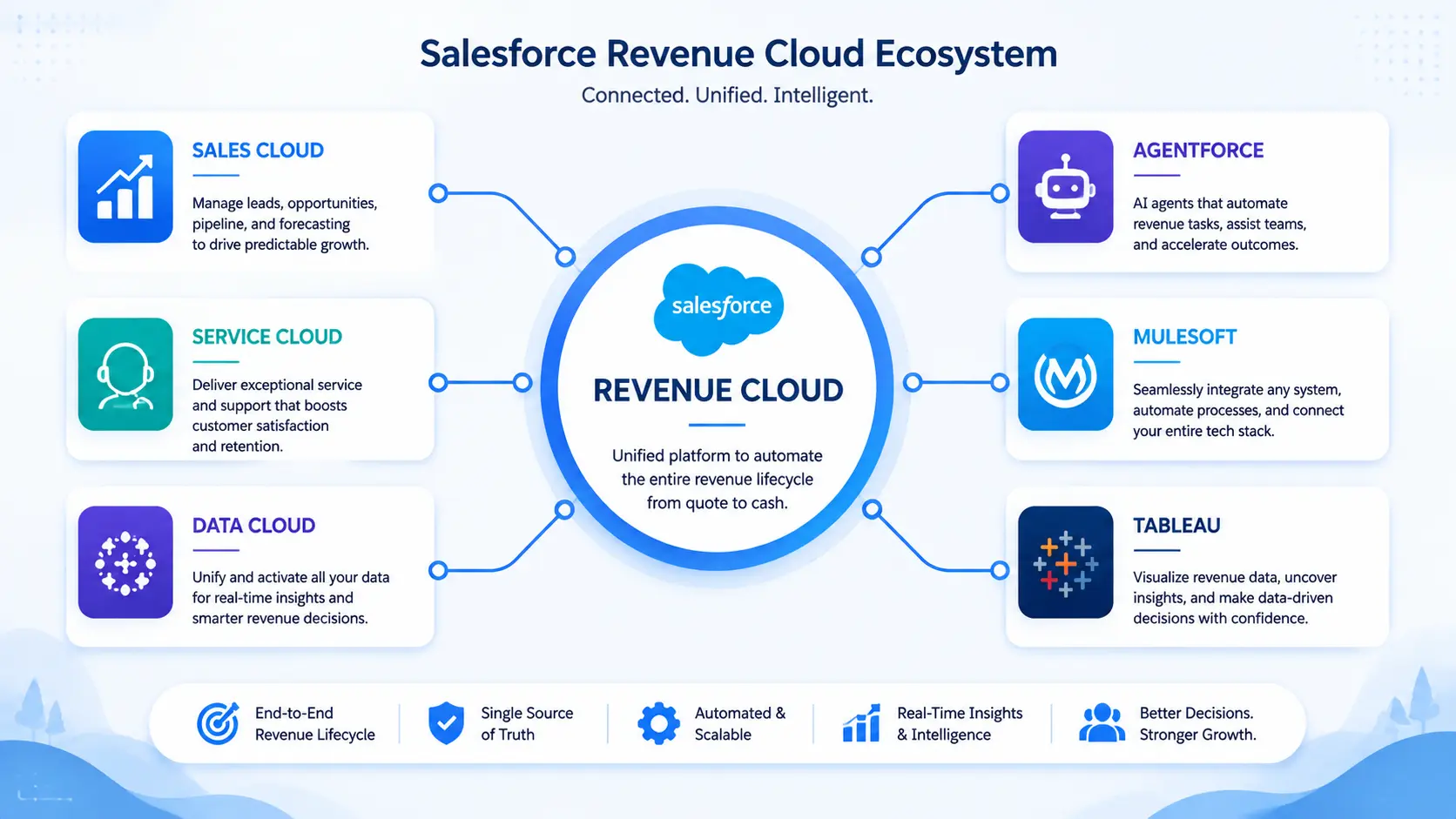
Salesforce is uniquely positioned to fix this because it isn’t just a CRM anymore — it’s a revenue platform. With Sales Cloud, Service Cloud, Salesforce Revenue Cloud, Flow, Data Cloud, and Agentforce all sitting on one metadata layer and one data model, Salesforce lets you automate the entire lead-to-cash lifecycle instead of automating each department in isolation.
This guide is written for Salesforce architects, RevOps leaders, sales operations teams, admins, and CIOs who need a practical, technically grounded reference — not a marketing pitch — on how to design, build, and scale RevOps automation inside Salesforce in 2026.
What is RevOps?
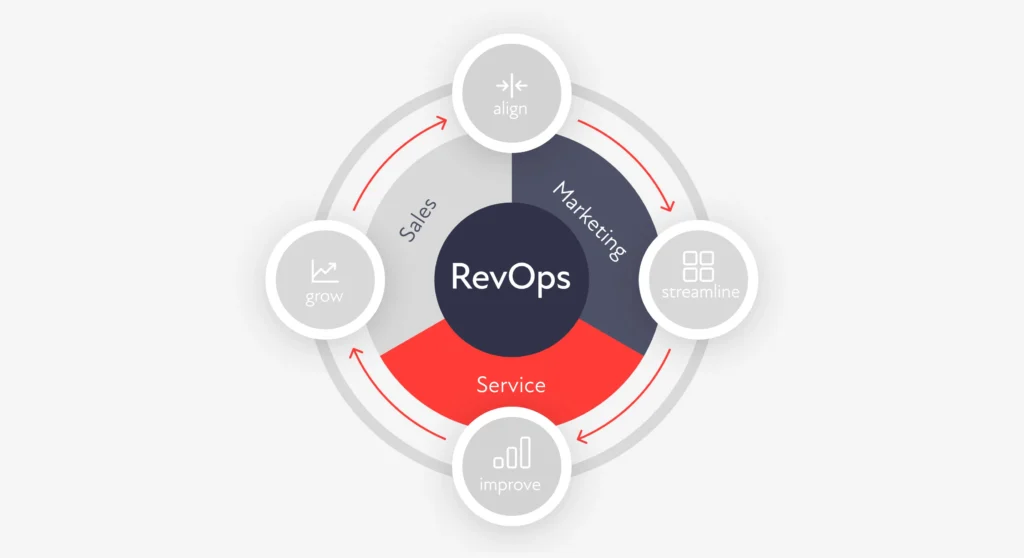
Revenue Operations (RevOps) is the operating model that unifies marketing, sales, customer success, and finance operations under one team, one data model, and one set of shared metrics — instead of each function running its own tools, processes, and definitions of “pipeline” or “revenue.”
A Short History
RevOps emerged in the mid-2010s as SaaS companies realized that Sales Ops, Marketing Ops, and Customer Success Ops optimizing separately created friction at every handoff. A lead qualified by marketing didn’t map to sales’ definition of an opportunity. A closed-won deal didn’t automatically become a provisioned, billed customer. By the early 2020s, RevOps had matured from a “nice to have” into a formal function reporting directly to the CRO or CFO in most high-growth companies.
Traditional Sales Ops vs. RevOps
| Dimension | Traditional Sales Ops | RevOps |
|---|
| Scope | Sales team only | Marketing, sales, CS, finance |
| Data ownership | Siloed per team | Unified data model |
| Metrics | Pipeline, quota attainment | Full-funnel: CAC, LTV, NRR, churn |
| Systems | CRM only | CRM + CPQ + Billing + ERP + Analytics |
| Automation focus | Lead routing, forecasting | End-to-end lead-to-cash automation |
| Reporting to | VP of Sales | CRO / CFO |
Benefits of a RevOps Model
- A single source of truth for pipeline, revenue, and customer data
- Faster quote-to-cash cycles because handoffs are automated, not manual
- Consistent forecasting because every team uses the same definitions
- Lower customer acquisition cost through better lead routing and qualification
- Higher net revenue retention because renewals and expansion are proactively managed
Real example: A mid-market SaaS company that unifies its lead scoring, CPQ approvals, and renewal alerts inside Salesforce typically cuts quote turnaround time from days to hours and reduces revenue leakage caused by missed renewal dates or manual billing errors.
What is RevOps Automation?
RevOps automation is the practical execution layer of the RevOps model. It’s where workflow automation, business rules, approvals, and AI are applied to every stage of the revenue lifecycle so that people only get involved for judgment calls — not repetitive data entry.
Quick answer: RevOps automation in Salesforce is the use of Flow, Approval Processes, CPQ, Billing, and Agentforce AI agents to automate the lead-to-cash lifecycle — lead routing, quoting, pricing approval, order creation, billing, revenue recognition, and renewals — without manual handoffs between systems.
Core components of RevOps automation include:
- Workflow automation — record-triggered and scheduled processes that move records through stages automatically
- Business rules engines — pricing logic, discount thresholds, and eligibility rules enforced consistently
- Approval automation — multi-step, condition-based approval chains for discounts, contracts, and non-standard terms
- CPQ automation — guided selling, automated bundling, and quote generation
- Billing automation — invoice generation, tax calculation, dunning, and payment application
- Renewal automation — automated renewal quote generation and expiration alerts
- Forecasting automation — AI-assisted, real-time forecast rollups instead of manual spreadsheet forecasting
- Revenue recognition automation — rule-based recognition schedules that comply with ASC 606 / IFRS 15
Why Salesforce is the Best RevOps Platform
Salesforce’s advantage isn’t any single product — it’s that every product shares the same underlying data model, security model, and automation engine.
| Product | Role in RevOps |
|---|
| Sales Cloud | Lead, account, opportunity, and pipeline management |
| Service Cloud | Post-sale support and case management feeding customer health scores |
| Salesforce Revenue Cloud | Unified CPQ, billing, and revenue lifecycle management |
| Revenue Cloud Advanced | Advanced pricing, contract lifecycle, and AI-driven revenue automation, built on Agentforce |
| Salesforce CPQ | Legacy/standard configure-price-quote engine (being extended by Revenue Cloud Advanced) |
| Billing | Subscription, usage, and one-time billing, invoicing, and payments |
| Salesforce Flow | The declarative automation engine underpinning nearly all RevOps workflows |
| Data Cloud (Data 360) | Unifies data from any source into a single customer profile that grounds AI decisions |
| Agentforce | Autonomous AI agents that execute revenue tasks — qualifying leads, drafting quotes, flagging renewal risk |
| MuleSoft | Integration layer connecting Salesforce to ERP, warehouse, and finance systems |
| Slack | Real-time approval notifications and deal-desk collaboration |
| Tableau | Revenue intelligence dashboards and forecasting visualization |
| Einstein AI | Predictive scoring, forecasting, and recommendations embedded across clouds |
Because these products share one object model (Lead, Account, Opportunity, Quote, Order, Asset, Contract), automation built in one area — say, an approval process on a Quote — can trigger downstream actions in Billing or Service Cloud without custom integration code. That’s what makes Salesforce structurally different from stitching together a CRM, a separate CPQ tool, and a separate billing platform from three different vendors.
Salesforce RevOps Architecture
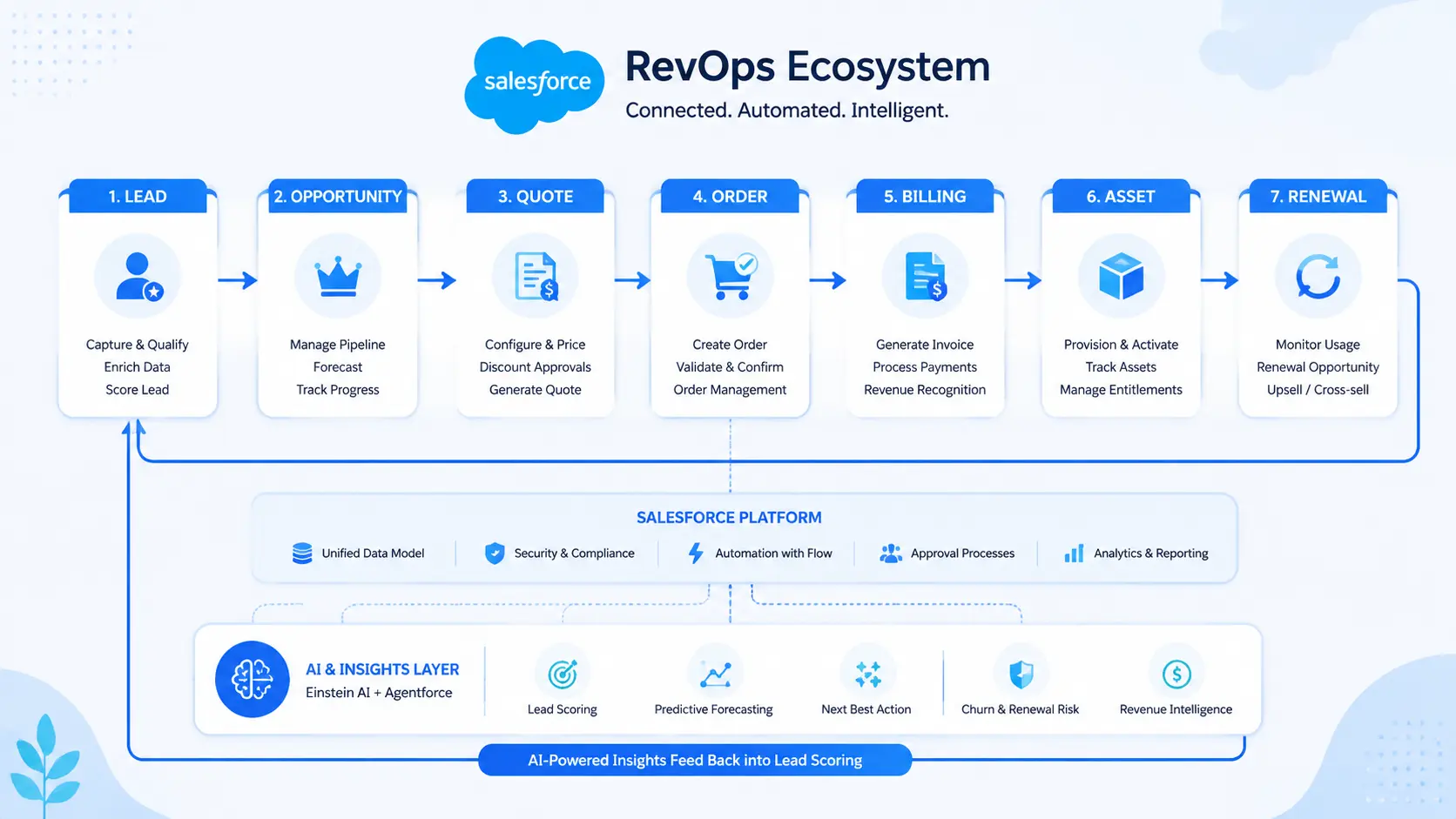
A mature Salesforce RevOps architecture connects every stage of the customer lifecycle through a single data spine. Here’s the logical flow, expressed as a textual architecture map (ready to be converted into an illustration):
LEAD
  └─▶ Lead Scoring & Routing (Flow / Agentforce Sales Agent)
        └─▶ OPPORTUNITY (Sales Cloud)
              └─▶ QUOTE (Revenue Cloud / CPQ)
                    ├─▶ Pricing Engine (Pricing Procedures)
                    ├─▶ Discount Approval (Approval Automation)
                    └─▶ Contract Lifecycle (CLM)
                          └─▶ ORDER (Order Management)
                                └─▶ BILLING (Revenue Cloud Billing)
                                      ├─▶ Invoice Generation
                                      ├─▶ Payment Processing
                                      └─▶ Revenue Recognition (ASC 606 / IFRS 15)
                                            └─▶ ASSET (Installed Product / Subscription)
                                                  └─▶ RENEWAL & UPSELL (Renewal Automation)
                                                        └─▶ CUSTOMER SUCCESS (Service Cloud)
                                                              └─▶ ANALYTICS (Tableau / Reports & Dashboards)
                                                                    └─▶ AI LAYER (Einstein / Agentforce — feeds insight back to Lead & Opportunity stages)
This is a closed loop, not a linear pipeline: analytics and AI feed insight back into lead scoring and pricing decisions, which is what separates a mature RevOps architecture from a simple sales funnel.
RevOps Automation Use Cases
| Use Case | What Gets Automated |
|---|
| Lead Routing | Territory- and score-based assignment rules via Flow or Agentforce |
| Quote Approval | Multi-tier approval chains based on discount thresholds |
| Pricing Automation | Rule-based pricing procedures instead of manual price lookups |
| Discount Approval | Conditional routing to deal desk or finance based on margin impact |
| Subscription Billing | Recurring invoice generation on defined billing schedules |
| Usage Billing | Consumption-based rating and invoicing for metered products |
| Invoice Automation | Auto-generation, tax calculation, and delivery of invoices |
| Renewals | Auto-created renewal opportunities and quotes before contract expiry |
| Partner Sales | Automated partner deal registration and margin calculation |
| Revenue Recognition | Scheduled recognition entries tied to delivery or usage milestones |
| Contract Lifecycle | Clause libraries, redlining, and e-signature routing |
| Self-Service Ordering | Customer-facing order and upgrade flows via Experience Cloud |
| AI Sales Assistant | Agentforce agents drafting outreach, summarizing calls, prioritizing pipeline |
| Customer 360 | Unified profile combining sales, service, billing, and product usage data |
| ERP Integration | Bi-directional sync of orders, invoices, and payments with ERP |
| Warehouse Integration | Inventory reservation and fulfillment status updates |
| Inventory Visibility | Real-time stock levels surfaced during quoting |
| Manufacturing Automation | Bill-of-materials-driven configuration and production triggers |
| Finance Automation | Automated reconciliation between CRM revenue and GL entries |
| Procurement Automation | Purchase requisition and vendor approval workflows |
| Logistics Automation | Shipment tracking and delivery status synced back to the Order record |
Salesforce Flow for RevOps
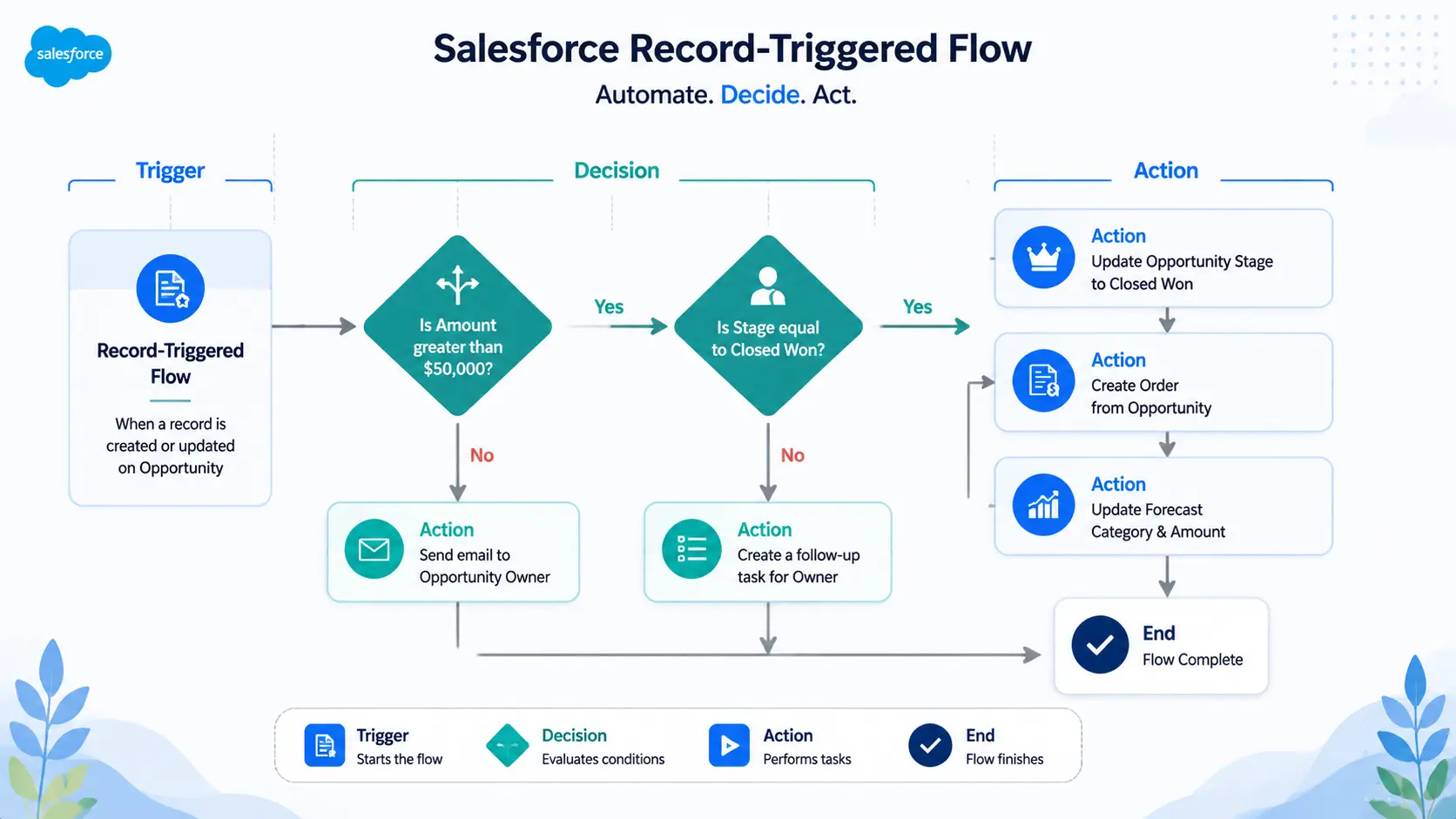
Salesforce Flow is the automation backbone of RevOps. Nearly every use case above is built using one or more Flow types, combined with Approval Processes for human-in-the-loop decisions.
Flow Types Used in RevOps
- Record-Triggered Flows — fire when a Lead, Opportunity, Quote, or Order is created or updated (e.g., auto-route a lead the moment it’s created)
- Scheduled Flows — run on a recurring basis (e.g., nightly job that creates renewal opportunities 90 days before contract end)
- Screen Flows — guided, interactive processes for reps (e.g., a guided quoting wizard)
- Autolaunched Flows — invoked by other automation or Apex, often used as reusable sub-flows (e.g., a “calculate discount tier” sub-flow called from multiple parent flows)
- Approval Automation — Approval Processes (declarative) or Flow-based approvals for discount, contract, and pricing exceptions
Best Practices
- Use one record-triggered flow per object where possible to avoid unpredictable execution order
- Separate fast-field-update logic (before-save flows) from logic that needs related records (after-save flows)
- Build reusable sub-flows for shared logic like discount calculation or tax lookup
- Document entry/exit criteria for every approval step
- Use Flow Trigger Explorer to manage execution order across multiple flows on the same object
Common Mistakes
- Stacking multiple record-triggered flows on the same object with no defined order
- Using Flow for high-volume, complex calculations that would be more efficient in Apex
- Hardcoding record IDs or user IDs instead of using custom metadata
- Skipping bulkification testing, causing governor limit failures during data loads
- No error-handling or fault paths, leaving records in a broken state silently
AI in RevOps
AI has moved from “nice dashboard insight” to active participant in the revenue process.
- Agentforce — Salesforce’s platform for autonomous AI agents. In a RevOps context, Agentforce agents can qualify inbound leads, research accounts, draft personalized outreach, generate quotes within guardrails, flag renewal risk, and escalate to a human when confidence is low or the customer asks for one.
- Einstein AI — powers predictive scoring (lead score, opportunity score), forecasting, and next-best-action recommendations embedded directly in Sales Cloud and Service Cloud.
- Predictive Analytics — forecasts pipeline conversion and revenue based on historical patterns, not just rep-entered close dates.
- Revenue Forecasting — AI-adjusted forecasts that flag deals likely to slip based on engagement signals.
- Sales Coaching — call summaries and conversation intelligence that highlight coaching moments.
- AI Recommendations — next-best-action suggestions surfaced directly on the Opportunity or Account record.
- Email Automation — AI-drafted follow-ups grounded in CRM context.
- Meeting Summaries — automatic capture and logging of call notes into the Opportunity timeline.
- Autonomous Agents — agents that don’t just recommend an action but execute it (e.g., automatically creating a renewal quote and notifying the account owner).
Featured Snippet Answer: Agentforce differs from traditional Einstein AI because Einstein primarily scores and recommends, while Agentforce agents can autonomously execute multi-step actions — like qualifying a lead, drafting an email, and routing it to a rep — grounded in real-time Salesforce and Data Cloud data.
The Future of AI in RevOps
Expect deterministic guardrails (explicit if/then logic layered on top of LLM reasoning) to become standard, so agents behave predictably in regulated, revenue-critical workflows — a trend already visible in how Agentforce combines reasoning with scripted control for high-stakes actions like pricing and contract terms.
RevOps KPIs
| KPI | What It Measures |
|---|
| CAC (Customer Acquisition Cost) | Total cost to acquire a new customer |
| LTV (Lifetime Value) | Total revenue expected from a customer relationship |
| MRR / ARR | Monthly / Annual Recurring Revenue |
| NRR (Net Revenue Retention) | Revenue retained + expanded from existing customers |
| GRR (Gross Revenue Retention) | Revenue retained excluding expansion |
| Pipeline Velocity | Speed at which deals move through the pipeline |
| Sales Velocity | Revenue generated per unit of time |
| Win Rate | Percentage of opportunities closed-won |
| Average Deal Size | Mean value of closed-won deals |
| Forecast Accuracy | Variance between forecasted and actual revenue |
| Revenue Leakage | Revenue lost to pricing errors, missed renewals, or billing gaps |
| Quote Cycle Time | Time from quote creation to customer acceptance |
| Renewal Rate | Percentage of contracts renewed on schedule |
| Churn | Percentage of customers or revenue lost |
| DSO (Days Sales Outstanding) | Average days to collect payment after invoicing |
Common Challenges
- Poor data quality — duplicate and incomplete records undermine every automation built on top of them
- Duplicate records — multiple Lead/Contact/Account records fragment the customer view
- Manual processes — spreadsheet-based quoting or approvals that don’t scale
- Disconnected systems — CRM, ERP, and billing platforms that don’t share real-time data
- Complex approval chains — over-engineered, unclear approval paths that slow deals down
- Pricing errors — inconsistent discounting applied outside of governed pricing rules
- CPQ problems — bloated product catalogs and unmaintained pricing rules
- Billing delays — manual invoice generation causing DSO to creep up
- ERP integration gaps — batch syncs instead of real-time integration, creating stale data
- Legacy systems — technical debt from earlier CPQ/CRM implementations that resist change
Best Practices
- Governance — establish a clear owner for automation logic, naming conventions, and change approval
- Automation strategy — map the full lead-to-cash process before building any single flow
- Security — enforce field-level security and sharing rules aligned to RevOps data sensitivity
- Permissions — use permission sets, not profile sprawl, to manage access at scale
- Scalability — design flows and objects to handle 10x current data volume
- Naming conventions — standardize flow, field, and automation naming across the org
- Documentation — maintain a living architecture diagram and automation inventory
- Testing — build and maintain regression test plans for every critical automation
- Monitoring — use Flow error emails, debug logs, and dashboards to catch failures early
- Change management — use sandboxes, version control, and CI/CD for all metadata changes
- Center of Excellence — a cross-functional RevOps CoE that governs Salesforce as a shared platform, not a sales-only tool
Industry Examples
- Manufacturing — Configure-to-order product catalogs combined with real-time inventory visibility mean sales reps quote only what can actually be built and shipped, reducing order cancellations.
- Healthcare — Automated approval chains route contract terms through compliance review before a quote can be sent, keeping every deal audit-ready.
- SaaS — Usage-based billing automation ties invoice amounts directly to product consumption data, eliminating manual usage reconciliation at month-end.
- Financial Services — Approval automation enforces regulatory discount and disclosure requirements automatically, rather than relying on reps to remember policy.
- Retail — Renewal and reorder automation for wholesale accounts triggers replenishment quotes based on historical purchase cadence.
- Wholesale Distribution — ERP-integrated order management gives sales visibility into real-time stock and lead times at the point of quoting.
- Logistics — Automated shipment status updates sync from carrier systems back into the Order record, so customer success sees delivery status without leaving Salesforce.
Implementation Roadmap
- Discovery — interview sales, finance, and CS stakeholders to map current-state pain points
- Assessment — audit existing Salesforce org, integrations, and technical debt
- Data Audit — identify duplicate records, missing fields, and data quality gaps
- Process Mapping — document the target lead-to-cash process end-to-end
- Architecture — design the object model, automation strategy, and integration points
- Implementation — build Flows, CPQ/Revenue Cloud configuration, and integrations in sandbox
- Testing — run UAT with real sales, finance, and CS users, not just admins
- Training — role-based enablement for reps, deal desk, and finance teams
- Go Live — phased rollout with a hypercare support window
- Optimization — review automation performance and KPIs 30/60/90 days post-launch
- Continuous Improvement — quarterly governance reviews as the business and Salesforce releases evolve
Why Cloudy Wave
Cloudy Wave works with mid-market and enterprise teams to design and implement RevOps automation on Salesforce — from initial architecture through Salesforce Revenue Cloud and Revenue Cloud Advanced rollouts, CPQ migration, Billing configuration, and ERP integration.
Our team has hands-on experience configuring Agentforce Revenue Management agents inside real production orgs, building governed pricing and approval logic in Revenue Cloud, and connecting Salesforce to manufacturing, distribution, and finance systems so that revenue data flows in real time rather than in nightly batches. We approach every engagement the way this guide is written: architecture first, automation second, and AI layered on top of clean data — not as a substitute for it.
Whether you’re migrating from legacy CPQ to Revenue Cloud Advanced, standing up your first Center of Excellence, or integrating Salesforce with your ERP and warehouse systems, Cloudy Wave brings the Salesforce Revenue Cloud, Agentforce, and RevOps expertise to get it right the first time.
Conclusion
RevOps automation in Salesforce isn’t a single project — it’s an operating model. It starts with unifying data across marketing, sales, finance, and customer success, and it matures through automation that removes manual handoffs at every stage of the lead-to-cash lifecycle: routing, quoting, approvals, billing, revenue recognition, and renewals.
Salesforce’s advantage is structural: Sales Cloud, Revenue Cloud, Flow, Data Cloud, and Agentforce all share one data model, which means automation compounds instead of fragmenting. As Agentforce and Revenue Cloud Advanced continue to mature through 2026, expect the next wave of RevOps automation to shift from “recommend and let a human decide” to “autonomously execute within governed guardrails” — with humans focused on judgment calls, exceptions, and relationships, not data entry.
The companies that win in this next phase won’t be the ones with the most tools. They’ll be the ones with the most connected, most automated, and most governed revenue engine — built on a platform designed to support all of it natively.
Ready to build an automated revenue engine on Salesforce? Talk to Cloudy Wave’s Salesforce Revenue Cloud team about a RevOps automation assessment.







 Salesforce ERP
 ERP + CRM Platform
  Inventory Management
  Warehouse Management
  Order Management
  Vendor Management
  Logistics Management
  BOM Management
  Order Fulfillment
  Business Operations
  SaaS Platform for Operations
  Salesforce Cloud ERP Platform
  Xero
Xero
 Zoho books
 Quickbooks
 Shopify
 Acumatica
 SAP
SAP
 Odoo
Odoo
 NetSuite
 Microsoft Dynamics 365
 Sage
Sage



 Agentforce Revenue Management
 Agentforce Revenue Management + Billing
  Salesforce CPQ
 Salesforce Advanced Billing
  Migrate from CPQ to ARM
  Managed Services
 Salesforce Implementation
 Revenue Cloud Implementation
 ServiceNow Consulting Services
 Zoho CRM implementation
 MuleSoft Integration
 Workato Integration
 Microsoft
 Data Cloud
 Tableau

 ·
August 5, 2026
·
14 min read
·
August 5, 2026
·
14 min read