


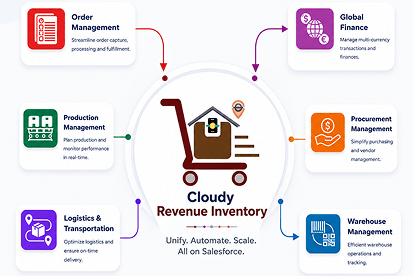



 Salesforce ERP
 ERP + CRM Platform
  Inventory Management
  Warehouse Management
  Order Management
  Vendor Management
  Logistics Management
  BOM Management
  Order Fulfillment
  Business Operations
  SaaS Platform for Operations
  Salesforce Cloud ERP Platform
  Xero
Xero
 Zoho books
 Quickbooks
 Shopify
 Acumatica
 SAP
SAP
 Odoo
Odoo
 NetSuite
 Microsoft Dynamics 365
 Sage
Sage



 Agentforce Revenue Management
 Agentforce Revenue Management + Billing
  Salesforce CPQ
 Salesforce Advanced Billing
  Migrate from CPQ to ARM
  Managed Services
 Salesforce Implementation
 Revenue Cloud Implementation
 MuleSoft Integration
 Microsoft
 Data Cloud
 Tableau

Trusted by Leading Companies
Our Globally 80+ Clients.










10+
Years of Salesforce Excellence

80+
Happy Clients

95%
Implementation Success Rate

Certified Salesforce
ISV & Consulting
Partner
ISV & Consulting
Partner
The Problem
Your Order Fulfillment System Is Running on Guesswork
Disconnected systems, manual pick-and-pack processes, and zero real-time visibility into fulfillment status are costing you deliveries, customers, and margins every single day.
Manual Pick & Pack
Paper pick lists and manual packing lead to wrong items, wrong quantities, and the returns, credits, and unhappy customers that follow.

No Real-Time Fulfillment Visibility
You only learn an order didn't ship after the customer calls. Without live status, your team is always reacting to escalations instead of preventing them.

Disconnected Systems
Your orders, inventory, and shipping tools don't talk to each other. The gaps between systems are where mis-picks, delays, and lost orders live.

Overselling & Allocation Conflicts
Without proper inventory allocation, two orders get promised the same stock — leading to stockouts, backorders, and broken delivery promises.

Partial Fulfillment Blind Spots
When partial shipments aren't tracked line by line, customers get incomplete deliveries and your team loses sight of what's still owed.
No Source-of-Truth for Order Status
Sales, warehouse, and finance each have a different view of where an order stands, so nobody can give the customer a straight answer.

Disconnected Fulfillment & Billing
When delivery doesn't trigger invoicing, billing is delayed or wrong — stretching your cash collection cycle and frustrating customers.

Poor Exception Handling
Damaged shipments, returns, and special-handling orders get lost in inboxes with no structured way to flag and follow up.
The Solution
What does an Our Order Fulfillment System do?
Cloudy Business Ops 360 is a Salesforce-native Order Fulfillment System that helps businesses manage inventory allocation, picking, packing, shipping, delivery tracking, and invoicing from a single platform. Gain real-time visibility and automate fulfillment workflows from order allocation to final delivery.

Real-Time Fulfillment Visibility
Every allocation, pick, pack, shipment, and delivery — visible in real time across warehouse, sales, and finance.

One-Click Order Fulfillment
Generate a fulfillment record directly from a sales order, pulling committed inventory and line items across automatically.

Inventory Allocation & Commitment
Reserve specific stock for each order before fulfillment, preventing overselling and broken delivery promises.

Line-Level Pick-Pack-Ship
Track exactly what was fulfilled, in what quantity, and from which warehouse and allocation, line by line.

Fulfillment-to-Invoice Automation
Once an order is delivered, fulfillment status can trigger invoice finalization and customer notifications automatically.
Fulfillment Ops Flow
Inventory Allocated to Order
Specific stock reserved exclusively for the sales order
↓
Order Fulfillment Generated
Created from the sales order with committed inventory and line items
↓
Picked & Packed
Items picked from allocation and marked Packed
↓
Shipped & Delivered
Outbound shipment created; status tracked to Delivered
↓
Invoice Triggered & Synced
Delivery confirmation finalizes invoicing and notifications
Platform Features
Everything Your Order Fulfillment System Needs to Perform
Every feature in Cloudy Business Ops 360 is purpose-built for fulfillment accuracy, inventory control, and delivery visibility - not bolted on as an afterthought.

Real-Time Fulfillment Tracking
Live status on every order through Packed, Shipped, and Delivered. No more "did it ship?" — just instant, accurate answers.
✦ Eliminate blind spots that cause delivery delays

One-Click Order Fulfillment
Generate a fulfillment record straight from a sales order, with committed inventory and line items carried across automatically.
✦ Turn an order into a fulfillment in seconds

Inventory Allocation & Commitment
Reserve specific quantities for each order before fulfillment, so committed stock is held exclusively and overselling is prevented.
✦ Never promise the same stock twice

Line-Level Fulfillment
Order fulfillment line items tie each item or variant to its allocation and warehouse source, recording exactly what shipped and from where.
✦ Know precisely what was fulfilled

Pick-Pack-Ship Status Flags
Checkbox-driven Packed?, Shipped?, and Delivered? flags keep everyone aligned and trigger downstream invoicing and notifications.
✦ Drive the whole flow from simple checkpoints
Partial Fulfillment Management
Fulfill what's available now and keep the remainder pending with the Partial Fulfillment flag, so nothing falls through the cracks.
✦ Handle split deliveries without losing the thread

Outbound Shipment Integration
Create outbound shipments directly from fulfillment, capturing carrier, tracking number, and shipping address for delivery visibility.
✦ Give customers tracking from dock to door

Multi-Warehouse Fulfillment
Fulfill orders from the right warehouse and storage bin based on allocation, optimizing picking and distribution.
✦ Ship from the smartest location every time

Exception & Follow-Up Handling
Flag orders needing special handling — damaged shipments or return requests — with the Requires Follow-up flag for structured resolution.
✦ Catch and resolve exceptions fast

Returns & Reverse Logistics
Process customer returns linked to the original order, inspect and restock goods, and update inventory in real time.
✦ Close the loop on every return cleanly

Fulfillment-to-Invoice Automation
Delivery confirmation can automatically finalize invoices and trigger customer notifications, compressing the order-to-cash cycle.
✦ Bill the moment an order is delivered

Operational Analytics & KPI Dashboards
Pre-built dashboards track fulfillment rates, on-time delivery, accuracy, and cycle times so every team sees the metrics that matter.
✦ Make decisions based on real fulfillment data
Comparison
Legacy Fulfillment Systems vs. Cloudy Business Ops 360
The platform architecture defines your operational ceiling. Here's what you're getting — and what you're leaving behind.
| Capability | Legacy / On-Premise Fulfillment System |  Cloudy Business Ops 360 Cloudy Business Ops 360 |
|---|---|---|
| Deployment Time | ✗3–9 months including hardware procurement | ✓14-day average cloud go-live |
| Real-Time Visibility | ~Delayed updates, batch-based reporting | ✓Live allocation, pick, pack, ship, and delivery status |
| Order Fulfillment | ~Manual entry, separate systems | ✓One-click fulfillment from sales orders |
| Inventory Allocation | ✗No reservation — overselling risk | ✓Stock committed per order before fulfillment |
| Partial Fulfillment | ~Hard to track | ✓Line-level partial fulfillment with pending tracking |
| Scalability | ✗Hardware upgrades required for growth | ✓Elastic cloud scaling — no infrastructure changes |
| System Updates | ✗Manual upgrades, costly IT projects | ✓Automatic updates, always on the latest version |
| Integrations | ~Custom development, high maintenance | ✓Pre-built connectors for Xero, Zoho Books, QuickBooks, Salesforce |
| Fulfillment-to-Invoice | ~Disconnected, manual billing hand-off | ✓Delivery can auto-trigger invoicing and notifications |
| Total Cost of Ownership | ✗High — hardware, maintenance, upgrades compound | ✓40–60% lower TCO vs. on-premise alternatives |
Clients Feedback
Don't Just Take Our Word for It

Cloudy Wave played a key role in building our complex financial operations with Salesforce ERP software. Their deep technical expertise, combined with a responsive and reliable approach, helped us streamline processes and scale efficiently

Over the past 8 years, Cloudy Wave has consistently delivered exceptional value. Their expertise in Salesforce ERP software, combined with a reliable and forward-thinking approach, has transformed our operations and enhanced our overall business performance.

We’ve partnered with Cloudy Wave for over 8 years, and their expertise in Salesforce ERP software has been exceptional. They consistently deliver high-quality solutions and proactively recommend improvements that have enhanced our operations and customer experience.