





 Salesforce ERP
 ERP + CRM Platform
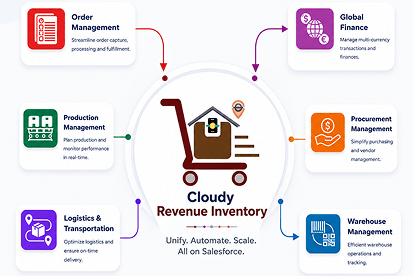
  Inventory Management
  Warehouse Management
  Order Management
  Vendor Management
  Logistics Management
  BOM Management
  Order Fulfillment
  Business Operations
  SaaS Platform for Operations
  Salesforce Cloud ERP Platform
  Xero
Xero
 Zoho books
 Quickbooks
 Shopify
 Acumatica
 SAP
SAP
 Odoo
Odoo
 NetSuite
 Microsoft Dynamics 365
 Sage
Sage



 Agentforce Revenue Management
 Agentforce Revenue Management + Billing
  Salesforce CPQ
 Salesforce Advanced Billing
  Migrate from CPQ to ARM
  Managed Services
 Salesforce Implementation
 Revenue Cloud Implementation
 ServiceNow Consulting Services
 Zoho CRM implementation
 MuleSoft Integration
 Workato Integration
 Microsoft
 Data Cloud
 Tableau

Powerful Features for Survey Success
Cloudy Survey & Form
From drag-and-drop building to enterprise-grade security, explore the 14 powerful features that make Cloudy Survey & Form the top choice.
 Build
Build

Drag-and-Drop Form Builder
Design, structure, and customize forms visually. No coding required—simply select components intuitively.

Diverse Question Types
Access an extensive library of input fields, from simple multiple-choice selections to complex rating scales.

Survey Editor & Flow
Precise control over how questions are structured, ordered, and displayed for a smooth experience.

Branding & Customization
Align the survey’s visual design with your corporate identity for a cohesive, professional experience.

Header & Footer Override
Tailor branding, instructions, or compliance content specifically for individual surveys.
 Logic & Flow

Conditional Logic
Adjust the survey flow based on inputs. Respondents only see questions that matter to them.

Time Limit & Auto-Submit
Perfect for quizzes. Ensure responses are captured within a fixed timeframe with auto-submit.

Response Redirection
Design custom success messaging or redirect respondents to external pages for follow-up actions.
 Security

Data Security & Compliance
Built natively on Salesforce. Inherits enterprise-grade security to keep sensitive information protected.

Survey Lifecycle Control
Full administrator control over when a survey is active, who can access it, and response organization.

Response Integrity
Ensures every submission is authentic, secure, and processed without delay to maintain data accuracy.
 Reach
Reach

Multi-Channel Distribution
Seamlessly distribute surveys across various channels to reach your audience effectively.

Email Templating
Design, personalize, and schedule survey invitation emails within the platform to ensure clear communication.

Advanced Survey Tracking
Enhanced in-survey controls, external tracking integrations, and customizable labels for optimized data.

