










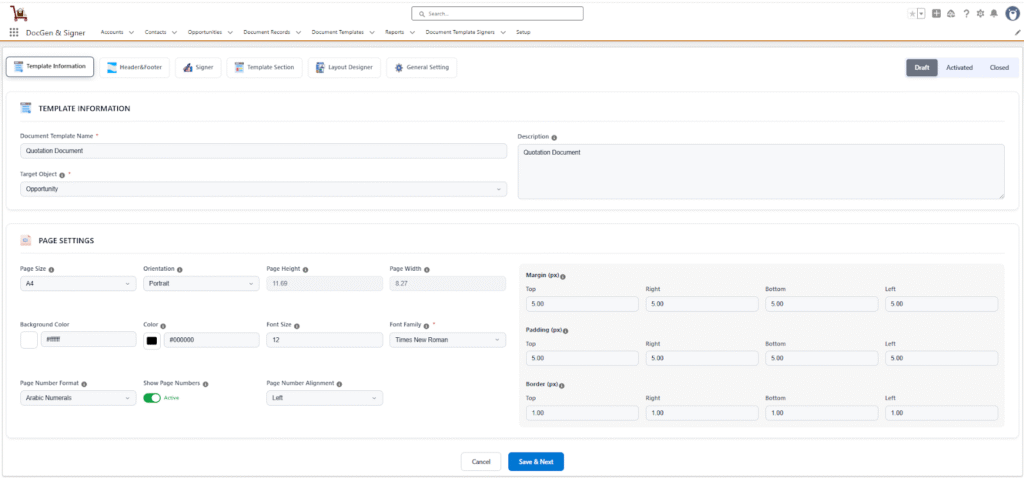
 Template Information
The Template Information section is used to identify and configure the template along with its associated Salesforce object.
- Document Template Name → The unique name of the document template used to identify it.
- Description → Additional details about the template (e.g., purpose, usage).
- Target Object → The Salesforce object (e.g., Account, Opportunity) on which this template will be generated
Page Settings
The Page Settings define the document’s layout, style, spacing, and numbering.
General Settings
- Page Size → Defines the paper size (e.g., A4, Letter).
- Orientation → Page layout orientation: Portrait (vertical) or Landscape (horizontal).
- Page Height → Auto-filled based on the selected page size.
- Page Width → Auto-filled based on the selected page size.
Style Settings
- Background Color → Sets the page background color (default: #ffffff).
- Color → Sets the text color for the document (default: #000000). But not display while creating document. It will display when preview or send th
- Font Size → Defines the size of the text (default: 12).
- Font Family → Defines the font style for the document (e.g., SansSerif, Serif, Times).
Page Number Settings
- Page Number Format → Defines the style of numbering for pages (e.g., Arabic Numerals 1,2,3…, Roman Numerals I, II, III…).
- Show Page Numbers → Used to set the page numbering.
- Page Number Alignments → Defines the alignment of page numbers within the document, allowing users to position them to the left, center, or right as desired.
After clicking Save and Next, you will be navigated to the Header and Footer .
 SEE ALSO :
___👉Add header and footer
___👉Add signers
___👉Template section Creation