










 Advanced Customization (Related List)
The Advanced Customization option provides full creative freedom to design your own template for displaying data. Instead of being restricted to a standard table, you can create a completely customized layout. This option is similar to the Content Section type but is limited to selecting a single child object.
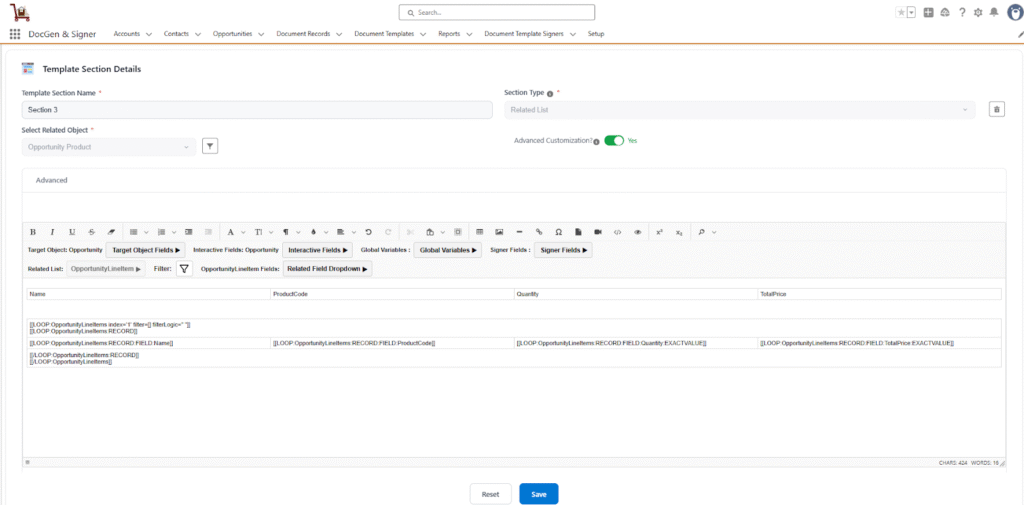
To design your document, select Related List as the section type and enable the Advanced Customization.
- Target Object → The Salesforce object (e.g., Account, Opportunity) on which this template will be generated.The template can access all fields from this object, including reference (lookup) fields, and traverse relationship paths up to five levels deep to retrieve data from parent records (e.g., Opportunity.Account.Owner.Contact.LastModifiedBy.Email).
You use it to add formatted text, images and dynamic fields from the target object of your document (e.g., the Opportunity, Account). - Interactive Fields → These are special dynamic fields that allow the end-user to update their values directly within the document generation workflow. This provides flexibility to adjust data, such as quantities or dates, to meet specific requirements before the final document is produced.
- Global Variables → These are predefined system values that are dynamically inserted into the document. Common examples include the current date (TODAY), the name of the user generating the document (USER.Name), organization details.
- Related List → A Related List is a section type used to display data from child objects that are related to the target object. Users can also apply filters to the selected related list object.
- Signers → These fields represent the signer details that can be inserted in between the document template wherever signer information is required.
- Serial Number – This option allows the user to add a serial number and is available when a related list object is selected.
 SEE ALSO :
____👉 Canvas