





 Salesforce ERP
 ERP + CRM Platform
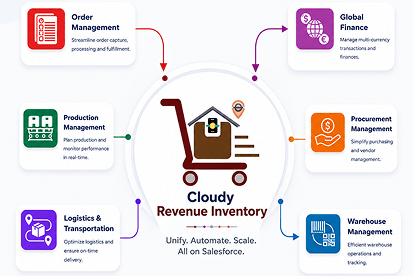
  Inventory Management
  Warehouse Management
  Order Management
  Vendor Management
  Logistics Management
  BOM Management
  Order Fulfillment
  Business Operations
  SaaS Platform for Operations
  Salesforce Cloud ERP Platform
  Xero
Xero
 Zoho books
 Quickbooks
 Shopify
 Acumatica
 SAP
SAP
 Odoo
Odoo
 NetSuite
 Microsoft Dynamics 365
 Sage
Sage



 Agentforce Revenue Management
 Agentforce Revenue Management + Billing
  Salesforce CPQ
 Salesforce Advanced Billing
  Migrate from CPQ to ARM
  Managed Services
 Salesforce Implementation
 Revenue Cloud Implementation
 ServiceNow Consulting Services
 Zoho CRM implementation
 MuleSoft Integration
 Workato Integration
 Microsoft
 Data Cloud
 Tableau

 Product Features
Cloudy DocGen & Signer provides a comprehensive suite of features designed to streamline every aspect of document management, from creation through signing and tracking.
- Templates & Document Creation
- Reusable Templates: Create and manage template libraries to ensure consistency and save time across all documents.
- Multiple Design Approaches: Choose between traditional rich-text editing and visual Canvas workspace for drag-and-drop document building.
- Pre-approved Templates: Maintain brand compliance with standardized, approved templates that reduce errors and accelerate approvals.
- Canvas Workspace – Visual Document Design
- Drag-and-Drop Interface: Build documents visually by placing fields exactly where needed.
- Interactive Components: Add checkboxes, radio buttons, and signature blocks with simple drag operations.
- Real-Time Formatting: Apply styling and formatting changes with immediate visual feedback.
- Image Integration: Upload and position images directly within the canvas workspace.
- Visual Layout Control: Structure content using flexible rows and columns with adjustable widths.
- Electronic Signature (eSignature)
- One-Click Sending: Initiate signature processes instantly from any Salesforce record.
- Digital Signing Anywhere: Enable secure signing across all devices – mobile, desktop, or tablet.
- Sending Options
- Flexible Routing: Support both sequential and parallel signing workflows for multiple recipients.
- Bulk Sending: Simultaneously send documents to multiple signers for large-scale agreements.
- Signer & Recipient Experience
- Mobile-Friendly & Responsive: Ensure seamless signing experience across all devices and platforms.
- Identity Verification: Enhance security with one-time verification codes sent to signer email addresses.
- Branding & Customization
- Custom Branding: Maintain brand consistency with logos, colors, and messaging across all signing pages and communications.
- Configurable Notifications: Customize alerts and reminders to keep signers engaged and reduce delays.
- Tracking & Notifications
- Real-Time Status Tracking: Monitor document progress with live updates on sent, viewed, signed, expired, or rejected status.
- Real-Time Status Tracking: Monitor document progress with live updates on sent, viewed, signed, expired, or rejected status.
- Automation
- Dynamic Data Population: Automatically pull information from Salesforce records and related objects.
- Multiple Field Type Support: Handle text, dates, numbers, picklists, and related records for comprehensive data mapping.
- Conditional Logic: Show or hide content dynamically based on predefined criteria or recipient data.
- Smart Automation: Automate data population, workflow routing, and notification processes.
- Security & Compliance
- Enterprise-Grade Protection: Implement OTP verification, secure signing links, and comprehensive audit trails.
- Compliance Ready: Meet regulatory requirements with tamper-evident documentation and complete activity tracking.
- Rich Text Editor
- Powerful and intuitive tool for creating, editing, and formatting dynamic, data-driven content.
- Text styling options: Bold, Italic, Headings, Lists, etc.
- Table management: Insert, delete, merge/split cells, adjust alignment and colors.
- Media insertion: Supports images, files, and links.
- Dynamic integration with Salesforce: Embed fields, related lists, and global variables.
- Customizable tables: Flexible formatting options for enhanced data presentation.
- Preview mode: Visualize content exactly as it will appear before saving or publishing.
- HTML source code editing: Advanced users can directly modify the HTML for deeper customization.
- User-friendly: Tools designed for both basic and advanced users, ensuring flexible and personalized document creation.
- Responsive Design
- Multi-Device Support – Accessible on desktop, tablet, and mobile devices.
- Adaptive Layout – Page layouts and components automatically adjust according to the available screen size.
- Mobile-Friendly Interface – Buttons, fields, menus, and other supported components are optimized for smaller screens.
- Document Interaction – Users can access supported document generation, preview, download, and signing functionality from compatible mobile and desktop devices.
- Consistent User Experience – Provides a similar and easy-to-navigate experience across different screen sizes.
 SEE ALSO :
_____👉 System Requirement
_____👉 Post-Setup Requirement