










 Response
The Response represents the data submitted by a participant after completing a survey. It captures all answers, timestamps, and related details, allowing administrators to review, analyze, and report on collected feedback. Each response is securely stored and linked to the corresponding survey, participant, and, if applicable, Salesforce records.
Purpose & Use:
- To record participants’ answers to survey questions.
- To store submission data for reporting, analytics, and follow-up actions.
- To maintain a historical record of all responses associated with each survey.
How to View Survey Responses
This guide explains how users can access and view the submitted responses for any survey inside the Survey & Form app.
Step-by-Step Instructions
- Go to the Survey & Form
- Navigate to Survey & Form from the App Launcher.

- Navigate to Survey & Form from the App Launcher.
- Open the Specific Survey
- From the top navigation, click Survey.
- Select the survey for which you want to view submitted responses.
- Click on the “Responses” Tab
- After opening the survey, select the Responses tab.
- This will display a list of all responses submitted for that survey.

Select a Particular Response
- From the Response List, click on the Response Record you want to view.
- This opens the detailed response page.
Click on the “View Response” Tab
- Inside the response record, navigate to the View Response tab.
- This tab displays the complete answers submitted by the participant, including:
- Survey introduction
- Questions
- Selected answers
- Ratings, choices, matrix responses, text inputs
- Footer message
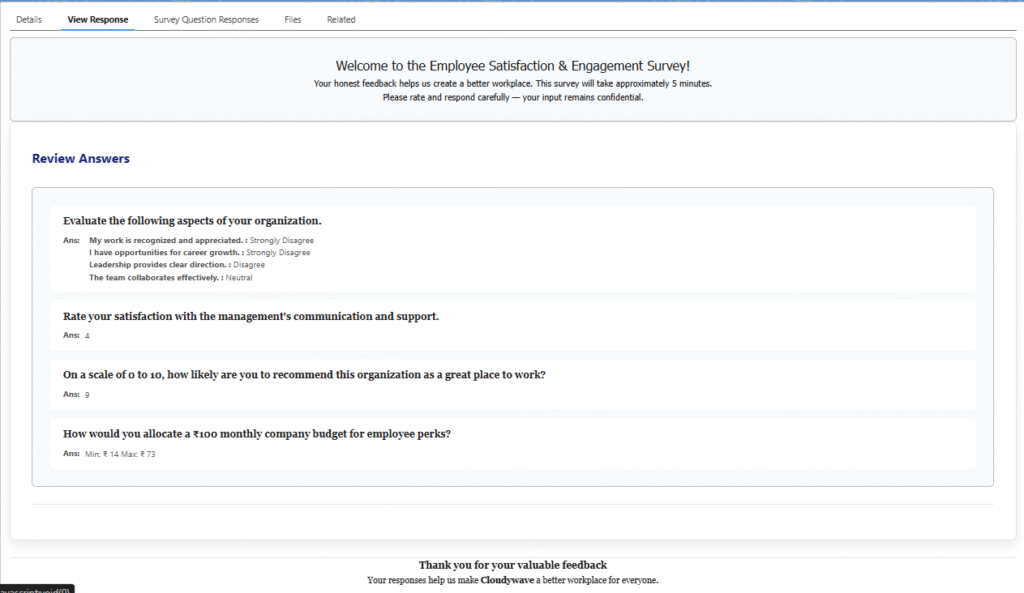
What You Will See in the View Response Page
The View Response page includes:
Survey Header
Shows the survey’s title and description.
Review Answers Section
All questions and the participant’s answers will be displayed clearly.
Footer / Thank You Message
If added, the user will see the global or survey-level thank-you text.
Purpose of View Response
- To review user-submitted answers.
- To validate accuracy and ensure data correctness.
- To support audits, analytics, or internal follow-ups.