










 Email Template
The Email Template defines the content and structure of the survey invitation email sent to participants. It includes fields for the subject, body, sender details, and dynamic elements like the Survey Link. Users can customize the message to match their branding and communication tone, ensuring a personalized and professional invitation experience. This template helps automate survey distribution while maintaining consistent and engaging email design.
- Enable Email Notifications?
- Purpose: Activates or deactivates email notifications for the survey.
- Function: When set to Active, the system will send email invitations and reminders to participants.
- Send Auto Reminders to Survey Invitation
- Purpose: Allows automatic reminder emails to be sent to participants who haven’t responded.
- Function: When enabled, reminders are sent based on the number of days specified in the “Send Reminder After (Days)” field.
- From Email Address Type
- Purpose: Defines the sender address for survey invitation emails.
- Function: Users can select a pre-configured email address or type depending on organization setup to ensure messages come from a trusted source.
- Send Reminder After (Days)
- Purpose: Specifies the delay time before an automatic reminder is sent to non-respondents.
- Function: Users enter the number of days (e.g., 3 days after invitation) for reminder scheduling.
- Invitation Email Subject
- Purpose: Defines the subject line of the survey invitation email.
- Function: This is the first text participants see in their inbox, so it should be engaging and clearly indicate the purpose of the survey.

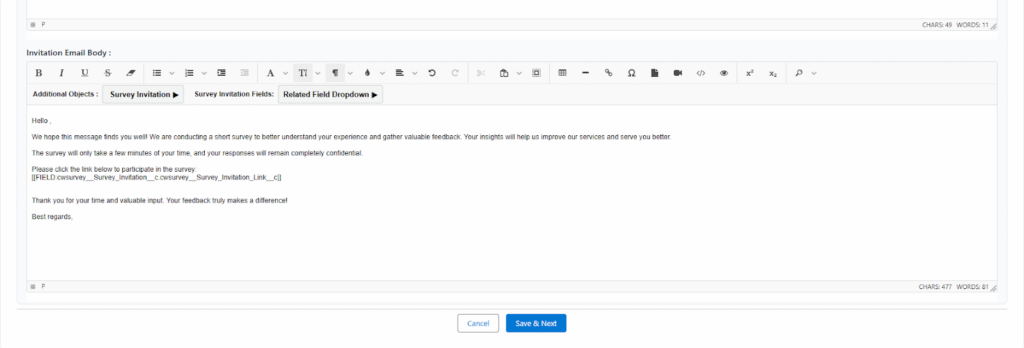
- Invitation Email Body
- Purpose: Contains the main message or content of the survey invitation email.
- Function: Supports rich text formatting, links, placeholders, and dynamic fields (like survey link or participant name) for personalization
- Purpose: Contains the main message or content of the survey invitation email.
- Additional Objects
- Purpose: Allows users to dynamically insert merge fields or data from related Salesforce objects into the email template.
- Function: Helps personalize and automate survey invitations by pulling live data (e.g., customer name, case details).
- Includes:
- Survey Link – Automatically generates and inserts the unique survey participation link for each recipient.
- Use: Add this link inside the email body so participants can directly access and complete the survey.
- Survey Link – Automatically generates and inserts the unique survey participation link for each recipient.
 SEE ALSO :