





 Salesforce ERP
 ERP + CRM Platform
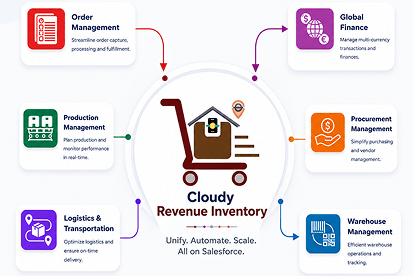
  Inventory Management
  Warehouse Management
  Order Management
  Vendor Management
  Logistics Management
  BOM Management
  Order Fulfillment
  Business Operations
  SaaS Platform for Operations
  Salesforce Cloud ERP Platform
  Xero
Xero
 Zoho books
 Quickbooks
 Shopify
 Acumatica
 SAP
SAP
 Odoo
Odoo
 NetSuite
 Microsoft Dynamics 365
 Sage
Sage



 Agentforce Revenue Management
 Agentforce Revenue Management + Billing
  Salesforce CPQ
 Salesforce Advanced Billing
  Migrate from CPQ to ARM
  Managed Services
 Salesforce Implementation
 Revenue Cloud Implementation
 MuleSoft Integration
 Microsoft
 Data Cloud
 Tableau

 Survey
A Survey is a structured set of questions created to collect valuable information, opinions, or feedback from a targeted audience. It serves as a key tool for organizations to evaluate user satisfaction, monitor performance, and support data-driven decision-making.
Surveys can be used across multiple domains such as customer feedback, employee engagement, market research, product evaluation, and event assessments. By gathering input directly from respondents, organizations gain actionable insights that drive continuous improvement.
Check box Functionality:
The following describes the function of each checkbox on the Survey object :
| Checkbox Field | Purpose |
| Enable Welcome Page? | Displays an introductory page to greet participants and provide survey instructions before they begin. |
| Enable Survey Resume | Gives participants the flexibility to take a break and return to the survey later, picking up right where they left off without having to start over |
| Enable Sections? | Allows users to divide the survey into multiple sections or pages, helping respondents navigate through the survey step by step in an organized manner |
| Enable Redirect | Allows respondents to be automatically redirected to a specific URL or page after completing the survey. |
| Enable Timeout? | Allows setting a specific time limit for completing the survey, after which it automatically ends or submits the responses. |
| Enable Verification Code | Allows the survey to require a verification code before access, ensuring that only authorized participants can respond. |
| Enable Survey Rejection | Allows respondents to decline or reject the survey if they are not interested in participating. |
| Enable Review All Questions? | Allows respondents to review and modify their answers before submitting the survey. |
| Enable Questions By Section | Allows displaying questions section by section, helping respondents focus on one part of the survey at a time. |
| Enable On-Demand Verification | Allows verification of respondent identity or data at specific points during the survey to ensure authenticity and accuracy. |
| Enable Email Notifications? | Allows automatic email alerts to be sent to respondents or administrators when a survey is submitted or updated. |
| Enable Back Button in Wizard | Allows respondents to navigate to previous sections or pages in the survey to review or change their answers. |
| Enable Auto Submit After Timeout | Automatically submits the survey responses when the set time limit expires, ensuring data is captured even if the respondent doesn’t submit manually. |
| Default Site Settings? | allows users to select the default public domain site and URL where the survey will be hosted and accessed. |
| Override Header & Footer | Allows users to replace the default survey header and footer with custom content for specific surveys. |
| Override General Setting | Allows users to customize general survey settings such as the favicon and survey tab title, replacing the default configurations with survey-specific options. |
| Send Auto Reminders to Survey Invitation | Automatically sends reminder emails to participants who haven’t completed the survey within a specified time frame. |
| Hide Question Numbers? | Allows users to hide question numbers in the survey, providing a cleaner and more minimalistic layout. |
| Approve form & Sync Immediately | Allows users to approve the form and instantly sync the data with the system for real-time updates. |
 SEE ALSO :
____👉 Survey Section
____👉 Question Choice